Symptoms related to test reliability, coverage effectiveness, speed, and environment consistency.
These symptoms indicate problems with your testing strategy. Unreliable or slow tests erode
confidence and slow delivery. Each page describes what you are seeing and links to the
anti-patterns most likely causing it.
How to use this section
Start with the symptom that matches what your team experiences. Each symptom page explains what
you are seeing, identifies the most likely root causes (anti-patterns), and provides diagnostic
questions to narrow down which cause applies to your situation. Follow the anti-pattern link to
find concrete fix steps.
1.1 - AI-Generated Code Ships Without Developer Understanding
Developers accept AI-generated code without verifying it against acceptance criteria, and functional bugs and security vulnerabilities reach production unchallenged.
What you are seeing
A developer asks an AI assistant to implement a feature. The generated code looks plausible.
The tests pass. The developer commits it. Two weeks later, a security review finds the code
accepts unsanitized input in a path nobody specified as an acceptance criterion. When asked
what the change was supposed to do, the developer says, “It implements the feature.” When
asked how they validated it, they say, “The tests passed.”
This is not an occasional gap. It is a pattern. Developers use AI to produce code faster, but
they do not define what “correct” means before generating code, verify the output against
specific acceptance criteria, or consider how they would detect a failure in production. The
code compiles. The tests pass. Nobody validated it against the actual requirements.
The symptoms compound over time. Defects appear in AI-generated code that the team cannot
diagnose quickly because nobody defined what the code was supposed to do beyond “implement
the feature.” Fixes are made by asking the AI to fix its own output without re-examining the
original acceptance criteria. Security vulnerabilities - injection flaws, broken access
controls, exposed credentials - ship because nobody asked “what are the security constraints
for this change?” before or after generation.
Common causes
Rubber-Stamping AI-Generated Code
When there is no expectation that developers own what a change does and how they validated it -
regardless of who or what wrote the code - AI output gets the same cursory glance as a trivial
formatting change. The team treats “AI wrote it and the tests pass” as sufficient evidence of
correctness. It is not. Passing tests prove the code satisfies the test cases. They do not
prove the code meets the actual requirements or handles the constraints the team cares about.
When the work item lacks concrete acceptance criteria - specific inputs, expected outputs,
security constraints, edge cases - neither the developer nor the AI has a clear target. The AI
generates something that looks right. The developer has no checklist to verify it against. The
review is a subjective “does this seem okay?” rather than an objective “does this satisfy every
stated requirement?”
When the test suite relies heavily on end-to-end tests and lacks targeted unit and component
tests, AI-generated code can pass the suite without its internal logic being verified. A
comprehensive component test suite would catch the cases where the AI’s implementation
diverges from the domain rules. Without it, “tests pass” is a weak signal.
Can developers explain what their recent changes do and how they validated them? Pick
three recent AI-assisted commits at random and ask the committing developer: what does this
change accomplish, what acceptance criteria did you verify, and how would you detect if it
were wrong? If they cannot answer, the review process is not catching unexamined code.
Start with
Rubber-Stamping AI-Generated Code.
Do your work items include specific, testable acceptance criteria before implementation
starts? If acceptance criteria are vague or added after the fact, neither the AI nor the
developer has a clear target. Start with
Monolithic Work Items.
Does your test suite include component tests that verify business rules with specific
inputs and outputs? If the suite is mostly end-to-end or integration tests, AI-generated
code can satisfy them without being correct at the rule level. Start with
Inverted Test Pyramid.
1.2 - Tests Pass in One Environment but Fail in Another
Tests pass locally but fail in CI, or pass in CI but fail in staging. Environment differences cause unpredictable failures.
What you are seeing
A developer runs the tests locally and they pass. They push to CI and the same tests fail. Or the
CI pipeline is green but the tests fail in the staging environment. The failures are not caused by
a code defect. They are caused by differences between environments: a different OS version, a
different database version, a different timezone setting, a missing environment variable, or a
service that is available locally but not in CI.
The developer spends time debugging the failure and discovers the root cause is environmental, not
logical. They add a workaround (skip the test in CI, add an environment check, adjust a timeout)
and move on. The workaround accumulates over time. The test suite becomes littered with
environment-specific conditionals and skipped tests.
The team loses confidence in the test suite because results depend on where the tests run rather
than whether the code is correct.
Common causes
Snowflake Environments
When each environment is configured by hand and maintained independently, they drift apart over
time. The developer’s laptop has one version of a database driver. The CI server has another. The
staging environment has a third. These differences are invisible until a test exercises a code
path that behaves differently across versions. The fix is not to harmonize configurations manually
(they will drift again) but to provision all environments from the same infrastructure code.
When deployment and environment setup are manual processes, subtle differences creep in. One
developer installed a dependency a particular way. The CI server was configured by a different
person with slightly different settings. The staging environment was set up months ago and has not
been updated. Manual processes are never identical twice, and the variance causes environment-
dependent behavior.
When the application has hidden dependencies on external state (filesystem paths, network
services, system configuration), tests that work in one environment fail in another because the
external state differs. Well-isolated code with explicit dependencies is portable across
environments. Tightly coupled code that reaches into its environment for implicit dependencies is
fragile.
Are all environments provisioned from the same infrastructure code? If not, environment
drift is the most likely cause. Start with
Snowflake Environments.
Are environment setup and configuration manual? If different people configured different
environments, the variance is a direct result of manual processes. Start with
Manual Deployments.
Do the failing tests depend on external services, filesystem paths, or system
configuration? If tests assume specific external state rather than declaring explicit
dependencies, the code’s coupling to its environment is the issue. Start with
Tightly Coupled Monolith.
Test coverage numbers look healthy but defects still reach production.
What you are seeing
Your dashboard shows 80% or 90% code coverage, but bugs keep getting through. Defects show up
in production that feel like they should have been caught. The team points to the coverage
number as proof that testing is solid, yet the results tell a different story.
People start losing trust in the test suite. Some developers stop running tests locally because
they do not believe the tests will catch anything useful. Others add more tests, pushing
coverage higher, without the defect rate improving.
Common causes
Inverted Test Pyramid
When most of your tests are end-to-end or integration tests, they exercise many code paths in a
single run - which inflates coverage numbers. But these tests often verify that a workflow
completes without errors, not that each piece of logic produces the correct result. A test that
clicks through a form and checks for a success message covers dozens of functions without
validating any of them in detail.
When teams face pressure to hit a coverage target, testing becomes theater. Developers write
tests with trivial assertions - checking that a function returns without throwing, or that a
value is not null - just to get the number up. The coverage metric looks healthy, but the tests
do not actually verify behavior. They exist to satisfy a gate, not to catch defects.
When the organization gates the pipeline on a coverage target, teams optimize for the number
rather than for defect detection. Developers write assertion-free tests, cover trivial code, or
add single integration tests that execute hundreds of lines without validating any of them. The
coverage metric rises while the tests remain unable to catch meaningful defects.
When test automation is absent or minimal, teams sometimes generate superficial tests or rely on
coverage from integration-level runs that touch many lines without asserting meaningful outcomes.
The coverage tool counts every line that executes, regardless of whether any test validates the
result.
Do most tests assert on behavior and expected outcomes, or do they just verify that code
runs without errors? If tests mostly check for no-exceptions or non-null returns, the
problem is testing theater - tests written to hit a number, not to catch defects. Start with
Pressure to Skip Testing.
Are the majority of your tests end-to-end or integration tests? If most of the suite runs
through a browser, API, or multi-service flow rather than testing units of logic directly,
start with Inverted Test Pyramid.
Does the pipeline gate on a specific coverage percentage? If the team writes tests
primarily to keep coverage above a mandated threshold, start with
Code Coverage Mandates.
Were tests added retroactively to meet a coverage target? If the bulk of tests were
written after the code to satisfy a coverage gate rather than to verify design decisions,
start with
Pressure to Skip Testing.
ACD - How ineffective tests undermine the acceptance criteria that agents depend on
1.4 - A Large Codebase Has No Automated Tests
Zero test coverage in a production system being actively modified. Nobody is confident enough to change the code safely.
What you are seeing
Every modification to this codebase is a gamble. The system has no automated tests. Changes are validated through manual testing, if they are validated at all. Developers work carefully but know that any change could trigger failures in code they did not touch, because the system has no seams and no isolation. The only way to know if a change works is to deploy it and observe what breaks.
Refactoring is effectively off the table. Improving the design of the code requires changing it in ways that should not alter behavior - but with no tests, there is no way to verify that behavior was preserved. Developers choose to add code around existing code rather than improve it, because change is unsafe. The codebase grows more complex with every feature because improving the underlying structure carries too much risk.
The team knows the situation is unsustainable but cannot see a path out. “We should write tests” appears in every retrospective. The problem is that adding tests to an untestable codebase requires refactoring first - and refactoring requires tests to do safely. The team is stuck in a loop with no obvious entry point.
Common causes
Manual testing only
The team has relied on manual testing as the primary quality gate. Automated tests were never required, never prioritized, and never resourced. The codebase was built without testability as a design constraint, which means the architecture does not accommodate automated testing without structural change.
Making the transition requires making a deliberate commitment: new code is always written with tests, existing code gets tests when it is modified, and high-risk areas are prioritized for retrofitted coverage. Over months, the areas of the codebase where developers can no longer safely make changes shrink, and the cycle of deploying to discover breakage is replaced by a test suite that catches failures before production.
Code without dependency injection, without interfaces, and without clear module boundaries cannot be tested without a major structural overhaul. Every function calls other functions directly. Every component reaches into every other component. Writing a test for one function requires instantiating the entire system.
Introducing seams - interfaces, dependency injection, module boundaries - makes code testable. This work is not glamorous and its value is invisible until tests start getting written. But it is the prerequisite for meaningful test coverage in a tightly coupled system. Once the seams exist, functions can be tested in isolation rather than requiring a full application instantiation - and developers stop needing to deploy to find out if a change is safe.
If management has historically prioritized features over tests, the codebase will reflect that history. Tests were deferred sprint by sprint. Technical debt accumulated. The team that exists today is inheriting the decisions of teams that operated under different constraints, but the codebase carries the record of every time testing lost to deadline pressure.
Reversing this requires organizational commitment to treat test coverage as a delivery requirement, not as optional work that gets squeezed out when time is short. Without that commitment, the same pressure that created the untested codebase will prevent escaping it - and developers will keep gambling on every deploy.
Can any single function in the codebase be tested without instantiating the entire application? If not, the architecture does not have the seams needed for unit tests. Start with Tightly coupled monolith.
Has the team ever had a sustained period of writing tests as part of normal development? If not, the practice was never established. Start with Manual testing only.
Did historical management decisions consistently deprioritize testing? If test debt accumulated from external pressure, the organizational habit needs to change before the technical situation can improve. Start with Pressure to skip testing.
Internal code changes that do not alter behavior cause widespread test failures.
What you are seeing
A developer renames a method, extracts a class, or reorganizes modules - changes that should not
affect external behavior. But dozens of tests fail. The failures are not catching real bugs.
They are breaking because the tests depend on implementation details that changed.
Developers start avoiding refactoring because the cost of updating tests is too high. Code
quality degrades over time because cleanup work is too expensive. When someone does refactor,
they spend more time fixing tests than improving the code.
Common causes
Inverted Test Pyramid
When the test suite is dominated by end-to-end and integration tests, those tests tend to be
tightly coupled to implementation details - CSS selectors, API response shapes, DOM structure,
or specific sequences of internal calls. A refactoring that changes none of the observable
behavior still breaks these tests because they assert on how the system works rather than what
it does.
Unit tests focused on behavior (“given this input, expect this output”) survive refactoring.
Tests coupled to implementation (“this method was called with these arguments”) do not.
When components lack clear interfaces, tests reach into the internals of other modules. A
refactoring in module A breaks tests for module B - not because B’s behavior changed, but
because B’s tests were calling A’s internal methods directly. Without well-defined boundaries,
every internal change ripples across the test suite.
Do the broken tests assert on internal method calls, mock interactions, or DOM structure?
If yes, the tests are coupled to implementation rather than behavior. This is a test design
issue - start with Inverted Test Pyramid for guidance
on building a behavior-focused test suite.
Are the broken tests end-to-end or UI tests that fail because of layout or selector
changes? If yes, you have too many tests at the wrong level of the pyramid. Start with
Inverted Test Pyramid.
Do the broken tests span multiple modules - testing code in one area but breaking because
of changes in another? If yes, the problem is missing boundaries between components. Start
with Tightly Coupled Monolith.
Unit Tests - Black box testing that survives internal changes
Test Doubles - Using test doubles without coupling to implementation
1.6 - Test Environments Take Too Long to Reset Between Runs
The team cannot run the full regression suite on every change because resetting the test environment and database takes too long.
What you are seeing
The team has a regression test suite that covers critical business flows. Running the tests
themselves takes twenty minutes. Resetting the test environment - restoring the database to a
known state, restarting services, clearing caches, reloading reference data - takes another
forty minutes. The total cycle is an hour. With multiple teams queuing for the same environment,
a developer might wait half a day to get feedback on a single change.
The team makes a practical decision: run the full regression suite nightly, or before a release,
but not on every change. Individual changes get a subset of tests against a partially reset
environment. Bugs that depend on data state - stale records, unexpected reference data, leftover
test artifacts - slip through because the partial reset does not catch them. The full suite
catches them later, but by then several changes have been merged and isolating which one
introduced the regression takes a multi-person investigation.
Some teams stop running the full suite entirely. The reset time is so long that the suite
becomes a release gate rather than a development tool. Developers lose confidence in the
suite because they rarely see it run and the failures they do see are often environment
artifacts rather than real bugs.
Common causes
Shared Test Environments
When multiple teams share a single test environment, the environment is never in a clean state.
One team’s tests leave data behind. Another team’s tests depend on data that was just deleted.
Resetting the environment means restoring it to a state that works for all teams, which
requires coordination and takes longer than resetting a single-team environment.
The shared environment also creates queuing. Only one test run can use the environment at a
time. Each team waits for the previous run to finish and the environment to reset before
starting their own.
When the regression suite is treated as a manual checkpoint rather than an automated pipeline
stage, the environment setup is also manual or semi-automated. Scripts that restore the
database, restart services, and verify the environment is ready have accumulated over time
without being optimized. Nobody has invested in making the reset fast because the suite was
never intended to run on every change.
When tests require live databases, running services, and real network connections for every
assertion, the environment reset is slow because every dependency must be restored to a known
state. A test that validates billing logic should not need a running payment gateway. A test
that checks order validation should not need a populated product catalog database.
The fix is to match each test to the right layer. Component tests that verify business rules
use in-memory databases or controlled fixtures - no environment reset needed. Contract tests
verify service boundaries with virtual services instead of live instances. Only a small number
of end-to-end tests need the fully assembled environment, and those run outside the pipeline’s
critical path. When the pipeline’s critical path depends on heavyweight integration for every
assertion, the reset time is a direct consequence of testing at the wrong layer.
When testing is deferred to a late stage - after development, after integration, before release
the tests assume a fully assembled system with a production-like database. Resetting that
system is inherently slow because it involves restoring a large database, restarting multiple
services, and verifying cross-service connectivity. The tests were designed for a heavyweight
environment because they run at a heavyweight stage.
Tests designed to run early - component tests with controlled data, contract tests between
services - do not need environment resets. They run in isolation with their own data fixtures.
Is the environment shared across multiple teams or test suites? If teams queue for a
single environment, the reset time is compounded by coordination. Start with
Shared Test Environments.
Does the reset process involve restoring a large database from backup? If the database
restore is the bottleneck, the tests depend on global data state rather than controlling
their own data. Start with
Manual Regression Testing Gates
and refactor tests to use isolated data fixtures.
Do most tests require live databases, running services, or network connections? If the
majority of tests need the fully assembled environment, the suite is testing at the wrong
layer. Component tests with in-memory databases and virtual services for
external dependencies would eliminate the reset bottleneck for most assertions. Start with
Inverted Test Pyramid.
Does the full suite only run before releases, not on every change? If the suite is a
release gate rather than a pipeline stage, it was designed for a different feedback loop.
Start with
Testing Only at the End and move
tests earlier in the pipeline.
Testing Fundamentals - Building a test strategy that does not depend on slow environment resets
1.7 - Test Suite Is Too Slow to Run
The test suite takes 30 minutes or more. Developers stop running it locally and push without verifying.
What you are seeing
The full test suite takes 30 minutes, an hour, or longer. Developers do not run it locally because
they cannot afford to wait. Instead, they push their changes and let CI run the tests. Feedback
arrives long after the developer has moved on. If a test fails, the developer must context-switch
back, recall what they were doing, and debug the failure.
Some developers run only a subset of tests locally (the ones for their module) and skip the rest.
This catches some issues but misses integration problems between modules. Others skip local testing
entirely and treat the CI pipeline as their test runner, which overloads the shared pipeline and
increases wait times for everyone.
The team has discussed parallelizing the tests, splitting the suite, or adding more CI capacity.
These discussions stall because the root cause is not infrastructure. It is the shape of the test
suite itself.
Common causes
Inverted Test Pyramid
When the majority of tests are end-to-end or integration tests, the suite is inherently slow. E2E
tests launch browsers, start services, make network calls, and wait for responses. Each test takes
seconds or minutes instead of milliseconds. A suite of 500 E2E tests will always be slower than a
suite of 5,000 unit tests that verify the same logic at a lower level. The fix is not faster
hardware. It is moving test coverage down the pyramid.
When the codebase has no clear module boundaries, tests cannot be scoped to individual components.
A test for one feature must set up the entire application because the feature depends on
everything. Test setup and teardown dominate execution time because there is no way to isolate the
system under test.
Sometimes the test suite is slow because the team added automated tests as an afterthought, using
E2E tests to backfill coverage for code that was not designed for unit testing. The resulting suite
is a collection of heavyweight tests that exercise the full stack for every scenario because the
code provides no lower-level testing seams.
What is the ratio of unit tests to E2E/integration tests? If E2E tests outnumber unit
tests, the test pyramid is inverted and the suite is slow by design. Start with
Inverted Test Pyramid.
Can tests be run for a single module in isolation? If running one module’s tests requires
starting the entire application, the architecture prevents test isolation. Start with
Tightly Coupled Monolith.
Were the automated tests added retroactively to a codebase with no testing seams? If tests
were bolted on after the fact using E2E tests because the code cannot be unit-tested, the
codebase needs refactoring for testability. Start with
Manual Testing Only.
Build Duration - Track pipeline speed as a first-class metric
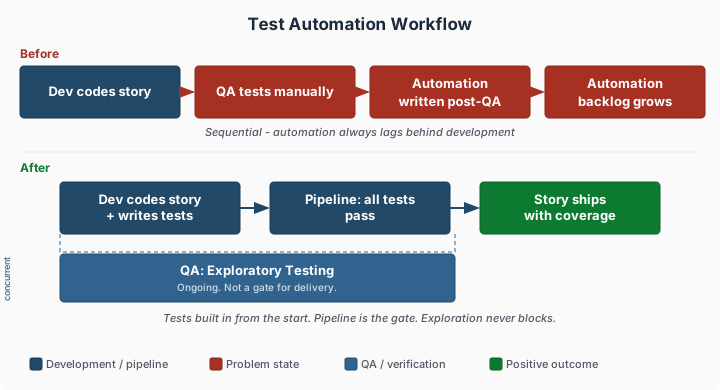
1.8 - Test Automation Always Lags Behind Development
Manual QA runs first, then automation is written from those results. Automation never catches up because it is always one step behind.
What you are seeing
Development completes a user story. It moves to QA. A QA engineer manually tests it, finds issues, they get fixed, and QA re-tests. Once manual testing passes, someone writes automated tests based on what QA verified. By then, development is three stories further along. The automation backlog never shrinks because the process guarantees it will always be one sprint behind.
Teams in this situation often wonder whether AI can close the gap by generating tests from requirements. AI tools can scaffold test cases from acceptance criteria, and that can reduce the time it takes to write automation. But if the process still sequences automation after manual QA sign-off, the lag persists. The bottleneck is structural. Automation that arrives after manual testing adds cost without adding speed.
A subtler problem is that automation written from manual QA results tends to encode what testers happened to check rather than what the requirements demand. Edge cases not discovered during manual testing remain uncovered in automation. The test suite grows to confirm what the team already knows, not to catch what it does not know yet.
Workflow comparison
Common causes
Testing only at the end
When testing is a phase that begins after development is marked complete, automation inherits that sequencing. Developers hand work to QA. QA validates it manually. Automation follows. There is no structural point in the workflow where automated tests are expected before the story ships. The lag is not a failure of discipline. It is the natural output of a process that positions testing downstream of development.
Shifting automation earlier requires treating automated tests as a delivery requirement, not a follow-up activity. Stories are not complete until automated tests exist and pass. Developers write or contribute to those tests as part of finishing the work. Manual QA shifts from primary verification to exploratory testing, catching edge cases the automated suite does not cover.
When a separate QA team owns both manual testing and test automation, developers have no role in either. Developers write code; QA writes tests. The division feels natural (testing is QA’s job), but it means the team most familiar with implementation details is not writing the tests. QA automation engineers are translating manual test results into code rather than working from source knowledge of the system.
When developers share responsibility for automated tests, automation can be written as code is written. A QA engineer reviewing a story during development can identify what needs automated coverage. A developer finishing a feature can write the corresponding unit and integration tests. The handoff that creates the lag disappears because there is no handoff.
When manual testing is the established quality gate, automated testing is treated as an enhancement rather than a requirement. Automation is written when time permits, which means it is written after the work that is required. The team talks about eliminating manual testing but the delivery process does not enforce automated test coverage, so manual testing remains the gate and automation remains optional.
Making automated test coverage a hard requirement (nothing ships without it) reorders the priorities. The question changes from “will we have time to automate this?” to “what automated tests does this story require?” Manual testing does not disappear, but it becomes the secondary layer rather than the primary one.
Is there a step in your workflow where a story moves from “dev complete” to “QA”? If work travels from developers to a separate QA queue before automated tests are written, the process is sequencing automation after manual testing by design. Start with Testing Only at the End.
Do developers write automated tests for their own stories, or does a separate team write them? If automation is QA’s responsibility, developers are structurally excluded from the activity that could close the lag. Start with Siloed QA Team.
Can a story ship without automated test coverage? If manual QA sign-off is sufficient to release, automation will be deferred whenever time is short, which is often. Start with Manual Testing Only.
1.9 - Tests Interfere with Each Other Through Shared Data
Tests share mutable state in a common database. Results vary by run order, making failures unreliable signals of real bugs.
What you are seeing
Your test suite is technically running, but the results are a coin flip. A test that passed yesterday fails today because another test ran first and left dirty data in the shared database. You spend thirty minutes debugging a failure only to find the root cause was a record inserted by an unrelated test two hours ago. When you rerun the suite in isolation, everything passes. When you run it in CI with the full suite, it fails at random.
Shared database state is the source of the chaos. The database schema and seed data were set up once, years ago, by someone who has since left. Nobody is sure what state the database is supposed to be in before any given test. Some tests clean up after themselves; most do not. Some tests depend on records created by other tests. The execution order matters, but nobody explicitly controls it - so the suite is fragile by construction.
The downstream effect is that your team has stopped trusting test failures. When a red build appears, the first instinct is not “there is a bug” but “someone broke the test data again.” You rerun the build, it goes green, and you ship. Real bugs make it to production because the signal-to-noise ratio of your test suite has collapsed.
Common causes
Manual testing only
Teams that have relied on manual testing tend to reach for a shared database as the natural extension of how testers have always worked - against a shared test environment. When automated tests are added later, they inherit the same model: one environment, one database, shared by everyone. Nobody designed a data strategy; it evolved from how the team already worked.
When teams shift to isolated test data - each test owns and tears down its own data - interference disappears. Tests become deterministic. A failing test means code is broken, not the environment.
When most automated tests are end-to-end or integration tests that exercise a real database, test data problems compound. Each test requires realistic, complex data to be in place. The more tests that depend on a shared database, the more opportunities for interference and the harder it becomes to manage the data lifecycle.
Shifting toward a pyramid with a large base of unit tests reduces database dependency dramatically. Unit tests run against in-memory structures and do not touch shared state. The integration and end-to-end tests that remain can be designed more carefully with isolated, purpose-built datasets. With fewer tests competing for shared database rows, the random CI failures that triggered “just rerun it” reflexes become rare, and a red build is a signal worth investigating.
When test environments are hand-crafted and not reproducible from code, database state drifts over time. Schema migrations get applied inconsistently. Seed data scripts run at different times in different environments. Each environment develops its own data personality, and tests written against one environment fail on another.
Reproducible environments - created from code on demand and destroyed after use - eliminate drift. When the database is provisioned fresh from a migration script and a known seed set for each test run, the starting state is always predictable. Tests that produced different results on different machines or at different times start producing consistent results, and the team can stop dismissing CI failures as environment noise.
Do tests pass when run individually but fail when run together? Mutual interference from shared mutable state is the most likely cause. Start with Inverted test pyramid.
Does the test suite pass on one machine but fail in CI? The test environment differs from the developer’s local database. Start with Snowflake environments.
Is there no documented strategy for setting up and tearing down test data? The team never established a data strategy. Start with Manual testing only.
The pipeline fails, the developer reruns it without changing anything, and it passes.
What you are seeing
A developer pushes a change. The pipeline fails on a test they did not touch, in a module they
did not change. They click rerun. It passes. They merge. This happens multiple times a day across
the team. Nobody investigates failures on the first occurrence because the odds favor flakiness
over a real problem.
The team has adapted: retry-until-green is a routine step, not an exception. Some pipelines are
configured to automatically rerun failed tests. Tests are tagged as “known flaky” and skipped.
Real regressions hide behind the noise because the team has been trained to ignore failures.
Common causes
Inverted Test Pyramid
When the test suite is dominated by end-to-end tests, flakiness is structural. E2E tests depend
on network connectivity, shared test environments, external service availability, and browser
rendering timing. Any of these can produce a different result on each run. A suite built mostly
on E2E tests will always be flaky because it is built on non-deterministic foundations.
Replacing E2E tests with component tests that use test doubles for external dependencies makes
the suite deterministic by design. The test produces the same result every time because it
controls all its inputs.
When the CI environment is configured differently from other environments - or drifts over time -
tests pass locally but fail in CI, or pass in CI on Tuesday but fail on Wednesday. The
inconsistency is not in the test or the code but in the environment the test runs in.
Tests that depend on specific environment configurations, installed packages, file system layout,
or network access are vulnerable to environment drift. Infrastructure-as-code eliminates this
class of flakiness by ensuring environments are identical and reproducible.
When components share mutable state - a database, a cache, a filesystem directory - tests that
run concurrently or in a specific order can interfere with each other. Test A writes to a shared
table. Test B reads from the same table and gets unexpected data. The tests pass individually
but fail together, or pass in one order but fail in another.
Without clear component boundaries, tests cannot be isolated. The flakiness is a symptom of
architectural coupling, not a testing problem.
Do the flaky tests hit real external services or shared environments? If yes, the tests
are non-deterministic by design. Start with
Inverted Test Pyramid and replace them with
component tests using test doubles.
Do tests pass locally but fail in CI, or vice versa? If yes, the environments differ.
Start with Snowflake Environments.
Do tests pass individually but fail when run together, or fail in a different order? If
yes, tests share mutable state. Start with
Tightly Coupled Monolith for the
architectural root cause, and isolate test data as an immediate fix.
Change Fail Rate - Track whether test reliability improvements reduce production failures
2 - Deployment and Release Problems
Symptoms related to deployment frequency, release risk, coordination overhead, and environment parity.
These symptoms indicate problems with your deployment and release process. When deploying is
painful, teams deploy less often, which increases batch size and risk. Each page describes what
you are seeing and links to the anti-patterns most likely causing it.
How to use this section
Start with the symptom that matches what your team experiences. Each symptom page explains what
you are seeing, identifies the most likely root causes (anti-patterns), and provides diagnostic
questions to narrow down which cause applies to your situation. Follow the anti-pattern link to
find concrete fix steps.
Breaking API changes reach all consumers simultaneously. Teams are afraid to evolve APIs because they do not know who depends on them.
What you are seeing
The team renames a field in an API response and a half-dozen consuming services start failing within minutes of deployment. Some consumers had documentation saying the API might change. Most assumed stability because the API had not changed in two years. The team spends the afternoon rolling back, notifying downstream owners, and coordinating a migration plan that will take weeks.
The harder problem is that the team does not know who depends on their API. Internal consumers are spread across teams and may not have registered their dependency anywhere. External consumers may have been added by third-party integrators years ago. Changing the API requires identifying every consumer and coordinating their migration - a process so expensive that the team simply stops evolving the API. It calcifies around its original design.
This leads to two failure modes: teams break APIs and cause incidents because they underestimate consumer impact, or teams freeze APIs and accumulate technical debt because the coordination cost of changing anything is too high.
Common causes
Distributed monolith
When services that are nominally independent must be coordinated in practice, API changes require simultaneous updates across multiple services. The consuming service cannot be deployed until the providing service is deployed, which requires coordinating deployment timing, which turns an API change into a coordinated release event.
Services that are truly independent can manage API compatibility through versioning or parallel versions: the old endpoint stays available while consumers migrate to the new one at their own pace. Consumers stop breaking on deployment day because they were never forced to migrate simultaneously - they adopt the new interface on their own schedule.
Tightly coupled services share data structures and schemas in ways that make changing any shared interface expensive. A change to a shared type propagates through the codebase to every caller. There is no stable interface boundary; internal implementation details leak through the API surface.
Services with well-defined interface contracts - stable public APIs backed by flexible internal implementations - can evolve their internals without breaking consumers. The contract is the stable surface; everything behind it can change.
When knowledge of who consumes which API lives in one person’s head or in nobody’s head, the team cannot assess the impact of a change. The inventory of consumers is a prerequisite for safe API evolution. Without it, every API change is a known unknown: the team cannot know what they are breaking until it is broken.
Maintaining a service catalog, using contract testing, or even an informal registry of consumer relationships gives the team the ability to evaluate change impact before deploying. The half-dozen services that used to fail within minutes of a deployment now have owners who were notified and prepared in advance - because the team finally knew they existed.
Does the team know every consumer of their APIs? If consumer inventory is incomplete or unknown, any API change carries unknown risk. Start with Knowledge silos.
Must consuming services be deployed at the same time as the providing service? If coordinated deployment is required, the services are not truly independent. Start with Distributed monolith.
Do internal implementation changes frequently affect the public API surface? If internal refactoring breaks consumers, the interface boundary is not stable. Start with Tightly coupled monolith.
Build outputs are discarded and rebuilt for each environment. Production is not running the artifact that was tested.
What you are seeing
The build runs in dev, produces an artifact, and tests run against it. Then the artifact is discarded and a new build runs for the staging branch. The staging artifact is tested, then discarded. A third build runs from the production branch. This is the artifact that gets deployed. The team has no way to verify that the artifact deployed to production is equivalent to the one that was tested in staging.
The problem is subtle until it causes an incident. A build that includes a library version cached in the dev builder but not in the staging builder. A build that captures a slightly different git state because a commit was made between the staging and production builds. An environment variable baked into the build artifact that differs between environments. These differences are usually invisible - until they cause a failure in production that cannot be reproduced anywhere else.
The team treats this as normal because “it has always worked this way.” The process was designed when builds were simple and deterministic. As dependencies, build tooling, and environment configurations have grown more complex, the assumption of build equivalence has become increasingly unreliable.
Common causes
Snowflake environments
When build environments differ between stages - different OS versions, cached dependency states, or tool versions - the same source code produces different artifacts in different environments. The “staging artifact” and the “production artifact” are built from nominally the same source but in environments with different characteristics.
Standardized build environments defined as code produce the same artifact from the same source, regardless of where the build runs. When the dev build, the staging build, and the production build all run in the same container with the same pinned dependencies, the team can verify that equivalence rather than assuming it. The production failure that could not be reproduced elsewhere becomes reproducible because the environments are no longer different in invisible ways.
A pipeline that promotes a single artifact through environments eliminates the per-environment rebuild entirely. The artifact is built once, assigned a version identifier, stored in an artifact registry, and deployed to each environment in sequence. The artifact that reaches production is exactly the artifact that was tested.
Without a pipeline with artifact promotion, rebuilding per environment is the natural default. Each environment has its own build process, and the relationship between artifacts built for different environments is assumed rather than guaranteed.
Is a separate build triggered for each environment? If staging and production builds run independently, the artifacts are not guaranteed to be equivalent. Start with Missing deployment pipeline.
Are the build environments for each stage identical? If dev, staging, and production builds run on different machines with different configurations, the same source will produce different artifacts. Start with Snowflake environments.
Can the team identify the exact artifact version running in production and trace it back to a specific test run? If not, there is no artifact provenance and no guarantee of what was tested. Start with Missing deployment pipeline.
2.3 - Every Change Requires a Ticket and Approval Chain
Change management overhead is identical for a one-line fix and a major rewrite. The process creates a queue that delays all changes equally.
What you are seeing
The team has a change management process. Every production change requires a change ticket, an impact assessment, a rollback plan document, a peer review, and final approval from a change board. The process was designed with major infrastructure changes in mind. It is now applied uniformly to every change, including renaming a log message.
The change board meets once a week. If a change misses the cutoff, it waits until next week. Urgent changes require emergency approval, which means tracking down the right people and interrupting them at unpredictable hours. The overhead for a critical security patch is the same as for a feature release. The team has learned to batch changes together to amortize the approval cost, which makes each deployment larger and riskier.
The intent of change management - reducing the risk of production changes - is accomplished here by slowing everything down rather than by increasing confidence in individual changes. The process treats all changes as equally risky regardless of their actual scope or the automated evidence available about their safety.
Common causes
CAB gates
Change advisory boards apply manual approval uniformly to all changes. The board reviews documentation rather than evidence from automated testing and deployment pipelines. This adds calendar time proportional to the board’s meeting cadence, not proportional to the risk of the change. A one-line fix and a major architectural change wait in the same queue.
Automated deployment systems with pipeline-generated evidence - test results, code coverage, artifact provenance - can satisfy the intent of change management without the calendar overhead. Low-risk changes pass automatically; high-risk changes get human review based on objective criteria rather than because everything gets reviewed.
When deployments are manual, the change management process exists partly as a compensating control. Since the deployment itself is not automated or auditable, the team adds process before and after to create accountability. Manual processes require manual oversight.
Automated deployments with pipeline logs create a built-in audit trail: which artifact was deployed, which tests it passed, who triggered the deployment, and what the environment state was before and after. This evidence replaces the need for pre-approval documentation for routine changes.
A pipeline provides objective evidence that a change was tested and what those tests found. Test results, code coverage, dependency scans, and deployment logs are generated as a natural output of the pipeline. This evidence can satisfy auditors and change reviewers without requiring manual documentation.
Without a pipeline, teams substitute documentation for evidence. The change ticket describes what the developer intended to test. It cannot verify that the tests were actually run or that they passed. A pipeline generates verifiable evidence rather than requiring trust in self-reported documentation.
Does a committee approve individual production changes? Manual approval boards add calendar-driven delays independent of change risk. Start with CAB gates.
Is the deployment process automated with pipeline-generated audit logs? If deployment requires manual documentation because there is no automated record, the pipeline is the missing foundation. Start with Missing deployment pipeline.
Do small, low-risk changes go through the same process as major changes? If the process is uniform regardless of risk, the classification mechanism - not just the process - needs to change. Start with CAB gates.
Ready to fix this? The most common cause is CAB gates. Start with its How to Fix It section for week-by-week steps.
2.4 - Multiple Services Must Be Deployed Together
Changes cannot go to production until multiple services are deployed in a specific order during a coordinated release window.
What you are seeing
A developer finishes a change to one service. It is tested, reviewed, and ready to deploy. But it
cannot go out alone. The change depends on a schema migration in a shared database, a new endpoint
in another service, and a UI update in a third. All three teams coordinate a release window.
Someone writes a deployment runbook with numbered steps. If step four fails, steps one through
three need to be rolled back manually.
The team cannot deploy on a Tuesday afternoon because the other teams are not ready. The change
sits in a branch (or merged to main but feature-flagged off) waiting for the coordinated release
next Thursday. By then, more changes have accumulated, making the release larger and riskier.
Common causes
Tightly Coupled Architecture
When services share a database, call each other without versioned contracts, or depend on
deployment order, they cannot be deployed independently. A change to Service A’s data model breaks
Service B if Service B is not updated at the same time. The architecture forces coordination
because the boundaries between services are not real boundaries. They are implementation details
that leak across service lines.
The organization moved from a monolith to services, but the service boundaries are wrong. Services
were decomposed along technical lines (a “database service,” an “auth service,” a “notification
service”) rather than along domain lines. The result is services that cannot handle a business
request on their own. Every user-facing operation requires a synchronous chain of calls across
multiple services. If one service in the chain is unavailable or deploying, the entire operation
fails.
This is a monolith distributed across the network. It has all the operational complexity of
microservices (network latency, partial failures, distributed debugging) with none of the
benefits (independent deployment, team autonomy, fault isolation). Deploying one service still
requires deploying the others because the boundaries do not correspond to independent units of
business functionality.
When work for a feature is decomposed by service (“Team A builds the API, Team B updates the UI,
Team C modifies the processor”), each team’s change is incomplete on its own. Nothing is
deployable until all teams finish their part. The decomposition created the coordination
requirement. Vertical slicing within each team’s domain, with stable contracts between services,
allows each team to deploy when their slice is ready.
Sometimes the coordination requirement is artificial. The service could technically be deployed
independently, but the team’s definition of done requires a cross-service integration test that
only runs during the release window. Or deployment is gated on a manual approval from another
team. The coordination is not forced by the architecture but by process decisions that bundle
independent changes into a single release event.
Do services share a database or call each other without versioned contracts? If yes, the
architecture forces coordination. Changes to shared state or unversioned interfaces cannot be
deployed independently. Start with
Tightly Coupled Monolith.
Does every user-facing request require a synchronous chain across multiple services? If a
single business operation touches three or more services in sequence, the service boundaries
were drawn in the wrong place. You have a distributed monolith. Start with
Distributed Monolith.
Was the feature decomposed by service or team rather than by behavior? If each team built
their piece of the feature independently and now all pieces must go out together, the work was
sliced horizontally. Start with
Horizontal Slicing.
Could each service technically be deployed on its own, but process or policy prevents it?
If the coupling is in the release process (shared release window, cross-team sign-off, manual
integration test gate) rather than in the code, the constraint is organizational. Start with
Undone Work and examine whether the definition
of done requires unnecessary coordination.
Lead Time - Measure the cost of coordination in delivery speed
2.5 - Work Requires Sign-Off from Teams Not Involved in Delivery
Changes cannot ship without approval from architecture review boards, legal, compliance, or other teams that are not part of the delivery process and have their own schedules.
What you are seeing
A change is ready to ship. Before it can go to production, it requires sign-off from an
architecture review board, a legal review for data handling, a compliance team for regulatory
requirements, or some combination of these. Each reviewing team has its own meeting cadence.
The architecture board meets every two weeks. Legal responds when they have capacity. Compliance
has a queue.
The team submits the request and waits. In the meantime, the code sits in a branch or is
merged behind a feature flag, accumulating risk as the codebase moves around it. When approval
finally arrives, the original context has faded. If the reviewer requests changes, the wait
restarts. The team learns to front-load reviews by submitting for approval before development
is complete, but the timing never aligns perfectly and changes after approval trigger new review
cycles.
Common causes
Compliance Interpreted as Manual Approval
Compliance requirements - security controls, audit trails, regulatory evidence - are real and
necessary. The problem is when compliance is operationalized as manual sign-off rather than as
automated verification. A control that requires a human to review and approve every change is a
bottleneck by design. The same control expressed as an automated check in the pipeline is fast,
consistent, and more reliable. Manual approval processes grow over time as new requirements are
added and old ones are never removed.
Separation of duties is a legitimate control for high-risk changes. It becomes an anti-pattern
when it is implemented as a structural requirement that every change go through a different team
for approval, regardless of risk level. Low-risk routine changes get the same review overhead as
high-risk changes. The review team becomes a bottleneck because they are reviewing everything
rather than focusing on changes that actually warrant scrutiny.
Are approval gates mandatory regardless of change risk? If a trivial config change and
a major architectural change go through the same review process, the gate is not calibrated
to risk. Start with
Separation of Duties as Separate Teams.
Could the compliance requirement be expressed as an automated check? If the review
consists of a human verifying something that a tool could verify faster and more consistently,
the control should be automated. Start with
Compliance Interpreted as Manual Approval.
2.6 - Database Migrations Block or Break Deployments
Schema changes require downtime, lock tables, or leave the database in an unknown state when they fail mid-run.
What you are seeing
Deploying a schema change is a stressful event. The team schedules a maintenance window, notifies users, and runs the migration hoping nothing goes wrong. Some migrations take minutes; others run for hours and lock tables the application needs. When a migration fails halfway through, the database is in an intermediate state that neither the old nor the new version of the application can handle correctly.
The team has developed rituals to cope. Migrations are reviewed by the entire team before running. Someone sits at the database console during the deployment ready to intervene. A migration runbook exists listing each migration and its estimated run time. New features requiring schema changes get batched with the migration to minimize the number of deployment events.
Feature development is constrained by when migrations can safely run. The team avoids schema changes when possible, leading to workarounds and accumulated schema debt. When a migration does run, it is a high-stakes event rather than a routine operation.
Common causes
Manual deployments
When deployments are manual, migration execution is manual too. There is no standardized approach to handling migration failures, rollback, or state verification. Each migration is a custom operation executed by whoever is available that day, following a procedure remembered from the last time rather than codified in an automated step.
Automated pipelines that run migrations as a defined step - with pre-migration backups, health checks after migration, and defined rollback procedures - replace the maintenance window ritual with a repeatable process. Failures trigger automated alerts rather than requiring someone to sit at the console. When migrations run the same way every time, the team stops batching them to minimize deployment events because each one is no longer a high-stakes manual operation.
When environments differ from production in undocumented ways, migrations that pass in staging fail in production. Data volumes are different. Index configurations were set differently. Existing data in production that was not in staging violates a constraint the migration adds. These differences are invisible until the migration runs against real data and fails.
Environments that match production in structure and configuration allow migrations to be validated before the maintenance window. When staging has production-like data volume and index configuration, a migration that completes without locking tables in staging will behave the same way in production. The team stops discovering migration failures for the first time during the deployment that users are waiting on.
A pipeline can enforce migration ordering and safety practices as part of every deployment. Expand-contract patterns - adding new columns before removing old ones - can be built into the pipeline structure. Pre-migration schema checks and post-migration application health verification become automatic steps.
Without a pipeline, migration ordering is left to whoever is executing the deployment. The right sequence is known by the person who thought through the migration, but that knowledge is not enforced at deployment time - which is why the team schedules reviews and sits someone at the console. The pipeline encodes that knowledge so it runs correctly without anyone needing to supervise it.
When a large application shares a single database schema, any migration affects the entire system simultaneously. There is no safe way to migrate incrementally because all code runs against the same schema at the same time. A column rename requires updating every query in every module before the migration runs.
Decomposed services with separate databases can migrate their own schema independently. A migration to the payment service schema does not require coordinating with the user service, scheduling a shared maintenance window, or batching with unrelated changes to amortize the disruption. Each service manages its own schema on its own schedule.
Are migrations run manually during deployment? If someone executes migration scripts by hand, the process lacks the consistency and failure handling of automation. Start with Manual deployments.
Do migrations behave differently in staging versus production? Environment differences - data volume, configuration, existing data - are the likely cause. Start with Snowflake environments.
Does the deployment pipeline handle migration ordering and validation? If migrations run outside the pipeline, they lack the pipeline’s safety checks. Start with Missing deployment pipeline.
Do schema changes require coordination across multiple teams or modules? If one migration touches code owned by many teams, the coupling is the root issue. Start with Tightly coupled monolith.
Ready to fix this? The most common cause is Manual deployments. Start with its How to Fix It section for week-by-week steps.
2.7 - Every Deployment Is Immediately Visible to All Users
There is no way to deploy code without activating it for users. All deployments are full releases with no controlled rollout.
What you are seeing
The team deploys and releases in a single step. When code reaches production, it is immediately live for every user. There is no mechanism to deploy an incomplete feature, route traffic to a new version gradually, or test new behavior in production before a full rollout.
This constraint shapes how the team works. Features must be fully complete before they can be deployed. Partially built functionality cannot live in production even in a dormant state. The team must complete entire features end to end before getting production feedback, which means feedback arrives only at the end of development - when changing course is most expensive.
For teams shipping to large user bases, the absence of controlled rollout means every deployment is an all-or-nothing event. An issue that affects 10% of users under specific conditions immediately affects 100% of users. The team cannot limit blast radius by controlling exposure, cannot validate behavior with a subset of real traffic, and cannot respond to emerging problems before they become full incidents.
Common causes
Monolithic work items
When work items are large, the absence of release separation matters more. A feature that takes one week to build can be deployed as a cohesive unit with acceptable risk. A feature that takes three months has accumulated enough scope and uncertainty that deploying it to all users simultaneously carries substantial risk. Large work items amplify the need for controlled rollout.
Decomposing work into smaller items reduces the blast radius of any individual deployment even without explicit release mechanisms. When each deployment contains a small, focused change, an issue that surfaces in production affects a narrow area. The team is no longer in the position where a single all-or-nothing deployment immediately affects every user with no ability to limit exposure.
A pipeline that supports blue-green deployments, canary releases, or feature flag integration requires infrastructure that does not exist without deliberate investment. Traffic routing, percentage rollouts, and gradual exposure are capabilities built on top of a mature deployment pipeline. Without the pipeline foundation, these capabilities cannot be added.
A pipeline with deployment controls transforms release strategy from “deploy everything now” to “deploy to N percent of traffic, watch metrics, expand or roll back.” The team moves from all-or-nothing deployments that immediately expose every user to a new version, to controlled rollouts where a problem that would have affected 100% of users is caught when it affects 5%.
When stories are organized by technical layer rather than user-visible behavior, complete functionality requires all layers to be done before anything ships. An API endpoint with no UI and a UI component that calls no API are both non-functional in isolation. The team cannot deploy incrementally because nothing is usable until all layers are complete.
Vertical slices deliver thin but complete functionality - a user can accomplish something with each slice. These can be deployed as soon as they are done, independently of other slices. The team gets production feedback continuously rather than at the end of a large batch.
Can the team deploy code to production without immediately exposing it to users? If every deployment activates immediately for all users, deploy and release are coupled. Start with Missing deployment pipeline.
How large are typical deployments? Large deployments have more surface area for problems. Start with Monolithic work items.
Are features built as complete end-to-end slices or as technical layers? Layered development prevents incremental delivery. Start with Horizontal slicing.
Production deployments cause anxiety because they frequently fail. The team delays deployments, which increases batch size, which increases risk.
What you are seeing
Nobody wants to deploy on a Friday. Or a Thursday. Ideally, deployments happen early in the week
when the team is available to respond to problems. The team has learned through experience that
deployments break things, so they treat each deployment as a high-risk event requiring maximum
staffing and attention.
Developers delay merging “risky” changes until after the next deploy so their code does not get
caught in the blast radius. Release managers add buffer time between deploys. The team informally
agrees on a deployment cadence (weekly, biweekly) that gives everyone time to recover between
releases.
The fear is rational. Deployments do break things. But the team’s response (deploy less often,
batch more changes, add more manual verification) makes each deployment larger, riskier, and more
likely to fail. The fear becomes self-reinforcing.
Common causes
Manual Deployments
When deployment requires human execution of steps, each deployment carries human error risk. The
team has experienced deployments where a step was missed, a script was run in the wrong order, or
a configuration was set incorrectly. The fear is not of the code but of the deployment process
itself. Automated deployments that execute the same steps identically every time eliminate the
process-level risk.
When there is no automated path from commit to production, the team has no confidence that the
deployed artifact has been properly built and tested. Did someone run the tests? Are we deploying
the right version? Is this the same artifact that was tested in staging? Without a pipeline that
enforces these checks, every deployment requires the team to manually verify the prerequisites.
When the team cannot observe production health after a deployment, they have no way to know
quickly whether the deploy succeeded or failed. The fear is not just that something will break but
that they will not know it broke until a customer reports it. Monitoring and automated health
checks transform deployment from “deploy and hope” to “deploy and verify.”
When the team has no automated tests, they have no confidence that the code works before
deploying it. Manual testing provides some coverage, but it is never exhaustive, and the team
knows it. Every deployment carries the risk that an untested code path will fail in production. A
comprehensive automated test suite gives the team evidence that the code works, replacing hope
with confidence.
When changes are large, each deployment carries more risk simply because more code is changing at
once. A deployment with 200 lines changed across 3 files is easy to reason about and easy to roll
back. A deployment with 5,000 lines changed across 40 files is unpredictable. Small, frequent
deployments reduce risk per deployment rather than accumulating it.
Is the deployment process automated? If a human runs the deployment, the fear may be of the
process, not the code. Start with
Manual Deployments.
Does the team have an automated pipeline from commit to production? If not, there is no
systematic guarantee that the right artifact with the right tests reaches production. Start with
Missing Deployment Pipeline.
Can the team verify production health within minutes of deploying? If not, the fear
includes not knowing whether the deploy worked. Start with
Blind Operations.
Does the team have automated tests that provide confidence before deploying? If not, the
fear is that untested code will break. Start with
Manual Testing Only.
How many changes are in a typical deployment? If deployments are large batches, the risk
per deployment is high by construction. Start with
Monolithic Work Items.
Ready to fix this? The most common cause is Manual Deployments. Start with its How to Fix It section for week-by-week steps.
2.9 - Hardening Sprints Are Needed Before Every Release
The team dedicates one or more sprints after “feature complete” to stabilize code before it can be released.
What you are seeing
After the team finishes building features, nothing is ready to ship. A “hardening sprint” is
scheduled: one or more sprints dedicated to bug fixing, stabilization, and integration testing. No
new features are built during this period. The team knows from experience that the code is not
production-ready when development ends.
The hardening sprint finds bugs that were invisible during development. Integration issues surface
because components were built in isolation. Performance problems appear under realistic load. Edge
cases that nobody tested during development cause failures. The hardening sprint is not optional
because skipping it means shipping broken software.
The team treats this as normal. Planning includes hardening time by default. A project that takes
four sprints to build is planned as six: four for features, two for stabilization.
Common causes
Manual Testing Only
When the team has no automated test suite, quality verification happens manually at the end. The
hardening sprint is where manual testers find the defects that automated tests would have caught
during development. Without automated regression testing, every release requires a full manual
pass to verify nothing is broken.
When most tests are slow end-to-end tests and few are unit tests, defects in business logic go
undetected until integration testing. The E2E tests are too slow to run continuously, so they run
at the end. The hardening sprint is when the team finally discovers what was broken all along.
When the team’s definition of done does not include deployment and verification, stories are
marked complete while hidden work remains. Testing, validation, and integration happen after the
story is “done.” The hardening sprint is where all that undone work gets finished.
When features are built as large, indivisible units, integration risk accumulates silently. Each
large feature is developed in relative isolation for weeks. The hardening sprint is the first time
all the pieces come together, and the integration pain is proportional to the batch size.
When management pressures the team to maximize feature output, testing is deferred to “later.”
The hardening sprint is that “later.” Testing was not skipped; it was moved to the end where it is
less effective, more expensive, and blocks the release.
Does the team have automated tests that run on every commit? If not, the hardening sprint
is compensating for the lack of continuous quality verification. Start with
Manual Testing Only.
Are most automated tests end-to-end or UI tests? If the test suite is slow and top-heavy,
defects are caught late because fast unit tests are missing. Start with
Inverted Test Pyramid.
Does the team’s definition of done include deployment and verification? If stories are
“done” before they are tested and deployed, the hardening sprint finishes what “done” should
have included. Start with
Undone Work.
How large are the typical work items? If features take weeks and integrate at the end, the
batch size creates the integration risk. Start with
Monolithic Work Items.
Is there pressure to prioritize features over testing? If testing is consistently deferred
to hit deadlines, the hardening sprint absorbs the cost. Start with
Pressure to Skip Testing.
Change Fail Rate - Track whether quality improves without hardening
2.10 - Releases Are Infrequent and Painful
Deploying happens monthly, quarterly, or less. Each release is a large, risky event that requires war rooms and weekend work.
What you are seeing
The team deploys once a month, once a quarter, or on some irregular cadence that nobody can
predict. Each release is a significant event. There is a release planning meeting, a deployment
runbook, a designated release manager, and often a war room during the actual deploy. People
cancel plans for release weekends.
Between releases, changes pile up. By the time the release goes out, it contains dozens or
hundreds of changes from multiple developers. Nobody can confidently say what is in the release
without checking a spreadsheet or release notes document. When something breaks in production, the
team spends hours narrowing down which of the many changes caused the problem.
The team wants to release more often but feels trapped. Each release is so painful that adding
more releases feels like adding more pain.
Common causes
Manual Deployments
When deployment requires a human to execute steps (SSH into servers, run scripts, click through a
console), the process is slow, error-prone, and dependent on specific people being available. The
cost of each deployment is high enough that the team batches changes to amortize it. The batch
grows, the risk grows, and the release becomes an event rather than a routine.
When there is no automated path from commit to production, every release requires manual
coordination of builds, tests, and deployments. Without a pipeline, the team cannot deploy on
demand because the process itself does not exist in a repeatable form.
When every production change requires committee approval, the approval cadence sets the release
cadence. If the Change Advisory Board meets weekly, releases happen weekly at best. If the meeting
is biweekly, releases are biweekly. The team cannot deploy faster than the approval process
allows, regardless of technical capability.
When work is not decomposed into small, independently deployable increments, each “feature” is a
large batch of changes that takes weeks to complete. The team cannot release until the feature is
done, and the feature is never done quickly because it was scoped too large. Small batches enable
frequent releases. Large batches force infrequent ones.
When every release requires a manual test pass that takes days or weeks, the testing cadence
limits the release cadence. The team cannot release until QA finishes, and QA cannot finish faster
because the test suite is manual and grows with every feature.
Is the deployment process automated? If deploying requires human steps beyond pressing a
button, the process itself is the bottleneck. Start with
Manual Deployments.
Does a pipeline exist that can take code from commit to production? If not, the team cannot
release on demand because the infrastructure does not exist. Start with
Missing Deployment Pipeline.
Does a committee or approval board gate production changes? If releases wait for scheduled
approval meetings, the approval cadence is the constraint. Start with
CAB Gates.
How large is the typical work item? If features take weeks and are delivered as single
units, the batch size is the constraint. Start with
Monolithic Work Items.
Does a manual test pass gate every release? If QA takes days per release, the testing
process is the constraint. Start with
Manual Regression Testing Gates.
Ready to fix this? The most common cause is Manual Deployments. Start with its How to Fix It section for week-by-week steps.
Developers announce merge freezes because the integration process is fragile. Deploying requires coordination in chat.
What you are seeing
A message appears in the team chat: “Please don’t merge to main, I’m about to deploy.” The
deployment process requires the main branch to be stable and unchanged for the duration of the
deploy. Any merge during that window could invalidate the tested artifact, break the build, or
create an inconsistent state between what was tested and what ships.
Other developers queue up their PRs and wait. If the deployment hits a problem, the freeze
extends. Sometimes the freeze lasts hours. In the worst cases, the team informally agrees on
“deployment windows” where merging is allowed at certain times and deployments happen at others.
The merge freeze is a coordination tax. Every deployment interrupts the entire team’s workflow.
Developers learn to time their merges around deploy schedules, adding mental overhead to routine
work.
Common causes
Manual Deployments
When deployment is a manual process (running scripts, clicking through UIs, executing a runbook),
the person deploying needs the environment to hold still. Any change to main during the deployment
window could mean the deployed artifact does not match what was tested. Automated deployments that
build, test, and deploy atomically eliminate this window because the pipeline handles the full
sequence without requiring a stable pause.
When the team does not have a reliable CI process, merging to main is itself risky. If the build
breaks after a merge, the deployment is blocked. The team freezes merges not just to protect the
deployment but because they lack confidence that any given merge will keep main green. If CI were
reliable, merging and deploying could happen concurrently because main would always be deployable.
When there is no pipeline that takes a specific commit through build, test, and deploy as a single
atomic operation, the team must manually coordinate which commit gets deployed. A pipeline pins
the deployment to a specific artifact built from a specific commit. Without it, the team must
freeze merges to prevent the target from moving while they deploy.
Is the deployment process automated end-to-end? If a human executes deployment steps, the
freeze protects against variance in the manual process. Start with
Manual Deployments.
Does the team trust that main is always deployable? If merges to main sometimes break the
build, the freeze protects against unreliable integration. Start with
Integration Deferred.
Does the pipeline deploy a specific artifact from a specific commit? If there is no
pipeline that pins the deployment to an immutable artifact, the team must manually ensure the
target does not move. Start with
Missing Deployment Pipeline.
Ready to fix this? The most common cause is Manual Deployments. Start with its How to Fix It section for week-by-week steps.
The team cannot prove what version is running in production, who deployed it, or what tests it passed.
What you are seeing
An auditor asks a simple question: what version of the payment service is currently running in production, when was it deployed, who authorized it, and what tests did it pass? The team opens a spreadsheet, checks Slack history, and pieces together an answer from memory and partial records. The spreadsheet was last updated two months ago. The Slack message that mentioned the deployment contains a commit hash but not a build number. The CI system shows jobs that ran, but the logs have been pruned.
Each deployment was treated as a one-time event. Records were not kept because nobody expected to need them. The process that makes deployments auditable is the same process that makes them reliable: a pipeline that creates a versioned artifact, records its provenance, and logs each promotion through environments.
Outside of formal audit requirements, the same problem shows up as operational confusion. The team is not sure what is running in production because deployments happen at different times by different people without a centralized record. Debugging a production issue requires determining which version introduced the behavior, which requires reconstructing the deployment history from whatever partial records exist.
Common causes
Manual deployments
Manual deployments leave no systematic record. Who ran them, what they ran, and when are questions whose answers depend on the discipline of individual operators. Some engineers write Slack messages when they deploy; others do not. Some keep notes; most do not. The audit trail is as complete as the most diligent person’s habits.
Automated deployments with pipeline logs create an audit trail as a side effect of execution. The pipeline records every run: who triggered it, what artifact was deployed, which tests passed, and what the deployment target was. This information exists without anyone having to remember to record it.
A pipeline produces structured, queryable records of every deployment. Which artifact, which environment, which tests passed, which user triggered the run - all of this is captured automatically. Without a pipeline, audit evidence must be manufactured from logs, Slack messages, and memory rather than extracted from the deployment process itself.
When auditors require evidence of deployment controls, a pipeline makes compliance straightforward. The pipeline log is the compliance record. Without a pipeline, compliance documentation is a manual reporting exercise conducted after the fact.
When environments are hand-configured, the concept of “what version is deployed” becomes ambiguous. A snowflake environment may have been modified in place after the last deployment - a config file edited directly, a package updated on the server, a manual hotfix applied. The artifact version in the deployment log may not accurately reflect the current state of the environment.
Environments defined as code have their state recorded in version control. The current state of an environment is the current state of the infrastructure code that defines it. When the auditor asks whether production was modified since the last deployment, the answer is in the git log - not in a manual check of whether someone may have edited a config file on the server.
Can the team identify the exact artifact version currently in production? If not, there is no artifact tracking. Start with Missing deployment pipeline.
Is there a complete log of who deployed what and when? If deployment records depend on engineers remembering to write Slack messages, the record will have gaps. Start with Manual deployments.
Could the environment have been modified since the last deployment? If production servers can be changed outside the deployment process, the deployment log does not represent the current state. Start with Snowflake environments.
Ready to fix this? The most common cause is Manual deployments. Start with its How to Fix It section for week-by-week steps.
2.13 - Deployments Are One-Way Doors
If a deployment breaks production, the only option is a forward fix under pressure. Rolling back has never been practiced or tested.
What you are seeing
When something breaks in production, the only option is a forward fix. Rolling back has never been practiced and there is no defined procedure for it. The previous version artifacts may not exist. Nobody is sure of the exact steps. The unspoken understanding is that deployments only go forward.
There is no defined reversal procedure. Database migrations run during deployment but rollback migrations were never written. The build server from the previous deployment was recycled. Configuration was updated in place. Even if someone wanted to roll back, they would need to reconstruct the previous state from memory - and that assumes the database is in a compatible state, which it often is not.
The team compensates by delaying deployments, adding more manual verification before each one, and keeping deployments large so there are fewer of them. Each of these adaptations makes deployments larger and riskier - exactly the opposite of what reduces the risk.
Common causes
Manual deployments
When deployment is a manual process, there is no corresponding automated rollback procedure. The operator who ran the deployment must figure out how to reverse each step under pressure, without having practiced the reversal. The steps that were run forward must be recalled and undone in the right order, often by someone who was not the original operator.
With automated deployments, rollback is the same procedure as a deployment - just pointed at the previous artifact. The team practices rollback every time they deploy, so when they need it, the steps are known and the process works. There is no scramble to reconstruct what the previous state was.
A pipeline creates a versioned artifact from a specific commit and promotes it through environments. That artifact can be redeployed to roll back. Without a pipeline, there is no defined artifact to restore, no promotion history to reverse, and no guarantee that a previous build can be reproduced.
When the pipeline exists, every previous artifact is stored and addressable. Rolling back means redeploying a known artifact through the same automated process used to deploy new versions. The team no longer faces the situation of needing to reconstruct a previous state from memory under pressure.
If the team cannot detect a bad deployment within minutes, they face a choice: roll back something that might be fine, or wait until the damage is certain. When detection takes hours, forward state has accumulated - new database writes, customer actions, downstream events - to the point where rollback is impractical even if someone wanted to do it.
Fast detection changes the math. When the team knows within five minutes that a deployment caused a spike in errors, rollback is still a viable option. The window for clean rollback is open. Monitoring and health checks that fire immediately after deployment keep that window open long enough to use.
When production is a hand-configured environment, “previous state” is not a well-defined concept. There is no snapshot to restore, no configuration-as-code to check out at a previous revision. Rolling back would require manually reconstructing the previous configuration from memory.
Environments defined as code have a previous state by definition: the previous commit to the infrastructure repository. Rolling back the environment means checking out that commit and applying it. The team no longer faces the situation where “previous state” is something they would have to reconstruct from memory - it is in version control and can be restored.
Is the deployment process automated? If not, rollback requires the same manual execution under pressure - without practice. Start with Manual deployments.
Does the team have an artifact registry retaining previous versions? If not, even attempting rollback requires reconstructing a previous build. Start with Missing deployment pipeline.
How quickly does the team detect deployment problems? If detection takes more than 30 minutes, rollback is often impractical by the time it is considered. Start with Blind operations.
Can the team recreate a previous environment state from code? If environments are hand-configured, there is no defined previous state to return to. Start with Snowflake environments.
Ready to fix this? The most common cause is Manual deployments. Start with its How to Fix It section for week-by-week steps.
2.14 - Teams Cannot Change Their Own Pipeline Without Another Team
Adding a build step, updating a deployment config, or changing an environment variable requires filing a ticket with a platform or DevOps team and waiting.
What you are seeing
A developer needs to add a security scan to the pipeline. They open the pipeline configuration
and find it lives in a repository they do not have write access to, managed by the platform
team. They file a ticket describing the change. The platform team reviews it, asks clarifying
questions, schedules it for next sprint. The change ships two weeks later.
The same pattern repeats for every pipeline modification: adding a new test stage, updating a
deployment timeout, rotating a secret, enabling a feature flag in the pipeline. Each change is
a ticket, a queue, a wait. Teams learn to live with suboptimal pipeline configurations rather
than pay the cost of requesting every improvement. The pipeline calcifies - nobody changes it
because changing it is expensive, so problems accumulate and are worked around rather than
fixed.
Common causes
Separate Ops/Release Team
When a dedicated team owns the pipeline infrastructure, delivery teams have no path to change
it themselves. The platform team controls who can modify pipeline definitions, which environments
are available, and how deployments are structured. This separation was often put in place for
consistency or security reasons, but the effect is that the teams doing the work cannot improve
the process supporting that work. Every pipeline improvement requires cross-team coordination,
which means most improvements never happen.
When pipeline configurations are managed through a GUI, a proprietary tool, or some other
mechanism outside version control, delivery teams cannot own them in the same way they own their
application code. There is no pull request process for pipeline changes, no way to review or
roll back, and no natural path for the delivery team to make changes. The configuration lives
in a system controlled by whoever administers the pipeline tool, which is typically not the
delivery team.
When infrastructure is configured manually rather than defined as code, changes require access
to systems and knowledge that delivery teams typically do not have. A delivery team cannot
self-service a new environment or update a deployment target without someone who has access
to the infrastructure tooling. Infrastructure as code puts the configuration in files the
delivery team can read, propose changes to, and own, removing the dependency on the platform
team for every modification.
Do delivery teams have write access to their own pipeline configuration? If the pipeline
lives in a repository or system the team cannot modify, they cannot own their delivery
process. Start with Separate Ops/Release Team.
Is the pipeline defined in version-controlled files? If pipeline configuration lives in
a GUI or proprietary system rather than code, there is no natural path for team ownership.
Start with Pipeline Definitions Not in Version Control.
Is infrastructure defined as code that the delivery team can read and propose changes to?
If infrastructure is managed manually by another team, self-service is not possible. Start
with No Infrastructure as Code.
2.15 - New Releases Introduce Regressions in Previously Working Functionality
Something that worked before the release is broken after it. The team spends time after every release chasing down what changed and why.
What you are seeing
The release goes out. Within hours, bug reports arrive for behavior that was working before the
release. A calculation that was correct is now wrong. A form submission that was completing now
errors. A feature that was visible is now missing. The team starts bisecting the release,
searching through a large set of changes to find which one caused the regression.
Post-mortems for regressions tend to follow the same pattern: the change that caused the problem
looked safe in isolation, but it interacted with another change in an unexpected way. Or the code
path that broke was not covered by any automated test, so nobody saw the breakage until a user
reported it. Or a configuration value changed alongside the code change, and the combination
behaved differently than either change alone.
Regressions erode trust in the team’s ability to release safely. The team responds by adding
more manual checks before releases, which slows the release cycle, which increases batch size,
which increases the surface area for the next regression.
Common causes
Large Release Batches
When releases contain many changes - dozens of commits, multiple features, several bug fixes -
the surface area for regressions grows with the batch size. Each change is a potential source
of breakage. Changes that are individually safe can interact in unexpected ways when they ship
together. Diagnosing which change caused the regression requires searching through a large set
of candidates. Small, frequent releases make regressions rare because each release contains
few changes, and when one does occur, the cause is obvious.
When tests run only immediately before a release rather than continuously throughout development,
regressions accumulate silently between test runs. A change that breaks existing behavior is not
detected until the pre-release test cycle, by which time more code has been built on top of the
broken behavior. The longer the gap between when the regression was introduced and when it is
found, the more expensive it is to fix.
When developers work on branches that diverge from the main codebase for days or weeks, merging
creates interactions that were never tested. Each branch was developed and tested independently.
When they merge, the combined code behaves differently than either branch alone. The larger the
divergence, the more likely the merge produces unexpected behavior that manifests as a regression
in previously working functionality.
Fixes Applied to the Release Branch but Not to Trunk
When a defect is found in a released version, the team branches from the release tag and
applies a fix to that branch to ship a patch quickly. If the fix is never ported back to
trunk, the next release from trunk still contains the defect. The patch branch and trunk have
diverged: the patch has the fix, trunk does not.
The correct sequence is to fix trunk first, then cherry-pick the fix to the release branch.
This guarantees trunk always contains the fix and subsequent releases from trunk are not
affected.
How many changes does a typical release contain? If a release contains more than a
handful of commits, the batch size is a risk factor. Reducing release frequency reduces the
chance of interactions and makes regressions easier to diagnose. Start with
Infrequent, Painful Releases.
Do tests run on every commit or only before a release? If the team discovers regressions
at release time, the feedback loop is too long. Tests should catch breakage within minutes of
the change being pushed. Start with
Testing Only at the End.
Are developers working on branches that diverge from the main codebase for more than a
day? If yes, untested merge interactions are a likely source of regressions. Start with
Long-Lived Feature Branches.
Does the same regression appear in multiple releases? If a bug that was fixed in a
patch release keeps coming back, the fix was applied to the release branch but never merged
to trunk. Start with
Release Branches with Extensive Backporting.
A single person coordinates and executes all production releases. Deployments stop when that person is unavailable.
What you are seeing
Deployments stop when one person is unavailable. The team has a release manager - or someone who has informally become one - who holds the institutional knowledge of how deployments work. They know which config values need to be updated, which services need to restart in which order, which monitoring dashboards to watch, and what warning signs of a bad deploy look like. When they go on vacation, the team either waits for them to return or attempts a deployment with noticeably less confidence.
The release manager’s calendar becomes a constraint on when the team can ship. Releases are scheduled around their availability. On-call engineers will not deploy without them present because the process is too opaque to navigate alone. When a production incident requires a hotfix, the first step is “find that person” rather than “follow the rollback procedure.”
The bottleneck is rarely a single person’s fault. It reflects a deployment process that was never made systematic or automated. Knowledge accumulated in one person because the process was never documented in a way that made it executable without that person. The team worked around the complexity rather than removing it.
Common causes
Manual deployments
Manual deployments require human expertise. When the steps are not automated, a deployment is only as reliable as the person executing it. Over time, the most experienced person becomes the de-facto release manager by default - not because anyone decided this, but because they have done it the most times and accumulated the most context.
Automated deployments remove the dependency on individual skill. The pipeline executes the same steps identically every time, regardless of who triggers it. Any team member can initiate a deployment by running the pipeline; the expertise is encoded in the automation rather than in a person.
The deployment process knowledge is not written down or codified. It lives in one person’s head. When that person leaves or is unavailable, the knowledge gap is immediately felt. The team discovers gaps in their collective knowledge only when the person who filled those gaps is not present.
Externalizing deployment knowledge into runbooks, pipeline definitions, and infrastructure code means the on-call engineer can deploy without finding the one person who knows the steps. The pipeline definition is readable by any engineer. When a production incident requires a hotfix, the first step is “follow the procedure” rather than “find that person.”
When environments are hand-configured and differ from each other in undocumented ways, releases require someone who has memorized those differences. The person who configured the environment knows which server needs the manual step and which config file is different from the others. Without that person, the deployment is a minefield of undocumented quirks.
Environments defined as code have their differences captured in the code. Any engineer reading the infrastructure definition can understand what is deployed where and why. The deployment procedure is the same regardless of which environment is the target.
A pipeline codifies deployment knowledge as executable code. Every step is documented, versioned, and runnable by any team member. The pipeline is the answer to “how do we deploy” - not a person, not a wiki page, but an automated procedure that the team maintains together.
Without a pipeline, the knowledge of how to deploy stays in the people who have done it. The release manager’s calendar remains a constraint on when the team can ship because no executable procedure exists that someone else could follow in their place. Any engineer can trigger the pipeline; no one can trigger another person’s institutional memory.
Can any engineer on the team deploy to production without help? If not, the deployment process has concentrations of required knowledge. Start with Knowledge silos.
Is the deployment process automated end to end? If a human runs deployment steps manually, expertise concentrates by default. Start with Manual deployments.
Do environments have undocumented configuration differences? If different environments require different steps known only to certain people, the environments are the knowledge trap. Start with Snowflake environments.
Does a written pipeline definition exist in version control? If not, the team has no shared, authoritative record of the deployment process. Start with Missing deployment pipeline.
Ready to fix this? The most common cause is Manual deployments. Start with its How to Fix It section for week-by-week steps.
2.17 - Security Review Is a Gate, Not a Guardrail
Changes queue for weeks waiting for central security review. Security slows delivery rather than enabling it.
What you are seeing
The queue for security review is weeks long. Changes that are otherwise ready to deploy sit waiting while the central security team works through backlog from across the organization. When security review finally happens, it is often a cursory check because the backlog pressure is too high for thorough review.
Security reviews happen late in the development cycle, after development is complete and the team has moved on to new work. When the security team identifies a real issue, it requires context-switching back to code written weeks ago. Developers have forgotten the details. The fix takes longer than it would have if the security issue had been caught during development.
The security team does not scale with development velocity. As the organization ships more, the security queue grows. The team has learned to front-load reviews for “obviously security-sensitive” changes and skip or rush reviews for everything else - exactly the wrong approach. The changes that seem routine are often where vulnerabilities hide.
Common causes
Missing deployment pipeline
Security tools can be integrated directly into the pipeline: dependency scanning, static analysis, secret detection, container image scanning. When these checks run automatically on every commit, they catch issues immediately - while the developer still has the code in mind and fixing is fast. The central security team can focus on policy and architecture rather than reviewing individual changes.
A pipeline with automated security gates provides continuous, scalable security coverage. The coverage is consistent because it runs on every change, not just the ones that reach the security team’s queue. Issues are caught in minutes rather than weeks.
The same dynamics that make change advisory boards a bottleneck for general changes apply to security review gates. Manual approval at the end of the process creates a queue. The queue grows when the team ships more than the reviewers can process. Calendar-driven release cycles create bursts of review requests at predictable times.
Moving security left - into development tooling and pipeline gates rather than release gates - eliminates the end-of-process queue entirely. Security feedback during development is faster and cheaper than security review after development.
When security review is one of several manual gates a change must pass, the waits compound. A change waiting for regression testing cannot enter the security review queue. A change completing security review cannot go to production until the regression window opens. Each gate multiplies the total lead time for a change.
Automated testing eliminates the regression testing gate, which reduces how many changes are stacked up waiting for security review at any given time. A change that exits automated testing immediately enters the security queue rather than waiting for a regression window to open. Shrinking the queue makes each security review faster and more thorough - which is what was lost when backlog pressure turned reviews into cursory checks.
Does the team have automated security scanning in the CI pipeline? If not, security coverage depends on the central security team’s capacity, which does not scale. Start with Missing deployment pipeline.
Is security review a manual approval gate before every production deployment? If changes cannot deploy without explicit security approval, the gate is the constraint. Start with CAB gates.
Do changes queue for multiple manual approvals in sequence? If security review is one of several sequential gates, reducing other gates will also reduce security review pressure. Start with Manual regression testing gates.
2.18 - Services Reach Production with No Health Checks or Alerting
No criteria exist for what a service needs before going live. New services deploy to production with no observability in place.
What you are seeing
A new service ships and the team moves on. Three weeks later, an on-call engineer is paged for a production incident involving that service. They open the monitoring dashboard and find nothing. No metrics, no alerts, no logs aggregation, no health endpoint. The service has been running in production for three weeks without anyone being able to tell whether it was healthy.
The problem is not that engineers forgot. It is that nothing prevented shipping without it. “Ready to deploy” means the feature is complete and tests pass. It does not mean the service exposes a health endpoint, publishes metrics to the monitoring system, has alerts configured for error rate and latency, or appears in the on-call runbook. These are treated as optional improvements to add later, and later rarely comes.
As the team owns more services, the operational burden grows unevenly. Some services have mature observability built over years of incidents. Others are invisible. On-call engineers learn which services are opaque and dread incidents that involve them. The services most likely to cause undiscovered problems are exactly the ones hardest to observe when problems occur.
Common causes
Blind operations
When observability is not a team-wide practice and value, it does not get built into new services by default. Services are built to the standard in place when they were written. If the team did not have a culture of shipping with health checks and alerting, early services were shipped without them. Each new service follows the existing pattern.
Establishing observability as a first-class delivery requirement - part of the definition of done for any service - ensures that new services ship with production readiness built in rather than bolted on after the first incident. The situation where a service runs unmonitored in production for weeks stops occurring because no service can reach production without meeting the standard.
A pipeline can enforce deployment standards as a condition of promotion to production. A pipeline stage that checks for a functioning health endpoint, at least one defined alert, and the service appearing in the runbook prevents services from bypassing the standard. When the check fails, the deployment fails, and the engineer must add the missing observability before proceeding.
Without this gate in the pipeline, observability requirements are advisory. Engineers who are under deadline pressure deploy without meeting them. The standard becomes aspirational rather than enforced.
Does the deployment pipeline check for a functioning health endpoint before production deployment? If not, services can ship without health checks and nobody will know until an incident. Start with Missing deployment pipeline.
Does the team have an explicit standard for what a service needs before it goes to production? If the standard does not exist or is not enforced, services will reflect individual engineer habits rather than a team baseline. Start with Blind operations.
Are there services in production with no associated alerts? If yes, those services will cause incidents that the team discovers from user reports rather than monitoring. Start with Blind operations.
Ready to fix this? The most common cause is Blind operations. Start with its How to Fix It section for week-by-week steps.
2.19 - Staging Passes but Production Fails
Deployments pass every pre-production check but break when they reach production.
What you are seeing
Code passes tests, QA signs off, staging looks fine. Then the release
hits production and something breaks: a feature behaves differently, a dependent service times
out, or data that never appeared in staging triggers an unhandled edge case.
The team scrambles to roll back or hotfix. Confidence in the pipeline drops. People start adding
more manual verification steps, which slows delivery without actually preventing the next
surprise.
Common causes
Snowflake Environments
When each environment is configured by hand (or was set up once and has drifted since), staging
and production are never truly the same. Different library versions, different environment
variables, different network configurations. Code that works in one context silently fails in
another because the environments are only superficially similar.
Sometimes the problem is not that staging passes and production fails. It is that production
failures go undetected until a customer reports them. Without monitoring and alerting, the team
has no way to verify production health after a deploy. “It works in staging” becomes the only
signal, and production problems surface hours or days late.
Hidden dependencies between components mean that a change in one area affects behavior in
another. In staging, these interactions may behave differently because the data is smaller, the
load is lighter, or a dependent service is stubbed. In production, the full weight of real usage
exposes coupling the team did not know existed.
When deployment involves human steps (running scripts by hand, clicking through a console,
copying files), the process is never identical twice. A step skipped in staging, an extra
configuration applied in production, a different order of operations. The deployment itself
becomes a source of variance between environments.
Are your environments provisioned from the same infrastructure code? If not, or if you
are not sure, start with Snowflake Environments.
How did you discover the production failure? If a customer or support team reported it
rather than an automated alert, start with
Blind Operations.
Does the failure involve a different service or module than the one you changed? If yes,
the issue is likely hidden coupling. Start with
Tightly Coupled Monolith.
Is the deployment process identical and automated across all environments? If not, start
with Manual Deployments.
Change Fail Rate - Track deployment failures that staging should have caught
2.20 - Deploying Stateful Services Causes Outages
Services holding in-memory state drop connections, lose sessions, or cause cache invalidation spikes on every redeployment.
What you are seeing
Deploying the session service drops active user sessions. Deploying the WebSocket server disconnects every connected client. Deploying the in-memory cache causes a cold-start period where every request misses cache for the next thirty minutes. The team knows which services are stateful and has developed rituals around deploying them: off-peak deployment windows, user notifications, manual drain procedures, runbooks specifying exact steps.
The rituals work until they do not. Someone deploys without the drain procedure because it was not enforced. A hotfix has to go out on a Tuesday afternoon because a security vulnerability was disclosed. The “we only deploy stateful services on weekends” policy conflicts with “we need to fix this now.” Users notice.
The underlying issue is that the deployment process does not account for the service’s stateful nature. There is no automated drain, no graceful shutdown that allows in-flight requests to complete, no mechanism for the new instance to warm up before the old one is terminated. The service was designed and deployed with no thought given to how it would be upgraded without interruption.
Common causes
Manual deployments
Stateful service deployments require precise sequencing: drain connections, allow in-flight requests to complete, terminate the old instance, start the new one, allow it to warm up before accepting traffic. Manual deployments rely on humans executing this sequence correctly under time pressure, from memory, without making mistakes.
Automated deployment pipelines that include graceful shutdown hooks, configurable drain timeouts, and health check gates before traffic routing eliminate the human sequencing requirement. The procedure is defined once, tested in lower environments, and executed consistently in production. Deployments that previously caused dropped sessions or cold-start spikes complete without service interruption because the sequencing is never skipped.
A pipeline can enforce graceful shutdown logic, connection drain periods, and health check gates as part of every deployment. Blue-green deployments - starting the new instance alongside the old one, waiting for it to become healthy, then shifting traffic - eliminate the downtime window entirely for stateless services and reduce it dramatically for stateful ones.
Without a pipeline, each deployment is a custom procedure executed by the operator on duty. The procedure may exist in a runbook, but runbooks are not enforced - they are consulted selectively and executed inconsistently.
When staging environments do not replicate the stateful characteristics of production - connection volumes, session counts, cache sizes, WebSocket concurrency - the drain procedure validated in staging does not reliably translate to production behavior. A drain that completes in 30 seconds in staging may take 10 minutes in production under load.
Environments that match production in scale and configuration allow stateful deployment procedures to be validated with confidence. The drain timing is calibrated to real traffic patterns, so the procedure that completes cleanly in staging also completes cleanly in production - and deployments stop causing outages that only surface under real load.
Is there an automated drain and graceful shutdown procedure for stateful services? If drain is manual or undocumented, the deployment will cause interruptions whenever the procedure is not followed perfectly. Start with Manual deployments.
Does the pipeline include health check gates before routing traffic to the new instance? If traffic switches before the new instance is healthy, users hit the new instance while it is still warming up. Start with Missing deployment pipeline.
Do staging environments match production in connection volume and load characteristics? If not, drain timing and warm-up behavior validated in staging will not generalize. Start with Snowflake environments.
Ready to fix this? The most common cause is Manual deployments. Start with its How to Fix It section for week-by-week steps.
2.21 - Features Must Wait for a Separate QA Team Before Shipping
Work is complete from the development team’s perspective but cannot ship until a separate QA team tests and approves it. QA has its own queue and schedule.
What you are seeing
Development marks a story done. It moves to a “ready for QA” column and waits. The QA team
has its own sprint, its own backlog, and its own capacity constraints. The feature sits for
three days before a QA engineer picks it up. Testing takes another two days. Feedback arrives
a week after development completed. The developer has moved on to other work and has to reload
context to address the comments.
Near release time, QA becomes a bottleneck. Many features arrive at once, QA capacity cannot
absorb them all, and some features are held over to the next release. Defects found late in QA
are more expensive to fix because other work has been built on top of the untested code. The
team’s release dates become determined by QA queue depth, not by development completion.
Common causes
Siloed QA Team
When quality assurance is a separate team rather than a shared practice embedded in development,
testing becomes a handoff rather than a continuous activity. Developers write code and hand it
to QA. QA tests it and hands defects back. The two teams operate on different cadences. Because
quality is seen as QA’s responsibility, developers write less thorough tests of their own -
why duplicate the effort? The siloed structure makes late testing the structural default rather
than an avoidable outcome.
When QA sign-off is a formal gate that must be passed before any release, the gate creates a
queue. Features arrive at the gate in batches. QA must process all of them before anything
ships. If QA finds a defect, the release waits while it is fixed and retested. The gate structure
means quality problems are found late, in large batches, making them expensive to fix and
disruptive to release schedules.
Is there a “waiting for QA” column on the board, and do items spend days there? If
work regularly accumulates waiting for QA to pick it up, the team has a handoff bottleneck
rather than a continuous quality practice. Start with
Siloed QA Team.
Can the team deploy without QA sign-off? If QA approval is a required step before
any production release, the gate creates batch testing and late defect discovery. Start with
QA Signoff as a Release Gate.
Ready to fix this? The most common cause is Siloed QA Team. Start with its How to Fix It section for week-by-week steps.
Symptoms related to work-in-progress, integration pain, review bottlenecks, and feedback speed.
These symptoms indicate problems with how work flows through your team. When integration is
deferred, feedback is slow, or work piles up, the team stays busy without finishing things.
Each page describes what you are seeing and links to the anti-patterns most likely causing it.
Team and Knowledge - Team instability, knowledge silos, missing shared practices
How to use this section
Start with the symptom that matches what your team experiences. Each symptom page explains what
you are seeing, identifies the most likely root causes (anti-patterns), and provides diagnostic
questions to narrow down which cause applies to your situation. Follow the anti-pattern link to
find concrete fix steps.
Code integration, merging, pipeline speed, and feedback loop problems.
Symptoms related to how code gets integrated, how the pipeline processes changes, and how
fast the team gets feedback.
3.1.1 - Every Change Rebuilds the Entire Repository
A single repository with multiple applications and no selective build tooling. Any commit triggers a full rebuild of everything.
What you are seeing
The CI build takes 45 minutes for every commit because the pipeline rebuilds every application and runs every test regardless of what changed. The team chose a monorepo for good reasons - code sharing is simpler, cross-cutting changes are atomic, and dependency management is more coherent - but the pipeline has no awareness of what actually changed. Changing a comment in Service A triggers a full rebuild of Services B, C, D, and E.
Developers have adapted by batching changes to reduce the number of CI runs they wait through. One CI run per hour instead of one per commit. The batching reintroduces the integration problems the monorepo was supposed to solve: multiple changes combined in a single commit lose the ability to bisect failures to any individual change.
The build system treats the entire repository as a single unit. Service owners have added scripts to skip unmodified services, but the scripts are fragile and not consistently maintained. The CI system was not designed for selective builds, so every workaround is an unsupported hack on top of an ill-fitting tool.
Common causes
Missing deployment pipeline
Pipelines that understand which services changed - using build tools that model the dependency graph or change detection based on file paths - can selectively build and test only what was affected by a commit. Without this investment, pipelines treat the monorepo as a single unit and rebuild everything.
Tools like Nx, Bazel, or Turborepo provide dependency graph awareness for monorepos. A pipeline built on these tools builds only what needs to be rebuilt and runs only the tests that could be affected by the change. Feedback loops shorten from 45 minutes to 5.
When deployment is manual, there is no automated mechanism to determine which services changed and which need to be deployed. Manual review determines what to deploy, which is slow and inconsistent. Inconsistency leads to either over-deploying (deploying everything to be safe) or under-deploying (missing services that changed).
Automated deployment pipelines with change detection deploy exactly the services that changed, with evidence of what changed and why.
Does the pipeline build and test only the services affected by a change? If every commit triggers a full rebuild, change detection is not implemented. Start with Missing deployment pipeline.
How long does a typical CI run take? If it takes more than 10 minutes regardless of what changed, the pipeline is not leveraging the monorepo’s dependency information. Start with Missing deployment pipeline.
Can the team deploy a single service from the monorepo without triggering deployments of all services? If not, deployment automation does not understand the monorepo structure. Start with Manual deployments.
The time from making a change to knowing whether it works is measured in hours, not minutes. Developers batch changes to avoid waiting.
What you are seeing
A developer makes a change and wants to know if it works. They push to CI and wait 45 minutes for
the pipeline. Or they open a PR and wait two days for a review. Or they deploy to staging and wait
for a manual QA pass that happens next week. By the time feedback arrives, the developer has moved
on to something else.
The slow feedback changes developer behavior. They batch multiple changes into a single commit to
avoid waiting multiple times. They skip local verification and push larger, less certain changes.
They start new work before the previous change is validated, juggling multiple incomplete tasks.
When feedback finally arrives and something is wrong, the developer must context-switch back. The
mental model from the original change has faded. Debugging takes longer because the developer is
working from memory rather than from active context. If multiple changes were batched, the
developer must untangle which one caused the failure.
Common causes
Inverted Test Pyramid
When most tests are slow E2E tests, the test feedback loop is measured in tens of minutes rather
than seconds. Unit tests provide feedback in seconds. E2E tests take minutes or hours. A team with
a fast unit test suite can verify a change in under a minute. A team whose testing relies on E2E
tests cannot get feedback faster than those tests can run.
When the team does not integrate frequently (at least daily), the feedback loop for integration
problems is as long as the branch lifetime. A developer working on a two-week branch does not
discover integration conflicts until they merge. Daily integration catches conflicts within hours.
Continuous integration catches them within minutes.
When there are no automated tests, the only feedback comes from manual verification. A developer
makes a change and must either test it manually themselves (slow) or wait for someone else to test
it (slower). Automated tests provide feedback in the pipeline without requiring human effort or
scheduling.
When pull requests wait days for review, the code review feedback loop dominates total cycle time.
A developer finishes a change in two hours, then waits two days for review. The review feedback
loop is 24 times longer than the development time. Long-lived branches produce large PRs, and
large PRs take longer to review. Fast feedback requires fast reviews, which requires small PRs,
which requires short-lived branches.
When every change must pass through a manual QA gate, the feedback loop includes human scheduling.
The QA team has a queue. The change waits in line. When the tester gets to it, days have passed.
Automated testing in the pipeline replaces this queue with instant feedback.
How fast can the developer verify a change locally? If the local test suite takes more than
a few minutes, the test strategy is the bottleneck. Start with
Inverted Test Pyramid.
How frequently does the team integrate to main? If developers work on branches for days
before integrating, the integration feedback loop is the bottleneck. Start with
Integration Deferred.
Are there automated tests at all? If the only feedback is manual testing, the lack of
automation is the bottleneck. Start with
Manual Testing Only.
How long do PRs wait for review? If review turnaround is measured in days, the review
process is the bottleneck. Start with
Long-Lived Feature Branches.
Is there a manual QA gate in the pipeline? If changes wait in a QA queue, the manual gate
is the bottleneck. Start with
Manual Regression Testing Gates.
Integration is a dreaded, multi-day event. Teams delay merging because it is painful, which makes the next merge even worse.
What you are seeing
A developer has been working on a feature branch for two weeks. They open a pull request and
discover dozens of conflicts across multiple files. Other developers have changed the same areas
of the codebase. Resolving the conflicts takes a full day. Some conflicts are straightforward
(two people edited adjacent lines), but others are semantic (two people changed the same
function’s behavior in different ways). The developer must understand both changes to merge
correctly.
After resolving conflicts, the tests fail. The merged code compiles but does not work because the
two changes are logically incompatible. The developer spends another half-day debugging the
interaction. By the time the branch is merged, the developer has spent more time integrating than
they spent building the feature.
The team knows merging is painful, so they delay it. The delay makes the next merge worse because
more code has diverged. The cycle repeats until someone declares a “merge day” and the team spends
an entire day resolving accumulated drift.
Common causes
Long-Lived Feature Branches
When branches live for weeks or months, they accumulate divergence from the main line. The longer
the branch lives, the more changes happen on main that the branch does not include. At merge time,
all of that divergence must be reconciled at once. A branch that is one day old has almost no
conflicts. A branch that is two weeks old may have dozens.
When the team does not practice continuous integration (integrating to main at least daily), each
developer’s work diverges independently. The build may be green on each branch but broken when
branches combine. CI means integrating continuously, not running a build server. Without frequent
integration, merge pain is inevitable.
When work items are too large to complete in a day or two, developers must stay on a branch for
the duration. A story that takes a week forces a week-long branch. Breaking work into smaller
increments that can be integrated daily eliminates the divergence window that causes painful
merges.
How long do branches typically live before merging? If branches live longer than two days,
the branch lifetime is the primary driver of merge pain. Start with
Long-Lived Feature Branches.
Does the team integrate to main at least once per day? If developers work in isolation for
days before integrating, they are not practicing continuous integration regardless of whether a
CI server exists. Start with
Integration Deferred.
How large are the typical work items? If stories take a week or more, the work
decomposition forces long branches. Start with
Monolithic Work Items.
Services in five languages with five build tools and no shared pipeline patterns. Each service is a unique operational snowflake.
What you are seeing
The Java service has a Jenkins pipeline set up four years ago. The Python service has a GitHub Actions workflow written by a consultant. The Go service has a Makefile. The Node.js service deploys from a developer’s laptop. The Ruby service has no deployment automation at all. Each service is a different discipline, maintained by whoever last touched it.
Onboarding a new engineer requires learning five different deployment systems. Fixing a security vulnerability in the dependency scanning step requires five separate changes across five pipeline definitions, each with different syntax. A compliance requirement that all services log deployment events requires five separate implementations, each time reinventing the pattern.
The team knows consolidation would help but cannot agree on a standard. The Java developers prefer their workflow. The Python developers prefer theirs. The effort to migrate any service to a common pattern feels risky because the current approach, however ad hoc, is known to work.
Common causes
Missing deployment pipeline
Without an organizational standard for pipeline design, each team or individual who sets up a service makes an independent choice based on personal familiarity. Establishing a standard pipeline pattern - even a minimal one - gives new services a starting point and gives existing services a target to migrate toward. Each service that adopts the standard is one fewer ad hoc pipeline to maintain separately.
Each pipeline is understood only by the person who built it. Changes require that person. Debugging requires that person. When that person leaves, the pipeline becomes a black box that nobody wants to touch. The knowledge of “how the Ruby service deploys” is not shared across the team.
When pipeline patterns are standardized and documented, any team member can understand, debug, and improve any service’s pipeline. The knowledge is in the pattern, not in the person.
Services that start with manual deployment accumulate automation piecemeal, in whatever form the person adding automation prefers. Without a standard, each automation effort produces a different result. The accumulation of five different automation approaches is harder to maintain than one standard approach applied to five services.
Does the team have a standard pipeline pattern that all services follow? If each service has a unique pipeline structure, start with establishing the standard. Start with Missing deployment pipeline.
Can any engineer on the team deploy any service? If deploying a specific service requires the person who set it up, the pipeline knowledge is siloed. Start with Knowledge silos.
Are there services with no deployment automation at all? Start with those services. Start with Manual deployments.
3.1.5 - Pull Requests Sit for Days Waiting for Review
Pull requests queue up and wait. Authors have moved on by the time feedback arrives.
What you are seeing
A developer opens a pull request and waits. Hours pass. A day passes. They ping someone in chat.
Eventually, comments arrive, but the author has moved on to something else and has to reload
context to respond. Another round of comments. Another wait. The PR finally merges two or three
days after it was opened.
The team has five or more open PRs at any time. Some are days old. Developers start new work
while they wait, which creates more PRs, which creates more review load, which slows reviews
further.
Common causes
Long-Lived Feature Branches
When developers work on branches for days, the resulting PRs are large. Large PRs take longer to
review because reviewers need more time to understand the scope of the change. A 300-line PR is
daunting. A 50-line PR takes 10 minutes. The branch length drives the PR size, which drives the
review delay.
When only specific individuals can review certain areas of the codebase, those individuals become
bottlenecks. Their review queue grows while other team members who could review are not
considered qualified. The constraint is not review capacity in general but review capacity for
specific code areas concentrated in too few people.
When work is assigned to individuals, reviewing someone else’s code feels like a distraction
from “my work.” Every developer has their own assigned stories to protect. Helping a teammate
finish their work by reviewing their PR competes with the developer’s own assignments. The
incentive structure deprioritizes collaboration.
Are PRs larger than 200 lines on average? If yes, the reviews are slow because the
changes are too large to review quickly. Start with
Long-Lived Feature Branches
and the work decomposition that feeds them.
Are reviews waiting on specific individuals? If most PRs are assigned to or waiting on
one or two people, the team has a knowledge bottleneck. Start with
Knowledge Silos.
Do developers treat review as lower priority than their own coding work? If yes, the
team’s norms do not treat review as a first-class activity. Start with
Push-Based Work Assignment and
establish a team working agreement that reviews happen before starting new work.
3.1.6 - The Team Resists Merging to the Main Branch
Developers feel unsafe committing to trunk. Feature branches persist for days or weeks before merge.
What you are seeing
Everyone still has long-lived feature branches. The team agreed to try trunk-based development, but three sprints later “merge to trunk when the feature is done” is the informal rule. Branches live for days or weeks. When developers finally merge, there are conflicts. The conflicts take hours to resolve. Everyone agrees this is a problem but nobody knows how to break the cycle.
The core objection is safety: “I’m not going to push half-finished code to main.” This is a reasonable concern in the current environment. The main branch has no automated test suite that would catch regressions quickly. There is no feature flag infrastructure to let partially-built features live in production in a dormant state. Trunk-based development feels reckless because the prerequisites for it are not in place.
The team is not wrong to feel unsafe. They are wrong to believe long-lived branches are safer. The longer a branch lives, the larger the eventual merge, the more conflicts, and the more risk concentrated into the merge event. The fear of merging to trunk is rational, but the response makes the underlying problem worse.
Common causes
Manual testing only
Without a fast automated test suite, merging to trunk means accepting unknown risk. Developers protect themselves by deferring the merge until they have done sufficient manual verification - which takes days. Teams with a fast automated suite that runs in minutes find the resistance dissolves. When a broken commit is caught in five minutes, committing to trunk stops feeling reckless and starts feeling like the obvious way to work.
When a manual QA phase gates each release, trunk is never truly releasable. Merging to trunk does not mean the code is production-ready - it still has to pass manual testing. This reduces the psychological pressure to keep trunk releasable. The team does not feel the cost of a broken trunk immediately because it is not the signal they monitor.
When trunk is the thing that gates production, a broken trunk is a fire drill - every minute it is broken is a minute the team cannot ship. That urgency is what makes developers take frequent integration seriously. Without it, the resistance to committing to trunk has no natural counter-pressure.
Feature branch habits are self-reinforcing. Teams with ingrained feature branch practices have calibrated their workflows, tools, and feedback loops to the batching model. Switching to trunk-based development requires changing all of those workflows simultaneously, which is disorienting.
The habits that make long-lived branches feel safe - waiting to merge until the feature is complete, doing final testing on the branch, getting full review before touching trunk - are the same habits that keep the resistance alive. Small, deliberate workflow changes - reviewing smaller units, integrating while work is in progress, getting feedback from the pipeline rather than a gated review - reduce the resistance step by step rather than requiring an all-at-once mindset shift.
Large work items cannot be integrated to trunk incrementally without deliberate design. A story that takes three weeks requires either keeping a branch for three weeks, or learning to hide in-progress work behind feature flags, dark launch patterns, or abstraction layers. Without those techniques, large items force long-lived branches.
Decomposing work into smaller items that can be integrated to trunk in a day or two makes trunk-based development natural rather than effortful.
Does the team have an automated test suite that runs in under 10 minutes? If not, the feedback loop needed to make frequent trunk commits safe does not exist. Start with Manual testing only.
Is trunk always releasable? If releases require a manual QA phase regardless of trunk state, there is no incentive to keep trunk releasable. Start with Manual regression testing gates.
Do work items typically take more than two days to complete? If items take longer than two days, integrating to trunk daily requires techniques for hiding in-progress work. Start with Monolithic work items.
Pipelines take 30 minutes or more. Developers stop waiting and lose the feedback loop.
What you are seeing
A developer pushes a commit and waits. Thirty minutes pass. An hour. The pipeline is still
running. The developer context-switches to another task, and by the time the pipeline finishes
(or fails), they have moved on mentally. If the build fails, they must reload context, figure out
what went wrong, fix it, push again, and wait another 30 minutes.
Developers stop running the full test suite locally because it takes too long. They push and hope.
Some developers batch multiple changes into a single push to avoid waiting multiple times, which
makes failures harder to diagnose. Others skip the pipeline entirely for small changes and merge
with only local verification.
The pipeline was supposed to provide fast feedback. Instead, it provides slow feedback that
developers work around rather than rely on.
Common causes
Inverted Test Pyramid
When most of the test suite consists of end-to-end or integration tests rather than unit tests,
the pipeline is dominated by slow, resource-intensive test execution. E2E tests launch browsers,
spin up services, and wait for network responses. A test suite with thousands of unit tests (that
run in seconds) and a small number of targeted E2E tests is fast. A suite with hundreds of E2E
tests and few unit tests is slow by construction.
When pipeline environments are not standardized or reproducible, builds include extra time for
environment setup, dependency installation, and configuration. Caching is unreliable because the
environment state is unpredictable. A pipeline that spends 15 minutes downloading dependencies
because there is no reliable cache layer is slow for infrastructure reasons, not test reasons.
When the codebase has no clear module boundaries, every change triggers a full rebuild and a full
test run. The pipeline cannot selectively build or test only the affected components because the
dependency graph is tangled. A change to one module might affect any other module, so the pipeline
must verify everything.
When the pipeline includes a manual testing phase, the wall-clock time from push to green
includes human wait time. A pipeline that takes 10 minutes to build and test but then waits two
days for manual sign-off is not a 10-minute pipeline. It is a two-day pipeline with a 10-minute
automated prefix.
What percentage of pipeline time is spent running tests? If test execution dominates and
most tests are E2E or integration tests, the test strategy is the bottleneck. Start with
Inverted Test Pyramid.
How much time is spent on environment setup and dependency installation? If the pipeline
spends significant time on infrastructure before any tests run, the build environment is the
bottleneck. Start with
Snowflake Environments.
Can the pipeline build and test only the changed components? If every change triggers a
full rebuild, the architecture prevents selective testing. Start with
Tightly Coupled Monolith.
Does the pipeline include any manual steps? If a human must approve or act before the
pipeline completes, the human is the bottleneck. Start with
Manual Regression Testing Gates.
Build Duration - Track pipeline speed as a first-class metric
3.1.8 - The Team Is Caught Between Shipping Fast and Not Breaking Things
A cultural split between shipping speed and production stability. Neither side sees how CD resolves the tension.
What you are seeing
The team is divided. Developers want to ship often and trust that fast feedback will catch problems. Operations and on-call engineers want stability and fewer changes to reason about during incidents. Both positions are defensible. The conflict is real and recurs in every conversation about deployment frequency, change windows, and testing requirements.
The team has reached an uncomfortable equilibrium. Developers batch changes to deploy less often, which partially satisfies the stability concern but creates larger, riskier releases. Operations accepts the change window constraints, which gives them predictability but means the team cannot respond quickly to urgent fixes. Nobody is getting what they actually want.
What neither side sees is that the conflict is a symptom of the current deployment system, not an inherent tradeoff. Deployments are risky because they are large and infrequent. They are large and infrequent because of the process and tooling around them. A system that makes deployments small, fast, automated, and reversible changes the equation: frequent small changes are less risky than infrequent large ones.
Common causes
Manual deployments
Manual deployments are slow and error-prone, which makes the stability concern rational. When deployments require hours of careful manual execution, limiting their frequency does reduce overall human error exposure. The stability faction’s instinct is correct given the current deployment mechanism.
Automated deployments that execute the same steps identically every time eliminate most human error from the deployment process. When the deployment mechanism is no longer a variable, the speed-vs-stability argument shifts from “how often should we deploy” to “how good is the code we are deploying” - a question both sides can agree on.
Without a pipeline with automated tests, health checks, and rollback capability, the stability concern is valid. Each deployment is a manual, unverified process that could go wrong in novel ways. A pipeline that enforces quality gates before production and detects problems immediately after deployment changes the risk profile of frequent deployments fundamentally.
When the team can deploy with high confidence and roll back automatically if something goes wrong, the frequency of deployments stops being a risk factor. The risk per deployment is low when each deployment is small, tested, and reversible.
When testing is perceived as an obstacle to shipping speed, teams cut tests to go faster. This worsens stability, which intensifies the stability faction’s resistance to more frequent deployments. The speed-vs-stability tension is partly created by the belief that quality and speed are in opposition - a belief reinforced by the experience of shipping faster by skipping tests and then dealing with the resulting production incidents.
When velocity is measured by features shipped to a deadline, every hour spent on test infrastructure, deployment automation, or operational excellence is an hour not spent on the deadline. The incentive structure creates the tension by rewarding speed while penalizing the investment that would make speed safe.
Is the deployment process automated and consistent? If deployments are manual and variable, the stability concern is about process risk, not just code risk. Start with Manual deployments.
Does the team have automated testing and fast rollback? Without these, deploying frequently is genuinely riskier than deploying infrequently. Start with Missing deployment pipeline.
Does management pressure the team to ship faster by cutting testing? If yes, the tension is being created from above rather than within the team. Start with Pressure to skip testing.
Ready to fix this? The most common cause is Manual deployments. Start with its How to Fix It section for week-by-week steps.
3.2 - Work Management and Flow Problems
WIP overload, cycle time, planning bottlenecks, and dependency coordination problems.
Symptoms related to how work is planned, prioritized, and moved through the delivery process.
3.2.1 - Blocked Work Sits Idle Instead of Being Picked Up
When a developer is stuck, the item waits with them rather than being picked up by someone else. The team has no mechanism for redistributing blocked work.
What you are seeing
A developer opens a ticket on Monday and hits a blocker by Tuesday - a missing dependency, an
unclear requirement, an area of the codebase they don’t understand well. They flag it in standup.
The item sits in “in progress” for two more days while they work around the blocker or wait for
it to resolve. Nobody picks it up.
The board shows items stuck in the same column for days. Blockers get noted but rarely acted on
by other team members. At sprint review, several items are “almost done” but not finished - each
stalled at a different blocker that a teammate could have resolved quickly.
Common causes
Push-Based Work Assignment
When work belongs to an assigned individual, nobody else feels authorized to touch it. Other team
members see the blocked item but do not pick it up because it is “someone else’s story.” The
assigned developer is expected to resolve their own blockers, even when a teammate could clear
the issue in minutes. The team’s norm is individual ownership, so swarming - the highest-value
response to a blocker - never happens.
When only the assigned developer understands the relevant area of the codebase, other team
members cannot help even when they want to. The blocker persists until the assigned person
resolves it because nobody else has the context to take over. Swarming is not possible because
the knowledge needed to continue the work lives in one person.
Does the blocked item sit with the assigned developer rather than being picked up by
someone else? If teammates see the blocker flagged in standup and do not act on it, the
norm of individual ownership is preventing swarming. Start with
Push-Based Work Assignment.
Could a teammate help if they had more context about that area of the codebase? If
knowledge is too concentrated to allow handoff, silos are compounding the problem. Start with
Knowledge Silos.
Knowledge Silos - Concentrated knowledge that prevents handoff
Limiting WIP - WIP limits make blocked items visible and prompt swarming
3.2.2 - Completed Stories Don't Match What Was Needed
Stories are marked done but rejected at review. The developer built what the ticket described, not what the business needed.
What you are seeing
A developer finishes a story and moves it to done. The product owner reviews it and sends it
back: “This isn’t quite what I meant.” The implementation is technically correct - it satisfies
the acceptance criteria as written - but it misses the point of the work. The story re-enters
the sprint as rework, consuming time that was not planned for.
This happens repeatedly with the same pattern: the developer built exactly what was described
in the ticket, but the ticket did not capture the underlying need. Stories that seemed clearly
defined come back with significant revisions. The team’s velocity looks reasonable but a
meaningful fraction of that work is being done twice.
Common causes
Push-Based Work Assignment
When work is assigned rather than pulled, the developer receives a ticket without the context
behind it. They were not in the conversation where the need was identified, the priority was
established, or the trade-offs were discussed. They implement the ticket as written and deliver
something that satisfies the description but not the intent.
In a pull system, developers engage with the backlog before picking up work. Refinement
discussions and Three Amigos sessions happen with the people who will actually do the work, not
with whoever happens to be assigned later. The developer who pulls a story understands why it is
at the top of the backlog and what outcome it is trying to achieve.
When acceptance criteria are written as checklists rather than as descriptions of user outcomes,
they can be satisfied without delivering value. A story that specifies “add a confirmation dialog”
can be implemented in a way that technically adds the dialog but makes it unusable. Requirements
that do not express the user’s goal leave room for implementations that miss the point.
Did the developer have any interaction with the product owner or user before starting the
story? If the developer received only a ticket with no conversation about context or intent,
the assignment model is isolating them from the information they need. Start with
Push-Based Work Assignment.
Are the acceptance criteria expressed as user outcomes or as implementation checklists?
If criteria describe what to build rather than what the user should be able to do, the
requirements do not encode intent. Start with
Work Decomposition and
look at how stories are written and refined.
Work Decomposition - Breaking work into slices with clear, outcome-focused acceptance criteria
Working Agreements - Team norms for refinement and Three Amigos sessions
3.2.3 - Stakeholders See Working Software Only at Release Time
There is no cadence for incremental demos. Feedback on what was built arrives months after decisions were made.
What you are seeing
Stakeholders do not see working software until a feature is finished. The team works for six weeks on a new feature, demonstrates it at the sprint review, and the response is: “This is good, but what we actually needed was slightly different. Can we change the navigation so it does X? And actually, we do not need this section at all.” Six weeks of work needs significant rethinking. The changes are scoped as follow-on work for the next planning cycle.
The problem is not that stakeholders gave bad requirements. It is that requirements look different when demonstrated as working software rather than described in user stories. Stakeholders genuinely did not know what they wanted until they saw what they said they wanted. This is normal and expected. The system that would make this feedback cheap - frequent demonstrations of small working increments - is not in place.
When stakeholder feedback arrives months after decisions, course corrections are expensive. Architecture that needs to change has been built on top of for months. The initial decisions have become load-bearing walls. Rework is disproportionate to the insight that triggered it.
Common causes
Monolithic work items
Large work items are not demonstrable until they are complete. A feature that takes six weeks cannot be shown incrementally because it is not useful in partial form. Stakeholders see nothing for six weeks and then see everything at once.
Small vertical slices can be demonstrated as soon as they are done - sometimes multiple times per week. Each slice is a unit of working, demonstrable software that stakeholders can evaluate and respond to while the team is still in the context of that work.
When work is organized by technical layer, nothing is demonstrable until all layers are complete. An API layer with no UI and a UI component that calls no API are both invisible to stakeholders. The feature exists in pieces that stakeholders cannot evaluate individually.
Vertical slices deliver thin but complete functionality that stakeholders can actually use. Each slice has a visible outcome rather than a technical contribution to a future visible outcome.
When the definition of “done” does not include deployed and available for stakeholder review, work piles up as “done but not shown.” The sprint review demonstrates a batch of completed work rather than continuously integrated increments. The delay between completion and review is the source of the feedback lag.
When done means deployed - and the team can demonstrate software in a production-like environment at any sprint review - the feedback loop tightens to the sprint cadence rather than the release cadence.
When delivery is organized around fixed dates rather than continuous value delivery, stakeholder checkpoints are scheduled at release boundaries. The mid-quarter check-in is a status update, not a demonstration of working software. Stakeholders’ ability to redirect the team’s work is limited to the brief window around each release.
Can the team demonstrate working software every sprint, not just at release? If demos require a release, work is batched too long. Start with Undone work.
Do stories regularly take more than one sprint to complete? If features are too large to show incrementally, start with Monolithic work items.
Are stories organized by technical layer? If the UI team and the API team must both finish before anything can be demonstrated, start with Horizontal slicing.
3.2.4 - Sprint Planning Is Dominated by Dependency Negotiation
Teams can’t start work until another team finishes something. Planning sessions map dependencies rather than commit to work.
What you are seeing
Sprint planning takes hours. Half the time is spent mapping dependencies: Team A cannot start story X until Team B delivers API Y. Team B cannot deliver that until Team C finishes infrastructure work Z. The board fills with items in “blocked” status before the sprint begins. Developers spend Monday through Wednesday waiting for upstream deliverables and then rush everything on Thursday and Friday.
The dependency graph is not stable. It changes every sprint as new work surfaces new cross-team requirements. Planning sessions produce a list of items the team hopes to complete, contingent on factors outside their control. Commitments are made with invisible asterisks. When something slips - and something always slips - the team negotiates whether the miss was their fault or the fault of a dependency.
The structural problem is that teams are organized around technical components or layers rather than around end-to-end capabilities. A feature that delivers value to a user requires work from three teams because no single team owns the full stack for that capability. The teams are coupled by the feature, even if the architecture nominally separates them.
Common causes
Tightly coupled monolith
When services or components are tightly coupled, changes to one require coordinated changes in others. A change to the data model requires the API team to update their queries, which requires the frontend team to update their calls. Teams working on different parts of a tightly coupled system cannot proceed independently because the code does not allow it.
Decomposed systems with stable interfaces allow teams to work against contracts rather than against each other’s code. When an interface is stable, the consuming team can proceed without waiting for the providing team to finish. The items that spent a sprint sitting in “blocked” status start moving again because the code no longer requires the other team to act first.
Services that are nominally independent but require coordinated deployment create the same dependency patterns as a monolith. Teams that own different services in a distributed monolith cannot ship independently. Every feature delivery is a joint operation involving multiple teams whose services must change and deploy together.
Services that are genuinely independent can be changed, tested, and deployed without coordination. True service independence is a prerequisite for team independence. Sprint planning stops being a dependency negotiation session when each team’s services can ship without waiting on another team’s deployment schedule.
When teams are organized by technical layer - front end, back end, database - every user-facing feature requires coordination across all teams. The frontend team needs the API before they can build the UI. The API team needs the database schema before they can write the queries. No team can deliver a complete feature independently.
Organizing teams around vertical slices of capability - a team that owns the full stack for a specific domain - eliminates most cross-team dependencies. The team that owns the feature can deliver it without waiting on other teams.
Large work items have more opportunities to intersect with other teams’ work. A story that takes one week and touches the data layer, the API layer, and the UI layer requires coordination with three teams at three different times. Smaller items scoped to a single layer or component can often be completed within one team without external dependencies.
Decomposing large items into smaller, more self-contained pieces reduces the surface area of cross-team interaction. Even when teams remain organized by layer, smaller items spend less time in blocked states.
Does changing one team’s service require changing another team’s service? If interface changes cascade across teams, the services are coupled. Start with Tightly coupled monolith.
Must multiple services deploy simultaneously to deliver a feature? If services cannot be deployed independently, the architecture is the constraint. Start with Distributed monolith.
Does each team own only one technical layer? If no team can deliver end-to-end functionality, the organizational structure creates dependencies. Start with Horizontal slicing.
Are work items frequently blocked waiting on another team’s deliverable? If items spend more time blocked than in progress, decompose items to reduce cross-team surface area. Start with Monolithic work items.
The board shows many items in progress but few reaching done. The team is busy but not delivering.
What you are seeing
Open the team’s board on any given day. Count the items in progress. Count the team members. If
the first number is significantly higher than the second, the team has a WIP problem. Every
developer is working on a different story. Eight items in progress, zero done. Nothing gets the
focused attention needed to finish.
At the end of the sprint, there is a scramble to close anything. Stories that were “almost done”
for days finally get pushed through. Cycle time is long and unpredictable. The team is busy all
the time but finishes very little.
Common causes
Push-Based Work Assignment
When managers assign work to individuals rather than letting the team pull from a prioritized
backlog, each person ends up with their own queue of assigned items. WIP grows because work is
distributed across individuals rather than flowing through the team. Nobody swarms on blocked
items because everyone is busy with “their” assigned work.
When work is split by technical layer (“build the database schema,” “build the API,” “build the
UI”), each layer must be completed before anything is deployable. Multiple developers work on
different layers of the same feature simultaneously, all “in progress,” none independently done.
WIP is high because the decomposition prevents any single item from reaching completion quickly.
When the team has no explicit constraint on how many items can be in progress simultaneously,
there is nothing to prevent WIP from growing. Developers start new work whenever they are
blocked, waiting for review, or between tasks. Without a limit, the natural tendency is to stay
busy by starting things rather than finishing them.
Does each developer have their own assigned backlog of work? If yes, the assignment model
prevents swarming and drives individual queues. Start with
Push-Based Work Assignment.
Are work items split by technical layer rather than by user-visible behavior? If yes,
items cannot be completed independently. Start with
Horizontal Slicing.
Is there any explicit limit on how many items can be in progress at once? If no, the team
has no mechanism to stop starting and start finishing. Start with
Unbounded WIP.
3.2.6 - Vendor Release Cycles Constrain the Team's Deployment Frequency
Upstream systems deploy quarterly or downstream consumers require advance notice. External constraints set the team’s release schedule.
What you are seeing
The team is ready to deploy. But the upstream payment provider releases their API once a quarter and the new version the team depends on is not live yet. Or the downstream enterprise consumer the team integrates with requires 30 days advance notice before any API change goes live. The team’s own deployment readiness is irrelevant - external constraints set the schedule.
The team adapts by aligning their release cadence with their most constraining external dependency. If one vendor deploys quarterly, the team deploys quarterly. Every advance the team makes in internal deployment speed is nullified by the external constraint. The most sophisticated internal pipeline in the world still produces a team that ships four times per year.
Some external constraints are genuinely fixed. A payment network’s settlement schedule, regulatory reporting requirements, hardware firmware update cycles - these cannot be accelerated. But many “external” constraints turn out to be negotiable, workaroundable through abstraction, or simply assumed to be fixed without ever being tested.
Common causes
Tightly coupled monolith
When the team’s system is tightly coupled to third-party systems at the technical level, any change to either side requires coordinated deployment. The integration code is tightly bound to specific vendor API versions, specific response shapes, specific timing assumptions. Wrapping third-party integrations in adapter layers creates the abstraction needed to deploy the team’s side independently.
An adapter that isolates the team’s code from vendor-specific details can handle multiple API versions simultaneously. The team can deploy their adapter update, leaving the old vendor path active until the vendor’s new version is available, then switch.
When the team’s services must be deployed in coordination with other systems - whether internal or external - the coupling forces joint releases. Each deployment event becomes a multi-party coordination exercise. The team cannot ship independently because their services are not actually independent.
Services that expose stable interfaces and handle both old and new protocol versions simultaneously can be deployed and upgraded without coordinating with consumers. That interface stability is what removes the external constraint: the team can ship on their own schedule because changing one side no longer requires the other side to change at the same time.
Without a pipeline, there is no mechanism for gradual migrations - running old and new integration paths simultaneously during a transition period. Switching to a new vendor API requires deploying new code that breaks old behavior unless both paths are maintained in parallel.
A pipeline with feature flag support can activate the new vendor integration for a subset of traffic, validate it against real load, and then complete the migration when confidence is established. This decouples the team’s deployment from the vendor’s release schedule.
Is the team’s code tightly bound to specific vendor API versions? If the integration cannot handle multiple vendor versions simultaneously, every vendor change requires a coordinated deployment. Start with Tightly coupled monolith.
Must the team coordinate deployment timing with external parties? If yes, the interfaces between systems do not support independent deployment. Start with Distributed monolith.
Can the team run old and new integration paths simultaneously? If switching to a new vendor version is a hard cutover, the pipeline does not support gradual migration. Start with Missing deployment pipeline.
3.2.7 - Services in the Same Portfolio Have Wildly Different Maturity Levels
Some services have full pipelines and coverage. Others have no tests and are deployed manually. No consistent baseline exists.
What you are seeing
Some services have full pipelines, comprehensive test coverage, automated deployment, and monitoring dashboards. Others have no tests, no pipeline, and are deployed by copying files onto a server. Both sit in the same team’s portfolio. The team’s CD practices apply to the modern ones. The legacy ones exist outside them.
Improving the legacy services feels impossible to prioritize. They are not blocking any immediate feature work. The incidents they cause are infrequent enough to accept. Adding tests, setting up a pipeline, and improving the deployment process are multi-week investments with no immediate visible output. They compete for sprint capacity against features that have product owners and deadlines.
The maturity gap widens over time. The modern services get more capable as the team’s CD practices improve. The legacy ones stay frozen. Eventually they represent a liability: they cannot benefit from any of the team’s improved practices, they are too risky to touch, and they handle increasingly critical functionality as other services are modernized around them.
Common causes
Missing deployment pipeline
Services without pipelines cannot participate in the team’s CD practices. The pipeline is the foundation on which automated testing, deployment automation, and observability build. A service with no pipeline is a service that will always require manual attention for every change.
Establishing a minimal viable pipeline for every service - even if it just runs existing tests and provides a deployment command - closes the gap between the modern services and the legacy ones. A service with even a basic pipeline can participate in the team’s practices and improve from there; a service with no pipeline cannot improve at all.
Teams spread across too many services and responsibilities cannot allocate the focused investment needed to bring lower-maturity services up to standard. Each sprint, the urgency of visible work displaces the sustained effort that improvement requires. Investment in a legacy service delivers no value for weeks before the improvement becomes visible.
Teams with appropriate scope relative to capacity can allocate improvement time in each sprint. A team that owns two services instead of six can invest in both. A team that owns six has to accept that four will be neglected.
Does every service in the team’s portfolio have an automated deployment pipeline? If not, identify which services lack pipelines and why. Start with Missing deployment pipeline.
Does the team have time to improve services that are not actively producing incidents? If improvement work is always displaced by feature or incident work, the team is spread too thin. Start with Thin-spread teams.
Are there services the team owns but is afraid to touch? Fear of touching a service is a strong indicator that the service lacks the safety nets (tests, pipeline, documentation) needed for safe modification.
3.2.8 - Some Developers Are Overloaded While Others Wait for Work
Work is distributed unevenly across the team. Some developers are chronically overloaded while others finish early and wait for new assignments.
What you are seeing
Sprint planning ends with everyone assigned roughly the same number of story points. By midweek,
two developers have finished their work and are waiting for something new, while three others are
behind and working evenings to catch up. The imbalance repeats every sprint, but the people who
are overloaded shift unpredictably.
At standup, some developers report being blocked or overwhelmed while others report nothing to
do. Managers respond by reassigning work in flight, which disrupts both the giver and the
receiver. The team’s throughput is limited by the most overloaded members even when others have
capacity.
Common causes
Push-Based Work Assignment
When managers distribute work at sprint planning, they are estimating in advance how long each
item will take and who is the right person for it. Those estimates are routinely wrong. Some
items take twice as long as expected; others finish in half the time. Because work was
pre-assigned, there is no mechanism for the team to self-balance. Fast finishers wait for new
assignments while slow finishers fall behind, regardless of available team capacity.
In a pull system, workloads balance automatically: whoever finishes first pulls the next
highest-priority item. No manager needs to predict durations or redistribute work mid-sprint.
When a team is responsible for too many products or codebases, workload spikes in one area
cannot be absorbed by people working in another. Each developer is already committed to their
domain. The team cannot rebalance because work is siloed by system ownership rather than
flowing to whoever has capacity.
Does work get assigned at sprint planning and rarely change hands afterward? If
assignments are fixed at the start of the sprint and the team has no mechanism for
rebalancing mid-sprint, the assignment model is the root cause. Start with
Push-Based Work Assignment.
Are developers unable to help with overloaded areas because they don’t know the codebase?
If the team cannot rebalance because knowledge is siloed, people are locked into their
assigned domain even when they have capacity. Start with
Thin-Spread Teams and
Knowledge Silos.
3.2.9 - Work Stalls Waiting for the Platform or Infrastructure Team
Teams cannot provision environments, update configurations, or access infrastructure without filing a ticket and waiting for a separate platform or ops team to act.
What you are seeing
A team needs a new environment for testing, a configuration value updated, a database instance
provisioned, or a new service account created. They file a ticket. The platform team has its own
backlog and prioritization process. The ticket sits for two days, then a week. The team’s sprint
work is blocked until it is resolved. When the platform team delivers, there is a round of
back-and-forth because the request was not specific enough, and the team waits again.
This happens repeatedly across different types of requests: compute resources, network access,
environment variables, secrets, certificates, DNS entries. Each one is a separate ticket, a
separate queue, a separate wait. Developers learn to front-load requests at the beginning of
sprints to get ahead of the lead time, but the lead times shift and the requests still arrive
too late.
Common causes
Separate Ops/Release Team
When infrastructure and platform work is owned by a separate team, developers have no path to
self-service. Every infrastructure need becomes a cross-team request. The platform team is
optimizing its own backlog, which may not align with the delivery team’s priorities. The
structural separation means that the team doing the work and the team enabling the work have
different schedules, different priorities, and different definitions of urgency.
When delivery teams do not own their infrastructure and operational concerns, they have no
incentive or capability to build self-service tooling. The platform team owns the infrastructure
and therefore controls access to it. Teams that own their own operations build automation and
self-service interfaces because the cost of tickets falls on them. Teams that don’t own operations
accept the ticket queue because there is no alternative.
Does the team file tickets for infrastructure changes that should take minutes? If
provisioning a test environment or updating a config value requires a cross-team request and
a multi-day wait, the team lacks self-service capability. Start with
Separate Ops/Release Team.
Does the team own the operational concerns of what they build? If another team manages
production, monitoring, and infrastructure for the delivery team’s services, the delivery team
has no path to self-service. Start with
No On-Call or Operational Ownership.
3.2.10 - Work Items Take Days or Weeks to Complete
Stories regularly take more than a week from start to done. Developers go days without integrating.
What you are seeing
A developer picks up a work item on Monday. By Wednesday, they are still working on it. By
Friday, it is “almost done.” The following Monday, they are fixing edge cases. The item finally
moves to review mid-week as a 300-line pull request that the reviewer does not have time to look
at carefully.
Cycle time is measured in weeks, not days. The team commits to work at the start of the sprint
and scrambles at the end. Estimates are off by a factor of two because large items hide unknowns
that only surface mid-implementation.
Common causes
Horizontal Slicing
When work is split by technical layer rather than by user-visible behavior, each item spans an
entire layer and takes days to complete. “Build the database schema,” “build the API,” “build the
UI” are each multi-day items. Nothing is deployable until all layers are done. Vertical slicing
(cutting thin slices through all layers to deliver complete functionality) produces items that
can be finished in one to two days.
When the team takes requirements as they arrive without breaking them into smaller pieces, work
items are as large as the feature they describe. A ticket titled “Add user profile page” hides
a login form, avatar upload, email verification, notification preferences, and password reset.
Without a decomposition practice during refinement, items arrive at planning already too large
to flow.
When developers work on branches for days or weeks, the branch and the work item are the same
size: large. The branching model reinforces large items because there is no integration pressure
to finish quickly. Trunk-based development creates natural pressure to keep items small enough to
integrate daily.
When work is assigned to individuals, swarming is not possible. If the assigned developer hits a
blocker - a dependency, an unclear requirement, a missing skill - they work around it alone rather
than asking for help. Asking for help means pulling a teammate away from their own assigned work,
so developers hesitate. Items sit idle while the assigned person waits or context-switches rather
than the team collectively resolving the blocker.
Are work items split by technical layer? If the board shows items like “backend for
feature X” and “frontend for feature X,” the decomposition is horizontal. Start with
Horizontal Slicing.
Do items arrive at planning without being broken down? If items go from “product owner
describes a feature” to “developer starts coding” without a decomposition step, start with
Monolithic Work Items.
Do developers work on branches for more than a day? If yes, the branching model allows
and encourages large items. Start with
Long-Lived Feature Branches.
Do blocked items sit idle rather than getting picked up by another team member? If work
stalls because it “belongs to” the assigned person and nobody else touches it, the assignment
model is preventing swarming. Start with
Push-Based Work Assignment.
Tooling friction, environment setup, local development, and codebase maintainability problems.
Symptoms related to the tools, environments, and codebase conditions that slow developers down
day to day.
3.3.1 - AI Tooling Slows You Down Instead of Speeding You Up
It takes longer to explain the task to the AI, review the output, and fix the mistakes than it would to write the code directly.
What you are seeing
A developer opens an AI chat window to implement a function. They spend ten minutes writing a
prompt that describes the requirements, the constraints, the existing patterns in the codebase,
and the edge cases. The AI generates code. The developer reads through it line by line because
they have no acceptance criteria to verify against. They spot that it uses a different pattern
than the rest of the codebase and misses a constraint they mentioned. They refine the prompt.
The AI produces a second version. It is better but still wrong in a subtle way. The developer
fixes it by hand. Total time: forty minutes. Writing it themselves would have taken fifteen.
This is not a one-time learning curve. It happens repeatedly, on different tasks, across the
team. Developers report that AI tools help with boilerplate and unfamiliar syntax but actively
slow them down on tasks that require domain knowledge, codebase-specific patterns, or
non-obvious constraints. The promise of “10x productivity” collides with the reality that
without clear acceptance criteria, reviewing AI output means auditing the implementation
detail by detail - which is often harder than writing the code from scratch.
Common causes
Skipping Specification and Prompting Directly
The most common cause of AI slowdown is jumping straight to code generation without
defining what the change should do. Instead of writing an intent description, BDD scenarios,
and acceptance criteria first, the developer writes a long prompt that mixes requirements,
constraints, and implementation hints into a single message. The AI guesses at the scope.
The developer reviews line by line because they have no checklist of expected behaviors. The
prompt-review-fix cycle repeats until the output is close enough.
The specification workflow from the
Agent Delivery Contract exists to
prevent this. When the developer defines the intent (what the change should accomplish), the
BDD scenarios (observable behaviors), and the acceptance criteria (how to verify correctness)
before generating code, the AI has a constrained target and the developer has a checklist.
If the specification for a single change takes more than fifteen minutes, the change is too
large - split it.
Agents can help with specification itself. The
agent-assisted specification
workflow uses agents to find gaps in your intent, draft BDD scenarios, and surface edge cases -
all before any code is generated. This front-loads the work where it is cheapest: in
conversation, not in implementation review.
When the team has no shared understanding of which tasks benefit from AI and which do not,
developers default to using AI on everything. Some tasks - writing a parser for a well-defined
format, generating test fixtures, scaffolding boilerplate - are good AI targets. Other tasks -
implementing complex business rules, debugging production issues, refactoring code with
implicit constraints - are poor AI targets because the context transfer cost exceeds the
implementation cost.
Without a shared agreement, each developer discovers this boundary independently through wasted
time.
When domain knowledge is concentrated in a few people, the acceptance criteria for domain-heavy
work exist only in those people’s heads. They can implement the feature faster than they can
articulate the criteria for an AI prompt. For developers who do not have the domain knowledge,
using AI is equally slow because they lack the criteria to validate the output against. Both
situations produce slowdowns for different reasons - and both trace back to domain knowledge
that has not been made explicit.
Are developers jumping straight to code generation without defining intent, scenarios, and
acceptance criteria first? If the prompting-reviewing-fixing cycle consistently takes
longer than direct implementation, the problem is usually skipped specification, not the AI
tool. Start with
Agent-Assisted Specification
to define what the change should do before generating code.
Does the team have a shared understanding of which tasks are good AI targets? If
individual developers are discovering this through trial and error, the team needs working
agreements. Start with the
AI Adoption Roadmap to identify
appropriate use cases.
Are the slowest AI interactions on tasks that require deep domain knowledge? If AI
struggles most where implicit business rules govern the implementation, the problem is
not the AI tool but the knowledge distribution. Start with
Knowledge Silos.
Ready to fix this? Start with Agent-Assisted Specification to learn the specification workflow that front-loads clarity before code generation.
Work Decomposition - Breaking work into pieces small enough for fast feedback
3.3.2 - AI Is Generating Technical Debt Faster Than the Team Can Absorb It
AI tools produce working code quickly, but the codebase is accumulating duplication, inconsistent patterns, and structural problems faster than the team can address them.
What you are seeing
The team adopted AI coding tools six months ago. Feature velocity increased. But the codebase
is getting harder to work in. Each AI-assisted session produces code that works - it passes
tests, it satisfies the acceptance criteria - but it does not account for what already exists.
The AI generates a new utility function that duplicates one three files away. It introduces a
third pattern for error handling in a module that already has two. It copies a data access
approach that the team decided to move away from last quarter.
Nobody catches these issues in review because the review standard is “does it do what it
should and how do we validate it” - which is the right standard for correctness, but it does
not address structural fitness. The acceptance criteria say what the change should do. They do
not say “and it should use the existing error handling pattern” or “and it should not duplicate
the date formatting utility.”
The debt is invisible in metrics. Test coverage is stable or improving. Change failure rate is
flat. But development cycle time is creeping up because every new change must navigate around
the inconsistencies the previous changes introduced. Refactoring is harder because the AI
generated code in patterns the team did not choose and would not have written.
Common causes
No Scheduled Refactoring Sessions
AI generates code faster than humans refactor it. Without deliberate maintenance sessions
scoped to cleaning up recently touched files, the codebase drifts toward entropy faster than
it would with human-paced development. The team treats refactoring as something that happens
organically during feature work, but AI-assisted feature sessions are scoped to their
acceptance criteria and do not include cleanup.
The fix is not to allow AI to refactor during feature sessions - that mixes concerns and
makes commits unreviewable. It is to schedule explicit refactoring sessions with their own
intent, constraints, and acceptance criteria (all existing tests still pass, no behavior
changes).
The team’s review process validates correctness (does it satisfy acceptance criteria?) and
security (does it introduce vulnerabilities?) but not structural fitness (does it fit the
existing codebase?). Standard review agents check for logic errors, security defects, and
performance issues. None of them check whether the change duplicates existing code, introduces
a third pattern where one already exists, or violates the team’s architectural decisions.
Automating structural quality checks requires two layers in the pre-commit gate sequence.
Layer 1: Deterministic tools
Deterministic tools run before any AI review and catch mechanical structural problems without
token cost. These run in milliseconds and cannot be confused by plausible-looking but incorrect
code. Add them to the pre-commit hook sequence alongside lint and type checking:
Duplication detection (e.g., jscpd) - flags when the same code block already exists
elsewhere in the codebase. When AI generates a utility that already exists three files away,
this catches it before review.
Complexity thresholds (e.g., ESLint complexity rule, lizard) - flags functions that exceed
a cyclomatic complexity limit. AI-generated code tends toward deeply nested conditionals when
the prompt does not specify a complexity budget.
Dependency and architecture rules (e.g., dependency-cruiser, ArchUnit) - encode module
boundary constraints as code. When the team decided to move away from a direct database access
pattern, architecture rules make violations a build failure rather than a code review comment.
These tools encode decisions the team has already made. Each one removes a category of
structural drift from the review queue entirely.
Layer 2: Semantic review agent with architectural constraints
The semantic review agent can catch structural drift that deterministic tools cannot detect -
like a third error-handling approach in a module that already has two - but only if the feature
description includes architectural constraints. If the feature description covers only functional
requirements, the agent has no basis for evaluating structural fit.
Add a constraints section to the feature description for every change:
“Use the existing UserRepository pattern - do not introduce new data access approaches”
“Error handling in this module follows the Result type pattern - do not introduce exceptions”
“New utilities belong in the shared/utils directory - do not create module-local utilities”
When the agent generates code that violates a stated constraint, the semantic review agent
flags it. Without stated constraints, the agent cannot distinguish deliberate new patterns
from drift.
The two layers are complementary. Deterministic tools handle mechanical violations fast and
cheaply. The semantic review agent handles intent alignment and pattern consistency, but only
where the feature description defines what those patterns are.
When developers do not own the change - cannot articulate what it does, what criteria they
verified, or how they would detect a failure - they also do not evaluate whether the change
fits the codebase. Structural quality requires someone to notice that the AI reinvented
something that already exists. That noticing only happens when a human is engaged enough with
the change to compare it against their knowledge of the existing system.
Does the pre-commit gate include duplication detection, complexity limits, and
architecture rules? If the only automated structural check is lint, the gate catches
style violations but not structural drift. Add deterministic structural tools to the hook
sequence described in
Coding and Review Agent Configuration.
Do feature descriptions include architectural constraints, not just functional
requirements? If the feature description only says what the change should do but not how
it should fit structurally, the semantic review agent has no basis for checking pattern
conformance. Start by adding constraints to the
Agent Delivery Contract.
Is the team scheduling explicit refactoring sessions after feature work? If cleanup
only happens incidentally during feature sessions, debt accumulates with every AI-assisted
change. Start with the
Pitfalls and Metrics
guidance on scheduling maintenance sessions after every three to five feature sessions.
Can developers identify where a new change duplicates existing code? If nobody in the
review process is comparing the AI’s output against existing utilities and patterns, the
team is not engaged enough with the change to catch structural drift. Start with
Rubber-Stamping AI-Generated Code.
Ready to fix this? Start with the pre-commit gate. Add duplication detection and architecture
rules to the hook sequence from Coding and Review Agent Configuration,
then add architectural constraints to your feature description template. These two changes automate
detection of the most common structural drift patterns on every change.
3.3.3 - Data Pipelines and ML Models Have No Deployment Automation
Application code has a CI/CD pipeline, but ML models and data pipelines are deployed manually or on an ad hoc schedule.
What you are seeing
ML models and data pipelines are deployed manually while application code has a full CI/CD pipeline. When a developer pushes a change to the application, tests run, an artifact is built, and deployment promotes automatically through environments. But the ML model that drives the product’s recommendations was trained two months ago and deployed by a data scientist who ran a Python script from their laptop. Nobody knows which version of the model is in production or what training data it was built on.
Data pipelines have a similar problem. The ETL job that populates the feature store was written in a Jupyter notebook, runs on a schedule via a cron job on a single server, and is updated by manually copying a new version to the server when it changes. There is no version control for the notebook, no automated tests for the pipeline logic, and no staging environment where the pipeline can be validated before it runs against production data.
Common causes
Missing deployment pipeline
The pipeline infrastructure that handles application deployments was not extended to cover model artifacts and data pipelines. Extending it requires ML-aware tooling - model registries, data versioning, training pipelines - that must be built or configured separately from standard application pipeline tools.
Establishing basic practices first - version control for pipeline code, a model registry with version tracking, automated tests for pipeline logic - creates the foundation. A minimal pipeline that validates data pipeline changes before production deployment closes the gap between how application code and model artifacts are treated, removing the dual delivery standard.
The default for ML work is manual because the discipline of ML operations is younger than software deployment automation. Without deliberate investment in model deployment automation, manual remains the default: a data scientist deploys a model by running a script, updating a config file, or copying files to a server.
Applying the same deployment automation principles to model deployment - versioned artifacts, automated promotion, health checks after deployment - closes the gap between ML and application delivery standards.
Model deployment and data pipeline operations often live with specific individuals who have the expertise and the access to execute them. When those people are unavailable, model retraining, pipeline updates, and deployment operations cannot happen. The knowledge of how the ML infrastructure works is not distributed.
Documenting deployment procedures, building runbooks for model rollback, and cross-training team members on data infrastructure operations distributes the knowledge before automation is in place.
Is the currently deployed model version tracked in version control with a record of when it was deployed? If not, there is no audit trail for model deployments. Start with Missing deployment pipeline.
Can any engineer deploy an updated model or data pipeline, or does it require a specific person? If specific expertise is required, the knowledge is siloed. Start with Knowledge silos.
Are data pipeline changes validated in a non-production environment before running against production data? If not, data pipeline changes go directly to production without validation. Start with Manual deployments.
3.3.4 - The Codebase No Longer Reflects the Business Domain
Business terms are used inconsistently. Domain rules are duplicated, contradicted, or implicit. No one can explain all the invariants the system is supposed to enforce.
What you are seeing
The same business concept goes by three different names in three different modules. A rule about
how orders are validated exists in the API layer, partially in a service, and also in the
database - with slight differences between them. A developer making a change to the payments flow
discovers undocumented assumptions mid-implementation and is not sure whether they are intentional
constraints or historical accidents.
New developers cannot form a coherent mental model of the domain from the code alone. They learn
by asking colleagues, but colleagues often disagree or are uncertain. The system works, mostly,
but nobody can fully explain why it is structured the way it is or what would break if a
particular constraint were removed.
Common causes
Thin-Spread Teams
When engineers rotate through a domain without staying long enough to understand its business
rules deeply, each rotation leaves its own layer of interpretation on the codebase. One team
names a concept one way. The next team introduces a parallel concept with a different name
because they did not recognize the existing one. A third team adds a validation rule without
knowing an equivalent rule already existed elsewhere. Over time the code reflects the sequence
of teams that worked in it rather than the business domain it is supposed to model.
When the canonical understanding of the domain lives in a few individuals, the code drifts from
that understanding whenever those individuals are not involved in a change. Developers without
deep domain knowledge make reasonable-seeming implementation choices that violate rules they were
never told about. The gap between what the domain expert knows and what the code expresses widens
with each change made without them.
Are the same business concepts named differently in different parts of the codebase? If
a developer must learn multiple synonyms for the same thing to navigate the code, the domain
model has been interpreted independently by multiple teams. Start with
Thin-Spread Teams.
Can team members explain all the validation rules the system enforces, and do their
explanations agree? If there is disagreement or uncertainty, domain knowledge is not
shared or externalized. Start with
Knowledge Silos.
Ready to fix this? The most common cause is Knowledge Silos. Start with its How to Fix It section for week-by-week steps.
Thin-Spread Teams - Rotation model that accumulates independent interpretations
Knowledge Silos - Domain understanding not embedded in shared artifacts
3.3.5 - The Development Workflow Has Friction at Every Step
Slow CI servers, poor CLI tools, and no IDE integration. Every step in the development process takes longer than it should.
What you are seeing
The CI servers are slow. A build that should take 5 minutes takes 25 because the agents are undersized and the queue is long. The IDE has no integration with the team’s testing framework, so running a specific test requires dropping to the command line and remembering the exact invocation syntax. The deployment CLI has no tab completion and cryptic error messages. The local development environment requires a 12-step ritual to restart after any configuration change.
Individual friction points seem minor in isolation. A 20-second wait is a slight inconvenience. A missing IDE shortcut is a small annoyance. But friction compounds. A developer who waits 20 seconds, remembers a command, waits 20 more seconds, then navigates an opaque error message has spent a minute on a task that should take 5 seconds. Across ten such interactions per day, across an entire team, this is a meaningful tax on throughput.
The larger cost is attentional, not temporal. Friction interrupts flow. When a developer has to stop thinking about the problem they are solving to remember a command syntax, context-switch to a different tool, or wait for an operation to complete, they lose the thread. Flow states that make complex problems tractable are incompatible with constant context switches caused by tooling friction.
Common causes
Missing deployment pipeline
Investment in pipeline tooling - build caching, parallelized test execution, automated deployment scripts with good error messages - directly reduces the friction of getting changes to production. Teams without this investment accumulate tooling debt. Each year that passes without improving the pipeline leaves a more elaborate set of workarounds in place.
A team that treats the pipeline as a first-class product, maintained and improved the same way they maintain production code, eliminates friction points incrementally. The slow CI queue, the missing IDE integration, the opaque deployment errors - each one is a bug in the pipeline product, and bugs get fixed when someone owns the product.
When the deployment process is manual, there is no pressure to make the tooling ergonomic. The person doing the deployment learns the steps and adapts. Automation forces the deployment process to be scripted, which creates an interface that can be improved, tested, and measured. A deployment script with good error messages and clear output is a better tool than a deployment runbook, and it can be improved as a piece of software.
How long does a full pipeline run take? If builds take more than 10 minutes, build caching and parallelization are likely available but not implemented. Start with Missing deployment pipeline.
Can a developer deploy with a single command that provides clear output? If deployment requires multiple manual steps with opaque error messages, the tooling has not been invested in. Start with Manual deployments.
Are builds getting faster over time? If build time is stable or increasing, nobody is actively working on pipeline performance. Start with Missing deployment pipeline.
3.3.6 - Getting a Test Environment Requires Filing a Ticket
Test environments are a scarce, contended resource. Provisioning takes days and requires another team’s involvement.
What you are seeing
A developer needs a clean environment to reproduce a bug. They file a ticket with the infrastructure team requesting environment access. The ticket enters a queue. Two days later, the environment is provisioned. By that time the developer has moved on to other work, the context for the bug is cold, and the urgency has faded.
Test environments are scarce because they are expensive to create manually. The infrastructure team provisions each one by hand: configuring servers, installing dependencies, seeding databases, updating DNS. The process takes hours of skilled work. Because it takes hours, environments are treated as long-lived shared resources rather than disposable per-task resources. Multiple teams share the same staging environment, which creates contention, coordination overhead, and mysterious failures when two teams’ work interacts unexpectedly.
The team has adapted by scheduling environment usage in advance and batching testing work. These adaptations work until there is a deadline, at which point contention over shared environments becomes a delivery risk.
Common causes
Snowflake environments
When environments are configured by hand, they cannot be created on demand. The cost of creating a new environment is the same as the cost of the initial configuration: hours of skilled work. This cost makes environments permanent rather than ephemeral. Infrastructure as code and containerization make environment creation a fast, automated operation that any team member can trigger.
When environments can be created in minutes from code, they stop being scarce. A developer who needs an environment can create one, use it, and destroy it. Two teams working on conflicting features each have their own environment. Contention disappears.
Pipelines that include environment provisioning steps can spin up, run tests against, and tear down ephemeral environments as part of every run. The environment is created fresh for each test run and destroyed when the run completes. Without this capability, environments are managed manually outside the pipeline and must be shared.
A pipeline with environment provisioning gives every commit its own isolated environment. There is no ticket to file, no queue to wait in, no contention with other teams - the environment exists for the duration of the run and is gone when the run completes.
The knowledge of how to provision an environment lives in the infrastructure team. Until that knowledge is codified as scripts or infrastructure code, environment creation requires a human from that team. The infrastructure team becomes a bottleneck even when they are working as fast as they can.
Externalizing environment provisioning knowledge into code - reproducible, runnable by anyone - removes the dependency on the infrastructure team for routine environment needs.
Can a developer create a new isolated test environment without filing a ticket? If not, environment creation is not self-service. Start with Snowflake environments.
Do multiple teams share a single staging environment? Shared environments create contention and interference. Start with Missing deployment pipeline.
Is environment provisioning knowledge documented as runnable code? If provisioning requires knowing undocumented manual steps, the knowledge is siloed. Start with Knowledge silos.
3.3.7 - The Deployment Target Does Not Support Modern CI/CD Tooling
Mainframes or proprietary platforms require custom integration or manual steps. CD practices stop at the boundary of the legacy stack.
What you are seeing
The deployment target is a z/OS mainframe, an AS/400, an embedded device firmware platform, or a proprietary industrial control system. The standard CI/CD tools the rest of the organization uses do not support this target. The vendor’s deployment tooling is command-line based, requires a licensed runtime, and was designed around a workflow that predates modern software delivery practices.
The team’s modern application code lives in a standard git repository with a standard pipeline for the web tier. But the batch processing layer, the financial calculation engine, or the device firmware is deployed through a completely separate process involving FTP, JCL job cards, and a deployment checklist that exists as a Word document on a shared drive.
The organization’s CD practices stop at the boundary of the modern stack. The legacy platform exists in a different operational world with different tooling, different skills, different deployment cadence, and different risk models. Bridging the two worlds requires custom integration work that is unglamorous, expensive, and consistently deprioritized.
Common causes
Manual deployments
Legacy platform deployments are almost always manual. The platform predates modern deployment automation. The deployment procedure exists in documentation and in the heads of the people who have done it. Without investment in custom tooling, mainframe deployments remain manual indefinitely.
Building automation for a mainframe or proprietary platform requires understanding both the platform’s native tools and modern automation principles. The result may not look like a standard pipeline, but it can provide the same benefits: consistent, repeatable, auditable deployments that do not require a specific person.
A pipeline that covers the full deployment surface - modern application code, database changes, and legacy platform components - requires platform-specific extensions. Standard pipeline tools do not ship with mainframe support, but they can be extended with custom steps that invoke platform-native tools. Without this investment, the pipeline covers only the modern stack.
Building coverage incrementally - wrapping the most common deployment operations first, then expanding - is more achievable than trying to fully automate a complex legacy deployment in one effort.
Mainframe and proprietary platform skills are rare and concentrating. Teams typically have one or two people who understand the platform deeply. When those people leave, the deployment process becomes opaque to everyone remaining. The knowledge that enables manual deployments is not distributed and not documented in a form anyone else can use.
Deliberately distributing platform knowledge - pair deployments, written procedures, runbooks that reflect the actual current process - reduces single-person dependency even before automation is available.
Is there anyone on the team other than one or two people who can deploy to the legacy platform? If not, knowledge concentration is the immediate risk. Start with Knowledge silos.
Is the legacy platform deployment automated in any way? If completely manual, automation of even one step is a starting point. Start with Manual deployments.
Is the legacy platform deployment included in the same pipeline as modern services? If it is managed outside the pipeline, it lacks all the pipeline’s safety properties. Start with Missing deployment pipeline.
Ready to fix this? The most common cause is Manual deployments. Start with its How to Fix It section for week-by-week steps.
3.3.8 - Developers Cannot Run the Pipeline Locally
The only way to know if a change passes CI is to push it and wait. Broken builds are discovered after commit, not before.
What you are seeing
A developer makes a change, commits, and pushes to CI. Thirty minutes later, the build is red. A linting rule was violated. Or a test file was missing from the commit. Or the build script uses a different version of a dependency than the developer’s local machine. The developer fixes the issue and pushes again. Another wait. Another failure - this time a test that only runs in CI and not in the local test suite.
This cycle destroys focus. The developer cannot stay in flow waiting for CI results. They switch to something else, then switch back when the notification arrives. Each context switch adds recovery time. A change that took thirty minutes to write takes two hours from first commit to green build, and the developer was not thinking about it for most of that time.
The deeper issue is that CI and local development are different environments. Tests that pass locally fail in CI because of dependency version differences, missing environment variables, or test execution order differences. The developer cannot reproduce CI failures locally, which makes them much harder to debug and creates a pattern of “push and hope” rather than “validate locally and push with confidence.”
Common causes
Missing deployment pipeline
Pipelines designed for cloud-only execution - pulling from private artifact repositories, requiring CI-specific secrets, using platform-specific compute resources - cannot run locally by construction. The pipeline was designed for the CI environment and only the CI environment.
Pipelines designed with local execution in mind use tools that run identically in any environment: containerized build steps, locally runnable test commands, shared dependency resolution. A developer running the same commands locally that the pipeline runs in CI gets the same results. The feedback loop shrinks from 30 minutes to seconds.
When the CI environment differs from the developer’s local environment in ways that affect test outcomes, local and CI results diverge. Different OS versions, different dependency caches, different environment variables, different file system behaviors - any of these can cause tests to pass locally and fail in CI.
Standardized, code-defined environments that run identically locally and in CI eliminate the divergence. If the build step runs inside the same container image locally and in CI, the results are the same.
Can a developer run every pipeline step locally? If any step requires CI-specific infrastructure, secrets, or platform features, that step cannot be validated before pushing. Start with Missing deployment pipeline.
Do tests produce different results locally versus in CI? If yes, the environments differ in ways that affect test outcomes. Start with Snowflake environments.
How long does a developer wait between push and feedback? If feedback takes more than a few minutes, the incentive is to batch pushes and work on something else while waiting. Start with Missing deployment pipeline.
3.3.9 - Setting Up a Development Environment Takes Days
New team members are unproductive for their first week. The setup guide is 50 steps long and always out of date.
What you are seeing
A new developer spends two days troubleshooting before the system runs locally. The wiki setup page was last updated 18 months ago. Step 7 refers to a tool that has been replaced. Step 12 requires access to a system that needs a separate ticket to provision. Step 19 assumes an operating system version that is three versions behind. Getting unstuck requires finding a teammate who has memorized the real procedure from experience.
The setup problem is not just a new-hire experience. It affects the entire team whenever someone gets a new machine, switches between projects, or tries to set up a second environment for a specific debugging purpose. The environment is fragile because it was assembled by hand and the assembly process was never made reproducible.
The business cost is usually invisible. Two days of new-hire setup is charged to onboarding. Senior engineers spending half a day helping unblock new hires is charged to sprint work. Developers who avoid setting up new environments and work around the problem are charged to productivity. None of these costs appear on a dashboard that anyone monitors.
Common causes
Snowflake environments
When development environments are not reproducible from code, the assembly process exists only in documentation (which drifts) and in the heads of people who have done it before (who are not always available). Each environment is assembled slightly differently, which means the “how to set up a development environment” question has as many answers as there are developers on the team.
When the environment definition is versioned alongside the code, setup becomes a single command. A new developer who runs that command gets the same working environment as everyone else on the team - no 18-month-old wiki page, no tribal knowledge required, no two-day troubleshooting session. When the code changes in ways that require environment changes, the environment definition is updated at the same time.
The real setup procedure exists in the heads of specific team members who have run it enough times to know which steps to skip and which to do differently on which operating systems. When those people are unavailable, setup fails. The knowledge gap is only visible when someone needs it.
When environment setup is codified as runnable scripts and containers, the knowledge is distributed to everyone who can read the code. A new developer no longer has to find the one person who remembers which steps to skip - they run the script, and it works.
When running any part of the application requires the full monolith running - including all its dependencies, services, and backing infrastructure - local setup is inherently complex. A developer who only needs to work on the notification service must stand up the entire application, all its databases, and all the services the notification service depends on, which is everything.
Decomposed services with stable interfaces can be developed in isolation. A developer working on the notification service stubs the services it calls and focuses on the piece they are changing. Setup is proportional to scope.
Can a new team member set up a working development environment without help? If not, the setup process is not self-contained. Start with Snowflake environments.
Does setup require tribal knowledge that is not captured in the documented procedure? If team members need to “fill in the gaps” from memory, that knowledge needs to be externalized. Start with Knowledge silos.
Does running a single service require running the entire application? If so, local development is inherently complex. Start with Tightly coupled monolith.
3.3.10 - Bugs in Familiar Areas Take Disproportionately Long to Fix
Defects that should be straightforward take days to resolve because the people debugging them are learning the domain as they go. Fixes sometimes introduce new bugs in the same area.
What you are seeing
A bug is filed against the billing module. It looks simple from the outside - a calculation is
off by a percentage in certain conditions. The developer assigned to it spends a day reading code
before they can even reproduce the problem reliably. The fix takes another day. Two weeks later,
a related bug appears: the fix was correct for the case it addressed but violated an assumption
elsewhere in the module that nobody told the developer about.
Defect resolution time in specific areas of the system is consistently longer than in others.
Post-mortems note that the fix was made by someone unfamiliar with the domain. Bugs cluster in
the same modules, with fixes that address the symptom rather than the underlying rule that was
violated.
Common causes
Knowledge Silos
When only a few people understand a domain deeply, defects in that domain can only be resolved
quickly by those people. When they are unavailable - on leave, on another team, or gone - the
bug sits or gets assigned to someone who must reconstruct context before they can make progress.
The reconstruction is slow, incomplete, and prone to introducing new violations of rules the
developer discovers only after the fact.
When engineers are rotated through a domain based on capacity, the person available to fix a bug
is often not the person who knows the domain. They are familiar with the tech stack but not with
the business rules, edge cases, and historical decisions that make the module behave the way it
does. Debugging becomes an exercise in reverse-engineering domain knowledge from code that may
not accurately reflect the original intent.
Are defect resolution times consistently longer in specific modules than in others? If
certain areas of the system take significantly longer to debug regardless of defect severity,
those areas have a knowledge concentration problem. Start with
Knowledge Silos.
Do fixes in certain areas frequently introduce new bugs in the same area? If corrections
create new violations, the developer fixing the bug lacks the domain knowledge to understand
the full set of constraints they are working within. Start with
Thin-Spread Teams.
Ready to fix this? The most common cause is Knowledge Silos. Start with its How to Fix It section for week-by-week steps.
Related Content
Domain Model Erosion - An eroded domain model makes every bug harder to reason about
A developer in London finishes a piece of work at 5 PM and creates a pull request. The reviewer in San Francisco is starting their day but has morning meetings and gets to the review at 2 PM Pacific - which is 10 PM London time, the next day. The author is offline. The reviewer leaves comments. The author responds the following morning. The review cycle takes four days for a change that would have taken 20 minutes with any overlap.
Integration conflicts sit unresolved for hours. The developer who could resolve the conflict is asleep when it is discovered. By the time they wake up, the main branch has moved further. Resolving the conflict now requires understanding changes made by multiple people across multiple time zones, none of whom are available simultaneously to sort it out.
The team has adapted with async-first practices: detailed PR descriptions, recorded demos, comprehensive written documentation. These adaptations reduce the cost of asynchrony but do not eliminate it. The team’s throughput is bounded by communication latency, and the work items that require back-and-forth are the most expensive.
Common causes
Long-lived feature branches
Long-lived branches mean that integration conflicts are larger and more complex when they finally surface. Resolving a small conflict asynchronously is tolerable. Resolving a three-day branch merge asynchronously is genuinely difficult - the changes are large, the context for each change is spread across people in different time zones, and the resolution requires understanding decisions made by people who are not available.
Frequent, small integrations to trunk reduce conflict size. A conflict that would have been 500 lines with a week-old branch is 30 lines when branches are integrated daily.
Large items create larger diffs, more complex reviews, and more integration conflicts. In a distributed team, the time cost of large items is amplified by communication overhead. A review that requires one round of comments takes one day in a distributed team. A review that requires three rounds takes three days. Large items that require extensive review are expensive by construction.
Small items have small diffs. Small diffs require fewer review rounds. Fewer review rounds means faster cycle time even with the communication latency of a distributed team.
When critical knowledge lives in one person and that person is in a different time zone, questions block for 12 or more hours. The developer in Singapore who needs to ask the database expert in London waits overnight for each exchange. Externalizing knowledge into documentation, tests, and code comments reduces the per-question communication overhead.
When the answer to a common question is in a runbook, a developer does not need to wait for the one person who knows. The knowledge is available regardless of time zone.
What is the average number of review round-trips for a pull request? Each round-trip adds approximately one day of latency in a distributed team. Reducing item size reduces review complexity. Start with Monolithic work items.
How often do integration conflicts require synchronous discussion to resolve? If conflicts regularly need a real-time conversation, they are large enough that asynchronous resolution is impractical. Start with Long-lived feature branches.
Do developers regularly wait overnight for answers to questions? If yes, the knowledge needed for daily work is not accessible without specific people. Start with Knowledge silos.
The same problems surface every sprint. Action items are never completed. The team has stopped believing improvement is possible.
What you are seeing
The same themes come up every sprint: too much interruption, unclear requirements, flaky tests, blocked items. The retrospective runs every two weeks. Action items are assigned. Two weeks later, none of them were completed because sprint work took priority. The same themes come up again. Someone adds them to the growing backlog of process improvements.
The team goes through the motions because the meeting is scheduled, not because they believe it will produce change. Participation is minimal. The facilitator works harder each time to generate engagement. The conversation stays surface-level because raising real problems feels pointless - nothing changes anyway.
The dysfunction runs deeper than meeting format. There is no capacity allocated for improvement work. Every sprint is 100% allocated to feature delivery. Action items that require real investment - automated deployment, test infrastructure, architectural cleanup - compete for time against items with committed due dates. The outcome is predetermined: features win.
Common causes
Unbounded WIP
When the team has more work in progress than capacity, every sprint has no slack. Action items from retrospectives require slack to complete. Without slack, improvement work is always displaced by feature work. The team is too busy to get less busy.
Creating and protecting capacity for improvement work is the prerequisite for retrospectives to produce change. Teams that allocate a fixed percentage of each sprint to improvement work - and defend it against feature pressure - actually complete their retrospective action items.
When work is assigned to the team from outside, the team has no authority over their own capacity allocation. They cannot protect time for improvement work because the queue is filled by someone else. Even if the team agrees in the retrospective that test automation is the priority, the next sprint’s work arrives already planned with no room for it.
Teams that pull work from a prioritized backlog and control their own capacity can make and honor commitments to improvement work. The retrospective can produce action items that the team has the authority to complete.
When management drives to fixed deadlines, all available capacity goes toward meeting the deadline. Improvement work that does not advance the deadline has no chance. The retrospective can surface the same problems indefinitely, but if the team has no capacity to address them and no organizational support to get that capacity, improvement is structurally impossible.
Are retrospective action items ever completed? If not, capacity is the first issue to examine. Start with Unbounded WIP.
Does the team control how their sprint capacity is allocated? If improvement work must compete against externally assigned feature work, the team lacks the authority to act on retrospective outcomes. Start with Push-based work assignment.
Is the team under sustained deadline pressure with no slack? If the team is always in crunch, improvement work has no room regardless of capacity or authority. Start with Deadline-driven development.
Ready to fix this? The most common cause is Unbounded WIP. Start with its How to Fix It section for week-by-week steps.
3.4.3 - The Team Has No Shared Agreements About How to Work
No explicit agreements on branch lifetime, review turnaround, WIP limits, or coding standards. Everyone does their own thing.
What you are seeing
Half the team uses feature branches; half commit directly to main. Some developers expect code reviews to happen within a few hours; others consider three days fast. Some engineers put every change through a full review; others self-merge small fixes. The WIP limit is nominally three items per person but nobody enforces it and most people carry five or six.
These inconsistencies create friction that is hard to name. Pull requests sit because there is no shared expectation for turnaround. Work items age because there is no agreement about WIP limits. Code quality varies because there is no agreement about review standards. The team functions, but at a lower level of coordination than it could with explicit norms.
The problem compounds as the team grows or becomes more distributed. A two-person co-located team can operate on implicit norms that emerge from constant communication. A six-person distributed team cannot. Without explicit agreements, each person operates on different mental models formed by prior team experiences.
Common causes
Push-based work assignment
When work is assigned to individuals by a manager or lead, team members operate as independent contributors rather than as a team managing flow together. Shared workflow norms only emerge meaningfully when the team experiences work as a shared responsibility - when they pull from a common queue, track shared flow metrics, and collectively own the delivery outcome.
Teams that pull work from a shared backlog develop shared norms because they need those norms to function - without agreement on review turnaround and WIP limits, pulling from the same queue becomes chaotic. When work is individually assigned, each person optimizes for their assigned items, not for team flow, and the shared agreements never form.
When there are no WIP limits, every norm around flow is implicitly optional. If work can always be added without limit, discipline around individual items erodes. “I’ll review that PR later” is always a reasonable response when there is always more work competing for attention.
WIP limits create the conditions where norms matter. When the team is committed to a WIP limit, review turnaround, merge cadence, and integration frequency become practical necessities rather than theoretical preferences.
Teams spread across many responsibilities often lack the continuous interaction needed to develop and maintain shared norms. Each member is operating in a different context, interacting with different parts of the codebase, working with different constraints. Common ground for shared agreements is harder to establish when everyone’s daily experience is different.
Does the team have written working agreements that everyone follows? If agreements are verbal or assumed, they will diverge under pressure. The absence of written agreements is the starting point.
Do team members pull from a shared queue or receive individual assignments? Individual assignment reduces team-level flow ownership. Start with Push-based work assignment.
Does the team enforce WIP limits? Without enforced limits, work accumulates until norms break down. Start with Unbounded WIP.
3.4.4 - The Same Mistakes Happen in the Same Domain Repeatedly
Post-mortems and retrospectives show the same root causes appearing in the same areas. Each new team makes decisions that previous teams already tried and abandoned.
What you are seeing
A post-mortem reveals that the payments module failed in the same way it failed eighteen months
ago. The fix applied then was not documented, and the developer who applied it is no longer on
the team. A retrospective surfaces a proposal to split the monolith into services - a direction
the team two rotations ago evaluated and rejected for reasons nobody on the current team knows.
The same conversations happen repeatedly. The same edge cases get missed. The same architectural
directions get proposed, piloted, and quietly abandoned without any record of why. Each new group
treats the domain as a fresh problem rather than building on what was learned before.
Common causes
Thin-Spread Teams
When engineers are rotated through a domain based on capacity rather than staying long enough to
build expertise, institutional memory does not accumulate. The decisions, experiments, and hard
lessons from previous rotations leave with those developers. The next group inherits the code but
not the understanding of why it is structured the way it is, what was tried before, or what the
failure modes are. They are likely to repeat the same exploration, reach the same dead ends, and
make the same mistakes.
When knowledge about a domain lives only in specific individuals, it evaporates when they leave.
Architectural decision records, runbooks, and documented post-mortem outcomes are the
externalized forms of that knowledge. Without them, every departure is a partial reset. The
remaining team cannot distinguish between “we haven’t tried that” and “we tried that and here
is what happened.”
Do post-mortems show the same root causes in the same areas of the system? If recurring
incidents map to the same modules and the fixes do not persist, the team is not accumulating
learning. Start with Thin-Spread Teams.
Are architectural proposals evaluated without knowledge of what was tried before? If
the team cannot answer “was this approach considered previously, and what happened,” decisions
are being made without institutional memory. Start with
Knowledge Silos.
Ready to fix this? The most common cause is Knowledge Silos. Start with its How to Fix It section for week-by-week steps.
Domain Model Erosion - Structural degradation caused by repeated uninformed decisions
Thin-Spread Teams - Rotation model that prevents institutional memory from forming
Knowledge Silos - Knowledge not externalized into artifacts the next team can use
3.4.5 - Delivery Slows Every Time the Team Rotates
A new developer joins or is flexed in and delivery slows for weeks while they learn the domain. The pattern repeats with every rotation.
What you are seeing
A developer is moved onto the team because there is capacity there and they know the tech stack.
For the first two to three weeks, velocity drops. Simple changes take longer than expected
because the new person is learning the domain while doing the work. They ask questions that
previous team members would have answered instantly. They make safe, conservative choices to
avoid breaking something they don’t fully understand.
Then the rotation ends or another team member is pulled away, and the cycle starts again. The
team never fully recovers its pre-rotation pace before the next disruption. Velocity measured
across a quarter looks flat even though the team is working as hard as ever.
Common causes
Thin-Spread Teams
When engineers are treated as interchangeable capacity and moved to where utilization is needed,
the team never develops stable domain expertise. Each rotation brings someone who knows the
technology but not the business rules, the data model quirks, the historical decisions, or the
failure modes that prior members learned through experience. The knowledge required to deliver
quickly in a domain cannot be acquired in days. It accumulates over months of working in it.
When domain knowledge lives in individuals rather than in documentation, runbooks, and code
structure, it is not available to the next person who joins. The new team member must reconstruct
understanding that the previous person carried in their head. Every rotation restarts that
reconstruction from scratch.
Does velocity measurably drop for several weeks after a team change? If the pattern is
consistent and repeatable, the team’s delivery speed depends on individual domain knowledge
rather than shared, documented understanding. Start with
Thin-Spread Teams.
Is domain knowledge written down or does it live in specific people? If new team members
learn by asking colleagues rather than reading documentation, the knowledge is not externalized.
Start with Knowledge Silos.
Ready to fix this? The most common cause is Thin-Spread Teams. Start with its How to Fix It section for week-by-week steps.
Members are frequently reassigned to other projects. There are no stable working agreements or shared context.
What you are seeing
The team roster changes every quarter. Engineers are pulled to other projects because they have relevant expertise, or they move to new teams as part of organizational restructuring. New members join but onboarding is informal - there is no written record of how the team works, what decisions were made and why, or what the technical context is.
The CD migration effort restarts with every significant roster change. New members bring different mental models and prior experiences. Practices the team adopted with care - trunk-based development, WIP limits, short-lived branches - get questioned by each new cohort who did not experience the problems those practices were designed to solve. The team keeps relitigating settled decisions instead of making progress.
The organizational pattern treats individual contributors as interchangeable resources. An engineer with payment domain expertise can be moved to the infrastructure team because the headcount numbers work out. The cost of that move - lost context, restarted relationships, degraded team performance for months - is invisible to the planning process that made the decision.
Common causes
Knowledge silos
When knowledge lives in individuals rather than in team practices, documentation, and code, departures create immediate gaps. The cost of reassignment is higher when the departing person carries critical knowledge that was never externalized. Losing one person does not just reduce capacity by one; it can reduce effective capability by much more if that person was the only one who understood a critical system or practice.
Teams that externalize knowledge into runbooks, architectural decision records, and documented practices distribute the cost of any individual departure. No single person’s absence leaves a critical gap. When a new cohort joins, the documented decisions and rationale are already there - the team stops relitigating trunk-based development and WIP limits because the record of why those choices were made is readable, not verbal.
Teams with too much in progress are more likely to have members pulled to other projects, because they appear to have capacity even when they are spread thin. If a developer is working on five things simultaneously, moving them to another project looks like it frees up a resource. The depth of their contribution to each item is invisible to the person making the assignment decision.
WIP limits make the team’s actual capacity visible. When each person is focused on one or two things, it is clear that they are fully engaged and that removing them would directly impact those items. The reassignments that have been disrupting the team’s CD progress become less frequent because the real cost is finally visible to whoever is making the staffing decision.
When a team’s members are already distributed across many responsibilities, any departure creates disproportionate impact. Thin-spread teams have no redundancy to absorb turnover. Each person’s departure leaves a hole in a different area of the team’s responsibility surface.
Teams with focused, overlapping responsibilities can absorb turnover because multiple people share each area of responsibility. Redundancy is built in rather than assumed to exist. When a member is reassigned, the team’s work continues without a collapse in that area - the constant restart cycle that has been stalling the CD migration does not recur with every roster change.
When work is assigned by specialty - “you’re the database person, so you take the database stories” - knowledge concentrates in individuals rather than spreading across the team. The same person always works the same area, so only they understand it deeply. When that person is reassigned or leaves, no one else can continue their work without starting over. Push-based assignment continuously deepens the knowledge silos that make every roster change more disruptive.
Is critical system knowledge documented or does it live in specific individuals? If departures create knowledge gaps, the team has knowledge silos regardless of who leaves. Start with Knowledge silos.
Does the team appear to have capacity because members are spread across many items? High WIP makes team members look available for reassignment. Start with Unbounded WIP.
Is each team member the sole owner of a distinct area of the team’s work? If so, any departure leaves an unmanned responsibility. Start with Thin-spread teams.
Is work assigned by specialty so the same person always works the same area? If departures leave knowledge gaps in specific parts of the system, assignment by specialty is reinforcing the silos. Start with Push-Based Work Assignment.
Ready to fix this? The most common cause is Knowledge silos. Start with its How to Fix It section for week-by-week steps.
4 - Production Visibility and Team Health
Symptoms related to production observability, incident detection, environment parity, and team sustainability.
These symptoms indicate problems with how your team sees and responds to production issues.
When problems are invisible until customers report them, or when the team is burning out from
process overhead, the delivery system is working against the people in it. Each page describes
what you are seeing and links to the anti-patterns most likely causing it.
How to use this section
Start with the symptom that matches what your team experiences. Each symptom page explains what
you are seeing, identifies the most likely root causes (anti-patterns), and provides diagnostic
questions to narrow down which cause applies to your situation. Follow the anti-pattern link to
find concrete fix steps.
4.1 - The Team Ignores Alerts Because There Are Too Many
Alert volume is so high that pages fire for non-issues. Real problems are lost in the noise.
What you are seeing
The on-call phone goes off fourteen times this week. Eight of the pages were non-issues that resolved on their own. Three were false positives from a known monitoring misconfiguration that nobody has prioritized fixing. One was a real problem. The on-call engineer, conditioned by a week of false positives, dismisses the real page as another false alarm. The real problem goes unaddressed for four hours.
The team has more alerts than they can respond to meaningfully. Every metric has an alert. The thresholds were set during a brief period when everything was running smoothly and nobody has touched them since. When a database is slow, thirty alerts fire simultaneously for every downstream metric that depends on database performance. The alert storm is worse than the underlying problem.
Alert fatigue develops slowly. It starts with a few noisy alerts that are tolerated because fixing them is less urgent than current work. Each new service adds more alerts calibrated optimistically. Over time, the signal disappears in the noise, and the on-call rotation becomes a form of learned helplessness. Real incidents are discovered by users before they are discovered by the team.
Common causes
Blind operations
Teams that have not developed observability as a discipline often configure alerts as an afterthought. Every metric gets an alert, thresholds are guessed rather than calibrated, and alert correlation - multiple alerts from one underlying cause - is never considered. This approach produces alert storms, not actionable signals.
Good alerting requires deliberate design: alerts should be tied to user-visible symptoms rather than internal metrics, thresholds should be calibrated to real traffic patterns, and correlated alerts should suppress to a single notification. This design requires treating observability as a continuous practice rather than a one-time setup.
A pipeline provides a natural checkpoint for validating monitoring configuration as part of each deployment. Without a pipeline, monitoring is configured manually at deployment time and never revisited in a structured way. Alert thresholds set at initial deployment are never recalibrated as traffic patterns change.
A pipeline that includes monitoring configuration as code - alert thresholds defined alongside the service code they monitor - makes alert configuration a versioned, reviewable artifact rather than a manual configuration that drifts.
What percentage of pages this week required action? If less than half required action, the alert signal-to-noise ratio is too low. Start with Blind operations.
Are alert thresholds defined as code or set manually in a UI? Manual threshold configuration drifts and is never revisited. Start with Missing deployment pipeline.
Do alerts fire at the symptom level (user-visible problems) or the metric level (internal system measurements)? Metric-level alerts create alert storms when one root cause affects many metrics. Start with Blind operations.
Ready to fix this? The most common cause is Blind operations. Start with its How to Fix It section for week-by-week steps.
4.2 - Team Burnout and Unsustainable Pace
The team is exhausted. Every sprint is a crunch sprint. There is no time for learning, improvement, or recovery.
What you are seeing
The team is always behind. Sprint commitments are missed or met only through overtime. Developers
work evenings and weekends to hit deadlines, then start the next sprint already tired. There is no
buffer for unplanned work, so every production incident or stakeholder escalation blows up the
plan.
Nobody has time for learning, experimentation, or process improvement. Suggestions like “let’s
improve our test suite” or “let’s automate that deployment” are met with “we don’t have time.”
The irony is that the manual work those improvements would eliminate is part of what keeps the
team too busy.
Attrition risk is high. The most experienced developers leave first because they have options.
Their departure increases the load on whoever remains, accelerating the cycle.
Common causes
Thin-Spread Teams
When a small team owns too many products, every developer is stretched across multiple codebases.
Context switching consumes 20 to 40 percent of their capacity. The team looks fully utilized but
delivers less than a focused team half its size. The utilization trap (“keep everyone busy”) masks
the real problem: the team has more responsibilities than it can sustain.
When every sprint is driven by an arbitrary deadline, the team never operates at a sustainable
pace. There is no recovery period after a crunch because the next deadline starts immediately.
Quality is the first casualty, which creates rework, which consumes future capacity, which makes
the next deadline even harder to meet. The cycle accelerates until the team collapses.
When there is no limit on work in progress, the team starts many things and finishes few. Every
developer juggles multiple items, each getting fragmented attention. The sensation of being
constantly busy but never finishing anything is a direct contributor to burnout. The team is
working hard on everything and completing nothing.
When work is assigned to individuals, asking for help carries a cost: it pulls a teammate away
from their own assigned stories. So developers struggle alone rather than swarming. Workloads are
also uneven because managers cannot precisely predict how long work will take at assignment time.
Some people finish early and wait for reassignment; others are chronically overloaded. The
overloaded developers cannot refuse new assignments without appearing unproductive, so the pace
becomes unsustainable for the people carrying the heaviest loads.
When individual story points are tracked, developers cannot afford to help each other, take time
to learn, or invest in quality. Every hour must produce measurable output. The pressure to perform
individually eliminates the slack that teams need to stay healthy. Helping a teammate, mentoring
a junior developer, or improving a build script all become career risks because they do not
produce points.
Is the team responsible for more products than it can sustain? If developers are spread
across many products with constant context switching, the workload exceeds what the team
structure can handle. Start with
Thin-Spread Teams.
Is every sprint driven by an external deadline? If the team has not had a sprint without
deadline pressure in months, the pace is unsustainable by design. Start with
Deadline-Driven Development.
Does the team have more items in progress than team members? If WIP is unbounded and
developers juggle multiple items, the team is thrashing rather than delivering. Start with
Unbounded WIP.
Are individuals measured by story points or velocity? If developers feel pressure to
maximize personal output at the expense of collaboration and sustainability, the measurement
system is contributing to burnout. Start with
Velocity as Individual Metric.
Are workloads distributed unevenly, with some people chronically overloaded while others
wait for new assignments? If the team cannot self-balance because work is assigned rather
than pulled, the assignment model is driving the unsustainable pace. Start with
Push-Based Work Assignment.
Ready to fix this? The most common cause is Thin-Spread Teams. Start with its How to Fix It section for week-by-week steps.
Limiting WIP - Reducing overload by constraining work in progress
Work in Progress - Track WIP as a leading indicator of team health
4.3 - When Something Breaks, Nobody Knows What to Do
There are no documented response procedures. Critical knowledge lives in one person’s head. Incidents are improvised every time.
What you are seeing
An alert fires at 2 AM. The on-call engineer looks at the dashboard and sees something is wrong with the payment service, but they have never been involved in a payment service incident before. They know the service is critical. They do not know the recovery procedure, the escalation path, the safe restart sequence, or the architectural context needed to diagnose the problem.
They wake up the one person who knows the payment service. That person is on vacation in a different time zone. They respond and start walking through the steps over a video call, explaining the system while simultaneously trying to diagnose the problem. The incident takes four hours to resolve, two of which were spent on knowledge transfer that should have been documented.
The team conducts a post-mortem. The action item is “document the payment service runbook.” The action item is added to the backlog. It does not get prioritized. Three months later, there is another 2 AM incident and the same knowledge transfer happens again.
Common causes
Knowledge silos
When system knowledge is not externalized into runbooks, architectural documentation, and operational procedures, it disappears when the person who holds it is unavailable. Incident response is the most time-pressured context in which to rediscover missing knowledge. The gap between “what we know collectively” and “what is documented” only becomes visible when the person who fills that gap is not present.
Teams that treat runbook maintenance as part of incident response - updating documentation immediately after resolving an incident, while the context is fresh - gradually close the gap. The runbook improves with every incident rather than remaining stale between rare documentation efforts.
Without adequate observability, diagnosing the cause of an incident requires deep system knowledge rather than reading dashboards. An on-call engineer with good observability can often identify the root cause of an incident from metrics, logs, and traces without needing the one person who understands the system internals. An on-call engineer without observability is flying blind, dependent on tribal knowledge.
Good observability turns incident response from an expert-only activity into something any trained engineer can do from a dashboard. The runbook points at the right metrics; the metrics tell the story.
Systems deployed manually often have complex, undocumented operational characteristics. The manual deployment knowledge and the incident response knowledge are often held by the same person - because the person who knows how to deploy a service also knows how it behaves and how to recover it. This concentration of knowledge is a single point of failure.
Does every service have a runbook that an on-call engineer unfamiliar with the service could follow? If not, incident response requires specific people. Start with Knowledge silos.
Can the on-call engineer determine the likely cause of an incident from dashboards alone? If diagnosing incidents requires deep system knowledge, observability is insufficient. Start with Blind operations.
Is there a single person whose absence would make incident response significantly harder for multiple services? That person is a single point of failure. Start with Knowledge silos.
Ready to fix this? The most common cause is Knowledge silos. Start with its How to Fix It section for week-by-week steps.
4.4 - The Team Is Chasing DORA Benchmarks
The team treats DORA metrics as targets to hit rather than signals of delivery health, optimizing numbers instead of the practices that drive them.
What you are seeing
The team has started tracking DORA metrics and is now asking which benchmark tier they should
be aiming for. Someone has seen the DORA research showing that elite performers deploy hundreds
of times per day, and the question on the table is: what number should we be hitting? The
conversation focuses on the metric, not on what is making deployments slow or risky.
A related version of this symptom appears when the team debates which metric to “focus on
first” as if improvement is a matter of directing attention at a number. The team wants to
know whether they should prioritize deployment frequency or lead time, without connecting
either metric to the specific practices that would cause them to change.
The metrics are moving in the wrong direction, or not moving at all, and the response is to
look harder at the dashboard. Improvement conversations center on the score rather than the
delivery process. The team knows what the numbers are but not what is causing them.
Common causes
DORA metrics used as targets
When DORA metrics are treated as OKRs or performance goals, teams optimize the number rather
than the underlying behavior. Deployment frequency goes up because the team starts deploying
to staging more often or splitting releases artificially. The metric improves. The actual
delivery process does not. Leadership sees progress on the dashboard; the team knows the
progress is not real.
The metrics are designed to be outcomes of good practices, not inputs to be directly
controlled. Deployment frequency rises when the delivery pipeline is fast and reliable enough
that deploying is routine. Lead time shortens when work is small, integrated continuously, and
moving without wait states. The benchmark is a description of what becomes possible once the
practices are in place, not a target to engineer toward.
Proxy metrics substituted for delivery understanding
The DORA benchmark conversation is often a symptom of a broader pattern: using a reported
number as a substitute for understanding what is actually happening in the delivery process.
The same dynamic appears with story points and velocity. When a team optimizes velocity, point
inflation follows. When a team optimizes deployment frequency without improving the pipeline,
deploy theater follows. The metric drifts from the thing it was meant to measure.
The diagnostic question is not “are we hitting the benchmark?” but “are deployments getting
easier, faster, and less risky over time?” A team that deploys twice a week with high
confidence is in a healthier position than one that deploys daily while holding its breath.
The metric is a trailing indicator; the practices come first.
Are the DORA metrics appearing on a management dashboard or OKR tracker? If leadership
is tracking DORA numbers as performance indicators, the team will optimize the number rather
than the practice. Start with
DORA Metrics as Delivery Improvement Goals.
Is the team asking which metric to improve rather than which practice is limiting them?
If the conversation is about which number to focus on rather than what is slowing or
destabilizing deployments, the metrics have replaced process understanding rather than
supporting it. Start with
Velocity as a Team Productivity Metric
for the pattern, then use the Metrics reference
to connect each metric to the practices that drive it.
The team finds out about production problems from support tickets, not alerts.
What you are seeing
The team deploys a change. Someone asks “is it working?” Nobody knows. There is no dashboard to
check. There are no metrics to compare before and after. The team waits. If nobody complains
within an hour, they assume the deployment was successful.
When something does go wrong, the team finds out from a customer support ticket, a Slack message
from another team, or an executive asking why the site is slow. The investigation starts with
SSH-ing into a server and reading raw log files. Hours pass before anyone understands what
happened, what caused it, or how many users were affected.
Common causes
Blind Operations
The team has no application-level metrics, no centralized logging, and no alerting. The
infrastructure may report that servers are running, but nobody can tell whether the application
is actually working correctly. Without instrumentation, the only way to discover a problem is to
wait for someone to experience it and report it.
When deployments involve human steps (running scripts by hand, clicking through a console),
there is no automated verification step. The deployment process ends when the human finishes the
steps, not when the system confirms it is healthy. Without an automated pipeline that checks
health metrics after deploying, verification falls to manual spot-checking or waiting for
complaints.
When there is no automated path from commit to production, there is nowhere to integrate
automated health checks. A deployment pipeline can include post-deploy verification that
compares metrics before and after. Without a pipeline, verification is entirely manual and
usually skipped under time pressure.
Does the team have application-level metrics and alerts? If no, the team has no way to
detect problems automatically. Start with
Blind Operations.
Is the deployment process automated with health checks? If deployments are manual or
automated without post-deploy verification, problems go undetected until users report them.
Start with Manual Deployments or
Missing Deployment Pipeline.
Does the team check a dashboard after every deployment? If the answer is “sometimes” or
“we click through the app manually,” the verification step is unreliable. Start with
Blind Operations to build
automated verification.
Ready to fix this? The most common cause is Blind Operations. Start with its How to Fix It section for week-by-week steps.
Progressive Rollout - Canary deployments that detect problems before full rollout
Mean Time to Repair - Measure how quickly the team detects and resolves incidents
4.6 - Logs Exist but Cannot Be Searched or Correlated
Every service writes logs, but they are not aggregated or queryable. Debugging requires SSH access to individual servers.
What you are seeing
Debugging a production problem requires SSH access to individual servers and manual correlation across log files. An engineer SSHes into the production server, navigates to the log directory, and greps through gigabytes of log files looking for error messages. The logs from three services involved in the failing request are on three different servers with three different log formats. Correlating events into a coherent timeline requires copying relevant lines into a document and sorting by timestamp manually.
Log rotation has pruned most of what might be relevant from two weeks ago when the issue likely started. The logs that exist are unstructured text mixed with stack traces. Field names differ between services: one logs user_id, another logs userId, a third logs uid. A query to find all errors from a specific user in the past hour would take thirty minutes to run manually across all servers.
The team knows this is a problem but treats it as “we need to add a log aggregation system eventually.” Eventually has not arrived. In the meantime, debugging production issues is slow, often incomplete, and dependent on whoever has the institutional knowledge to navigate the logging infrastructure.
Common causes
Blind operations
Unstructured, unaggregated logs are one form of not having instrumented a system for observability. Logs that cannot be searched or correlated are only marginally more useful than no logs at all. Observability requires structured logs with consistent field names, aggregated into a searchable store, with the ability to correlate log events across services by request ID or trace context.
Structured logging requires deliberate adoption: a standard log format, consistent field names, correlation identifiers on every log entry. When these are in place, a query that previously required thirty minutes of manual grepping across servers runs in seconds from a single interface.
Understanding how to navigate the logging infrastructure - which servers hold which logs, what the rotation schedule is, which grep patterns produce useful results - is knowledge that concentrates in the people who have done enough debugging to learn it. New team members cannot effectively debug production issues independently because they do not know the informal map of where things are.
When logs are aggregated into a centralized, searchable system, the knowledge of where to look is built into the tooling. Any team member can write a query without knowing the physical location of log files.
Can the team search logs across all services from a single interface? If debugging requires SSH access to individual servers, logs are not aggregated. Start with Blind operations.
Can the team trace a single request across multiple services using a shared correlation ID? If not, distributed debugging is manual assembly work. Start with Blind operations.
Can new team members debug production issues independently, without help from senior engineers? If debugging requires knowing the informal map of log locations and formats, the knowledge is siloed. Start with Knowledge silos.
Ready to fix this? The most common cause is Blind operations. Start with its How to Fix It section for week-by-week steps.
4.7 - Leadership Sees CD as a Technical Nice-to-Have
Management does not understand why CD matters. No budget for tooling. No time allocated for improvement.
What you are seeing
Pipeline improvement work loses to feature delivery every sprint. The team wants to invest in deployment automation, test infrastructure, and pipeline improvements. The engineering manager supports this in principle. But every sprint, when capacity is allocated, the product backlog wins. There are features to ship, commitments to keep, a roadmap to deliver against. Pipeline improvements are real work - weeks of investment - but they do not appear on any roadmap and do not map to revenue-generating features.
When the team escalates to leadership, the response is supportive but non-committal: “Yes, we need to do that. Find a way to fit it in.” The team tries to fit it in - at the margins, in slack time, adjacent to feature work. The improvement work is slow, fragmented, and regularly displaced. Three years in, the pipeline is incrementally better, but the fundamental problems remain.
What is missing is organizational priority. CD adoption requires sustained investment - not a one-time sprint but ongoing capacity allocated to improving the delivery system. Without a sponsor who can protect that capacity from feature demand, improvement work will always lose to delivery pressure.
Common causes
Velocity as individual metric
When management measures progress by story points or feature delivery rate, investment in pipeline infrastructure looks like a reduction in output. A sprint where half the team works on deployment automation produces fewer feature story points than a sprint where everyone delivers features. Leaders optimizing for short-term throughput will consistently deprioritize it.
When lead time and deployment frequency are tracked alongside feature delivery, pipeline investment has a visible ROI. Leadership can see the case for it in the same dashboard they use for feature delivery - and pipeline work stops competing invisibly against features that do show up on a scoreboard.
Without a product owner who understands that delivery capability is itself a product attribute, pipeline work has no advocate in planning. Features with product owners get prioritized. Infrastructure work without sponsors does not. The team needs someone with organizational standing who can represent improvement work as a priority in the same planning conversation as feature work.
When the organization is organized around fixed delivery dates, any work that does not directly advance the date looks like overhead. CD adoption requires investing in the delivery system itself, which competes with delivering to the schedule. Until management understands that delivery capability is what makes future schedules achievable, the investment will not be protected.
Does management measure and track delivery lead time, deployment frequency, and change fail rate? If not, the measurement system does not reward CD investment. Start with Velocity as individual metric.
Is there an organizational sponsor who advocates for delivery capability improvements in planning? If improvement work has no sponsor, it will always lose to features with sponsors. Start with Missing product ownership.
Is delivery organized around fixed commitment dates? If yes, anything not tied to the date is implicitly deprioritized. Start with Deadline-driven development.
4.8 - Runbooks and Architecture Docs Are Years Out of Date
Deployment procedures, architecture diagrams, and operational runbooks describe a system that no longer matches reality.
What you are seeing
The runbook for the API service describes a deployment process involving a tool the team migrated away from two years ago. The architecture diagram shows four services; there are now eleven. The “how to add a new service” guide assumes a project structure that was refactored in the last rewrite. The documents are not wrong - they were accurate when written - but nobody updated them as the system evolved.
The team has learned to use documentation as a rough starting point and rely on tribal knowledge for the details. Senior engineers know which documents are outdated and which are still accurate. Newer team members cannot make this distinction and waste time following outdated procedures. Incidents that could be resolved in minutes take hours because the runbook does not match the system the on-call engineer is looking at.
The documentation gap compounds over time. Each change that is not documented increases the gap between documentation and reality. Eventually the gap is so large that nobody trusts any documentation, and all knowledge defaults to person-to-person transfer.
Common causes
Knowledge silos
When documentation is the only path from tribal knowledge to shared knowledge, and the team does not value documentation as a practice, knowledge accumulates in people rather than in records. The runbook written under pressure during an incident is the only runbook that gets written. Day-to-day changes that affect operations never get documented because the documentation habit is not part of the development workflow.
Teams that treat documentation as part of the definition of done - the change is not done until it is documented - produce documentation that stays current. Each change author updates the relevant runbooks and architectural records as part of completing the work.
Systems deployed manually have deployment procedures that are highly contextual, learned by doing, and resistant to documentation. The deployment is a craft practice: the person executing it knows which steps to skip in which situations, which warnings to ignore, and which undocumented behaviors to watch for. Documenting this craft knowledge is difficult because it is tacit.
Automating the deployment process forces documentation into code. The pipeline definition is the authoritative deployment procedure. When the deployment changes, the pipeline definition changes. The code is always current because the code is the process.
When environments evolve by hand, the gap between documented architecture and the actual running architecture grows with every undocumented change. An architecture diagram drawn at the last major redesign does not show the database added directly to production for a performance fix, the caching layer added informally, or the service split that happened in a hackathon. Infrastructure as code makes the infrastructure itself the documentation.
Can the on-call engineer follow the runbook for a critical service without help from someone who knows the service? If not, the runbook is out of date. Start with Knowledge silos.
Is the deployment procedure defined as pipeline code or as written documentation? Written documentation drifts; pipeline code is the process itself. Start with Manual deployments.
Does the architecture documentation match the current production system? If the diagram and the reality diverge, the environments were changed without corresponding documentation. Start with Snowflake environments.
Ready to fix this? The most common cause is Knowledge silos. Start with its How to Fix It section for week-by-week steps.
4.9 - Production Problems Are Discovered Hours or Days Late
Issues in production are not discovered until users report them. There is no automated detection or alerting.
What you are seeing
A deployment goes out on Tuesday. On Thursday, a support ticket comes in: a feature is broken for
a subset of users. The team investigates and discovers the problem was introduced in Tuesday’s
deploy. For two days, users experienced the issue while the team had no idea.
Or a performance degradation appears gradually. Response times creep up over a week. Nobody
notices until a customer complains or a business metric drops. The team checks the dashboards and
sees the degradation started after a specific deploy, but the deploy was days ago and the trail is
cold.
The team deploys carefully and then “watches for a while.” Watching means checking a few URLs
manually or refreshing a dashboard for 15 minutes. If nothing obviously breaks in that window, the
deployment is declared successful. Problems that manifest slowly, affect a subset of users, or
appear under specific conditions go undetected.
Common causes
Blind Operations
When the team has no monitoring, no alerting, and no aggregated logging, production is a black
box. The only signal that something is wrong comes from users, support staff, or business reports.
The team cannot detect problems because they have no instruments to detect them with. Adding
observability (metrics, structured logging, distributed tracing, alerting) gives the team eyes on
production.
When the team’s definition of done does not include post-deployment verification, nobody is
responsible for confirming that the deployment is healthy. The story is “done” when the code is
merged or deployed, not when it is verified in production. Health checks, smoke tests, and canary
analysis are not part of the workflow because the workflow ends before production.
When deployments are manual, there is no automated post-deploy verification step. An automated
pipeline can include health checks, smoke tests, and rollback triggers as part of the deployment
sequence. A manual deployment ends when the human finishes the runbook. Whether the deployment is
actually healthy is a separate question that may or may not get answered.
Does the team have production monitoring with alerting thresholds? If not, the team cannot
detect problems that users do not report. Start with
Blind Operations.
Does the team’s definition of done include post-deploy verification? If stories are closed
before production health is confirmed, nobody owns the detection step. Start with
Undone Work.
Does the deployment process include automated health checks? If deployments end when the
human finishes the script, there is no automated verification. Start with
Manual Deployments.
Ready to fix this? The most common cause is Blind Operations. Start with its How to Fix It section for week-by-week steps.
Code that works in one developer’s environment fails in another, in CI, or in production. Environment differences make results unreproducible.
What you are seeing
A developer runs the application locally and everything works. They push to CI and the build
fails. Or a teammate pulls the same branch and gets a different result. Or a bug report comes in
that nobody can reproduce locally.
The team spends hours debugging only to discover the issue is environmental: a different Node
version, a missing system library, a different database encoding, or a service running on the
developer’s machine that is not available in CI. The code is correct. The environments are
different.
New team members experience this acutely. Setting up a development environment takes days of
following an outdated wiki page, asking teammates for help, and discovering undocumented
dependencies. Every developer’s machine accumulates unique configuration over time, making “works
on my machine” a common refrain and a useless debugging signal.
Common causes
Snowflake Environments
When development environments are set up manually and maintained individually, each developer’s
machine becomes unique. One developer installed Python 3.9, another has 3.11. One has PostgreSQL
14, another has 15. These differences are invisible until someone hits a version-specific behavior.
Reproducible, containerized development environments eliminate the variance by ensuring every
developer works in an identical setup.
When environment setup is a manual process documented in a wiki or README, it is never followed
identically. Each developer interprets the instructions slightly differently, installs a slightly
different version, or skips a step that seems optional. The manual process guarantees divergence
over time. Infrastructure as code and automated setup scripts ensure consistency.
When the application has implicit dependencies on its environment (specific file paths, locally
running services, system-level configuration), it is inherently sensitive to environmental
differences. Well-designed code with explicit, declared dependencies works the same way
everywhere. Code that reaches into its runtime environment for undeclared dependencies works only
where those dependencies happen to exist.
Do all developers use the same OS, runtime versions, and dependency versions? If not,
environment divergence is the most likely cause. Start with
Snowflake Environments.
Is the development environment setup automated or manual? If it is a wiki page that takes
a day to follow, the manual process creates the divergence. Start with
Manual Deployments.
Does the application depend on local services, file paths, or system configuration that is
not declared in the codebase? If the application has implicit environmental dependencies,
it will behave differently wherever those dependencies differ. Start with
Tightly Coupled Monolith.