Start here. These pages cover the configuration, skills, and prerequisites teams need before agents can safely contribute to the delivery pipeline.
This is the multi-page printable view of this section. Click here to print.
Getting Started
Agent configuration, learning path, prompting skills, and organizational readiness for agentic continuous delivery.
- 1: Getting Started: Where to Put What
- 2: The Agentic Development Learning Curve
- 3: The Four Prompting Disciplines
- 4: Repository Readiness for Agentic Development
- 5: AI Adoption Roadmap
1 - Getting Started: Where to Put What
How to structure agent configuration across the project context file, rules, skills, and hooks - mapped to their purpose and time horizon for effective context management.
Each configuration mechanism serves a different purpose. Placing information in the right mechanism controls context cost: it determines what every agent pays on every invocation, and what must be loaded only when needed.
Configuration Mechanisms
| Mechanism | Purpose | When loaded |
|---|---|---|
| Project context file | Project facts every agent always needs | Every session |
| Rules (system prompts) | Per-agent behavior constraints | Every agent invocation |
| Skills | Named session procedures - the specification | On explicit invocation |
| Commands | Named invocations - trigger a skill or a direct action | On user or agent call |
| Hooks | Automated, deterministic actions | On trigger event - no agent involved |
Project Context File
The project context file is a markdown document that every agent reads at the start of every session. Put here anything that every agent always needs to know about the project. The filename differs by tool - Claude Code uses CLAUDE.md, Gemini CLI uses GEMINI.md, OpenAI Codex uses AGENTS.md, and GitHub Copilot uses .github/copilot-instructions.md - but the purpose does not.
Put in the project context file:
- Language, framework, and toolchain versions
- Repository structure - key directories and what lives where
- Architecture decisions that constrain all changes (example: “this service must not make synchronous external calls in the request path”)
- Non-obvious conventions that agents would otherwise violate (example: “all database access goes through the repository layer; never access the ORM directly from handlers”)
- Where tests live and naming conventions for test files
- Non-obvious business rules that govern all changes
Do not put in the project context file:
- Task instructions - those go in rules or skills
- File contents - load those dynamically per session
- Context specific to one agent - that goes in that agent’s rules
- Anything an agent only needs occasionally - load it when needed, not always
Because the project context file loads on every session, every line is a token cost on every invocation. Keep it to stable facts, not procedures. A bloated project context file is an invisible per-session tax.
Rules (System Prompts)
Rules define how a specific agent behaves. Each agent has its own rules document, injected at the top of that agent’s context on every invocation. Rules are stable across sessions - they define the agent’s operating constraints, not what it is doing right now.
Put in rules:
- Agent scope: what the agent is responsible for, and explicitly what it is not
- Output format requirements - especially for agents whose output feeds another agent (use structured JSON at these boundaries)
- Explicit prohibitions (“do not modify files not in your context”)
- Early-exit conditions to minimize cost (“if the diff contains no logic changes, return
{"decision": "pass"}immediately without analysis”) - Verbosity constraints (“return code only; no explanation unless explicitly requested”)
Do not put in rules:
- Project facts - those go in the project context file
- Session-specific information - that is loaded dynamically by the orchestrator
- Multi-step procedures - those go in skills
Rules are placed first in every agent’s context. This placement is a caching decision, not just convention. Stable content at the top of context allows the model’s server to cache the rules prefix and reuse it across calls, which reduces the effective input cost of every invocation. See Tokenomics for how caching interacts with context order.
Rules are plain markdown, injected at session start. The content is the same regardless of tool; where it lives differs.
Skills
A skill is a named session procedure - a markdown document describing a multi-step workflow that an agent invokes by name. The agent reads the skill document, follows its instructions, and returns a result. A skill has no runtime; it is pure specification in text. Claude Code calls these commands and stores them in .claude/commands/; Gemini CLI uses .gemini/skills/; OpenAI Codex supports procedure definitions in AGENTS.md; GitHub Copilot reads procedure markdown from .github/.
Put in skills:
- Session lifecycle procedures: how to start a session, how to run the pre-commit review gate, how to close a session and write the summary
- Pipeline-restore procedures for when the pipeline fails mid-session
- Any multi-step workflow the agent should execute consistently and reproducibly
Do not put in skills:
- One-time instructions - write those inline
- Anything that should run automatically without agent involvement - that belongs in a hook
- Project facts - those go in the project context file
- Per-agent behavior constraints - those go in rules
Each skill should do one thing. A skill named review-and-commit is doing two things. Split it. When a procedure fails mid-execution, a single-responsibility skill makes it obvious which step failed and where to look.
A normal session runs three skills in sequence: /start-session (assembles context and prepares the implementation agent), /review (invokes the pre-commit review gate), and /end-session (validates all gates, writes the session summary, and commits). Add /fix for pipeline-restore mode. See Coding & Review Setup for the complete definition of each skill.
The skill text is identical across tools. Where the file lives differs:
| Tool | Skill location |
|---|---|
| Claude Code | .claude/commands/start-session.md |
| Gemini CLI | .gemini/skills/start-session.md |
| OpenAI Codex | Named ## Task: section in AGENTS.md |
| GitHub Copilot | .github/start-session.md |
Commands
A command is a named invocation - it is how you or the agent triggers a skill. Skills define what to do; commands are how you call them. In Claude Code, a file named start-session.md in .claude/commands/ creates the /start-session command automatically. In Gemini CLI, skills in .gemini/skills/ are invoked by name in the same way. The command name and the skill document are one-to-one: one file, one command.
Put in commands:
- Short-form aliases for frequently used skills (example:
/reviewinstead of “run the pre-commit review gate”) - Direct one-line instructions that do not need a full skill document (“summarize the session”, “list open scenarios”)
- Agent actions you want to invoke consistently by name without retyping the instruction
Do not put in commands:
- Multi-step procedures - those belong in a skill document that the command references
- Anything that should run without being called - that belongs in a hook
- Project facts or behavior constraints - those go in the project context file or rules
A command that runs a multi-step procedure should invoke the skill document by name, not inline the steps. This keeps the command short and the procedure in one place.
Hooks
Hooks are automated actions triggered by events - pre-commit, file-save, post-test. Hooks run deterministic tooling: linters, type checkers, secret scanners, static analysis. No agent decision is involved; the tool either passes or blocks.
Put in hooks:
- Linting and formatting checks
- Type checking
- Secret scanning
- Static analysis (SAST)
- Any check that is fast, deterministic, and should block on failure without requiring judgment
Do not put in hooks:
- Semantic review - that requires an agent; invoke the review orchestrator via a skill
- Checks that require judgment - agents decide, hooks enforce
- Steps that depend on session context - hooks operate without session awareness
Hooks run before the review agent. If the linter fails, there is no reason to invoke the review orchestrator. Deterministic checks fail fast; the AI review gate runs only on changes that pass the baseline mechanical checks.
Git pre-commit hooks are independent of the AI tool - they run via git regardless of which model you use. Claude Code and Gemini CLI additionally support tool-use hooks in their settings.json, which trigger shell commands in response to agent events (for example, running linters automatically when the agent stops). OpenAI Codex and GitHub Copilot do not have an equivalent built-in hook system; use git hooks directly with those tools.
The AI review step (/review) runs after these pass. It is invoked by the agent as part of the session workflow, not by the hook sequence directly.
Decision Framework
For any piece of information or procedure, apply this sequence:
- Does every agent always need this? - Project context file
- Does this constrain how one specific agent behaves? - That agent’s rules
- Is this a multi-step procedure invoked by name? - A skill
- Is this a short invocation that triggers a skill or a direct action? - A command
- Should this run automatically without any agent decision? - A hook
Context Loading Order
Within each agent invocation, load context in this order:
- Agent rules (stable - cached across every invocation)
- Project context file (stable - cached across every invocation)
- Feature description (stable within a feature - often cached)
- BDD scenario for this session (changes per session)
- Relevant existing files (changes per session)
- Prior session summary (changes per session)
- Staged diff or current task context (changes per invocation)
Stable content at the top. Volatile content at the bottom. Rules and the project context file belong at the top because they are constant across invocations and benefit from server-side caching. Staged diffs and current files change on every call and provide no caching benefit regardless of where they appear.
File Layout
The examples below show how the configuration mechanisms map to Claude Code, Gemini CLI, OpenAI Codex CLI, and GitHub Copilot. The file names and locations differ; the purpose of each mechanism does not.
The skill and command documents are plain markdown in all cases - the same procedure
text works across tools because skills are specifications, not code. In Claude Code,
the commands directory unifies both: each file in .claude/commands/ is a skill
document and creates a slash command of the same name. The .claude/agents/ directory
is specific to Claude Code - it defines named sub-agents with their own system prompt
and model tier, invocable by the orchestrator. Other tools handle agent configuration
programmatically rather than via files. For multi-agent architectures and advanced
agent composition, see Agentic Architecture Patterns.
Decomposed Context by Code Area
A single project context file at the repo root works for small codebases. For larger ones with distinct bounded contexts, split the project context file by code area. Claude Code, Gemini CLI, and OpenAI Codex load context files hierarchically: when an agent works in a subdirectory, it reads the context file there in addition to the root-level file. Area-specific facts stay out of the root file and load only when relevant, which reduces per-session token cost for agents working in unrelated areas.
What goes in area-specific files: Facts that apply only to that area - domain rules, local naming conventions, area-specific architecture constraints, and non-obvious business rules that govern changes in that part of the codebase. Do not repeat content already in the root file.
Related Content
- Agentic Architecture Patterns - the design principles behind skills, agents, hooks, and multi-agent composition
- Coding & Review Setup - the complete rules, skills, and hooks for a coding and pre-commit review configuration
- Small-Batch Sessions - how session discipline and context hygiene work together
- Tokenomics - the full optimization framework including prompt caching strategy and context order
2 - The Agentic Development Learning Curve
The stages developers normall experience as they learn to work with AI - why many stay stuck at Stage 1 or 2, and what information is needed to progress.
Many developers using AI coding tools today are at Stage 1 or Stage 2. Many conclude from that experience that AI is only useful for boilerplate, or that it cannot handle real work. That conclusion is not wrong given their experience - it is wrong about the ceiling. The ceiling they hit is the ceiling of that stage, not of AI-assisted development. Every stage above has a higher ceiling, but the path up is not obvious without exposure to better practices.
The progression below describes the stages developers generally experience when learning AI-assisted development. At each stage, a specific bottleneck limits how much value AI actually delivers. Solving that constraint opens the next stage. Ignoring it means productivity gains plateau - or reverse - and developers conclude AI is not worth the effort.
Progress through these stages does not happen naturally or automatically. It requires intentional practice changes and, most importantly, exposure to what the next stage looks like. Many developers never see Stages 4 through 6 demonstrated. They optimize within the stage they are at and assume that is the limit of the technology.
Stage 1: Autocomplete
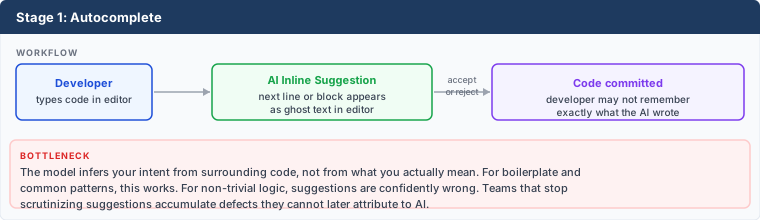
What it looks like: AI suggests the next line or block of code as you type. You accept, reject, or modify the suggestion and keep typing. GitHub Copilot tab completion, Cursor tab, and similar tools operate in this mode.
Where it breaks down: Suggestions are generated from context the model infers, not from what you intend. For non-trivial logic, suggestions are plausible-looking but wrong - they compile, pass surface review, and fail at runtime or in edge cases. Teams that stop reviewing suggestions carefully discover this months later when debugging code they do not remember writing.
What works: Low friction, no context management, passive. Excellent for boilerplate, repetitive patterns, argument completion, and common idioms. Speed gains are real, especially for code that follows well-known patterns.
Why developers stay here: The gains at Stage 1 are real and visible. Autocomplete is faster than typing, requires no workflow change, and integrates invisibly into existing habits. There is no obvious failure that signals a ceiling has been hit - developers just accept that AI is useful for simple things and not for complex ones. Without seeing what Stage 4 or Stage 5 looks like, there is no reason to assume a better approach exists.
What drives the move forward: Deliberate curiosity, or an incident traced to an accepted suggestion the developer did not scrutinize. Developers who move forward are usually ones who encountered a demonstration of a higher stage and wanted to replicate it - not ones who naturally outgrew autocomplete.
Stage 2: Prompted Function Generation
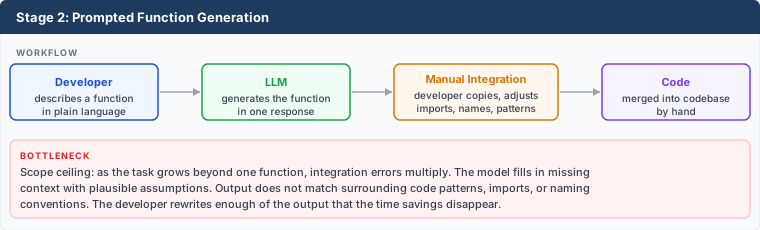
What it looks like: The developer describes what a function or module should do, pastes the description into a chat interface, and integrates the result. This is single-turn: one request, one response, manual integration.
Where it breaks down: Scope creep. As requests grow beyond a single function, integration errors accumulate: the generated code does not match the surrounding codebase’s patterns, imports are wrong, naming conflicts emerge. The developer rewrites more than half the output and the AI saved little time. Larger requests also produce confidently incorrect code - the model cannot ask clarifying questions, so it fills in assumptions.
What works: Bounded, well-scoped tasks with clear inputs and outputs. Writing a parser, formatting utility, or data transformation that can be fully described in a few sentences. The developer reviews a self-contained unit of work.
Why developers abandon here: Stage 2 is where many developers decide AI “cannot write real code.” They try a larger task, receive confidently wrong output, spend an hour correcting it, and conclude the tool is not worth the effort for anything non-trivial. That conclusion is accurate at Stage 2. The problem is not the technology - it is the workflow. A single-turn prompt with no context, no surrounding code, and no specified constraints will produce plausible-looking guesses for anything beyond simple functions. Developers who abandon here never discover that the same model, given different inputs through a different workflow, produces dramatically better output.
What drives the move forward: Frustration that AI is only useful for small tasks, combined with exposure to someone using it for larger ones. The realization that giving the AI more context - the surrounding files, the calling code, the data structures - would produce better output. This realization is the entry point to context engineering.
Stage 3: Chat-Driven Development

What it looks like: Multi-turn back-and-forth with the model. Developer pastes relevant code, describes the problem, asks for changes, reviews output, pastes it back with follow-up questions. The conversation itself becomes the working context.
Where it breaks down: Context accumulates. Long conversations degrade model performance as the relevant information gets buried. The model loses track of constraints stated early in the conversation. Developers start seeing contradictions between what the model said in turn 3 and what it generates in turn 15. Integration is still manual - copying from chat into the editor introduces transcription errors. The history of what changed and why lives in a chat window, not in version control.
What works: Exploration and learning. Asking “why does this fail” with a stack trace and getting a diagnosis. Iterating on a design by discussing trade-offs. For developers learning a new framework or language, this stage can be transformative.
What drives the move forward: The integration overhead and context degradation become obvious. Developers want the AI to work directly in the codebase, not through a chat buffer.
Stage 4: Agentic Task Completion
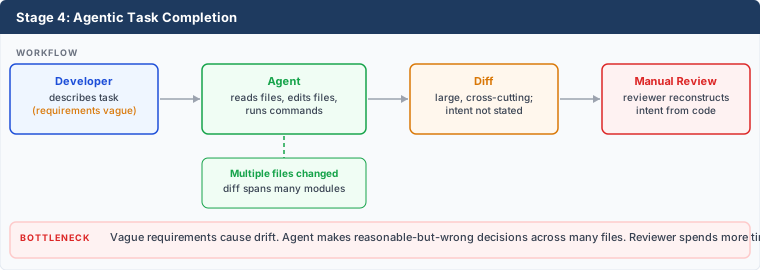
What it looks like: The agent has tool access - it reads files, edits files, runs commands, and works across the codebase autonomously. The developer describes a task and the agent executes it, producing diffs across multiple files.
Where it breaks down: Vague requirements. An agent given a fuzzy description makes reasonable-but-wrong architectural decisions, names things inconsistently, misses edge cases it cannot infer from the existing code, and produces changes that look correct locally but break something upstream. Review becomes hard because the diff spans many files and the reviewer must reconstruct the intent from the code rather than from a stated specification. Hallucinated APIs, missing error handling, and subtle correctness errors compound because each small decision compounds on the next.
What works: Larger-scoped tasks with clear intent. Refactoring a module to match a new interface, generating tests for existing code, migrating a dependency. The agent navigates the codebase rather than receiving pasted excerpts.
What drives the move forward: Review burden. The developer spends more time validating the agent’s output than they would have spent writing the code. The insight that emerges: the agent needs the same thing a new team member needs - explicit requirements, not vague descriptions.
Stage 5: Spec-First Agentic Development
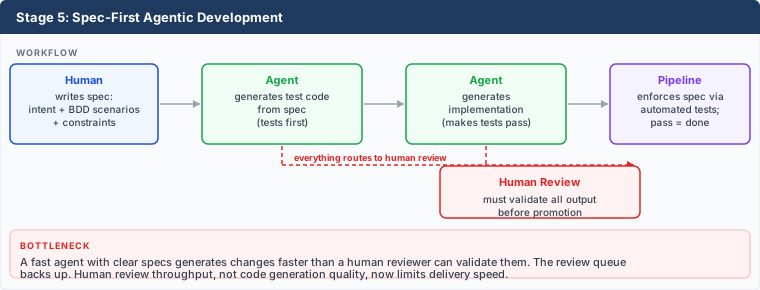
What it looks like: The developer writes a specification before the agent writes any code. The specification includes intent (why), behavior scenarios (what users experience), and constraints (performance budgets, architectural boundaries, edge case handling). The agent generates test code from the specification first. Tests pass when the behavior is correct. Implementation follows. The Agent Delivery Contract defines the artifact structure. Agent-Assisted Specification describes how to produce specifications at a pace that does not bottleneck the development cycle.
Where it breaks down: Review volume. A fast agent with a spec-first workflow generates changes faster than a human reviewer can validate them. The bottleneck shifts from code generation quality to human review throughput. The developer is now a reviewer of machine output, which is not where they deliver the most value.
What works: Outcomes become predictable. The agent has bounded, unambiguous requirements. Tests make failures deterministic rather than subjective. Code review focuses on whether the implementation is reasonable, not on reconstructing what the developer meant. The specification becomes the record of why a change exists.
What drives the move forward: The review queue. Agents generate changes at a pace that exceeds human review bandwidth. The next stage is not about the developer working harder - it is about replacing the human at the review stages that do not require human judgment.
Stage 6: Multi-Agent Architecture
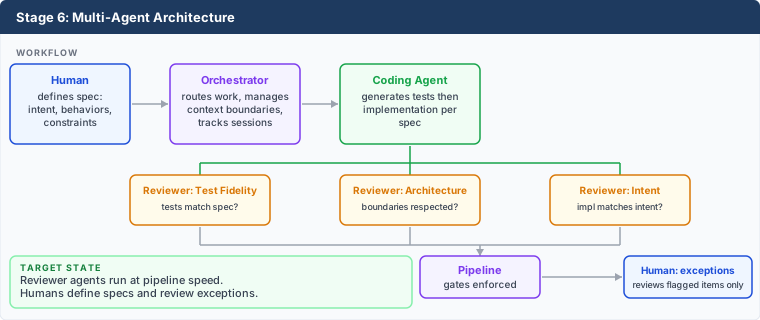
What it looks like: Separate specialized agents handle distinct stages of the workflow. A coding agent implements behavior from specifications. Reviewer agents run in parallel to validate test fidelity, architectural conformance, and intent alignment. An orchestrator routes work and manages context boundaries. Humans define specifications and review what agents flag - they do not review every generated line.
What works: The throughput constraint from Stage 5 is resolved. Expert review agents run at pipeline speed, not human reading speed. Each agent is optimized for its task - the reviewer agents receive only the artifacts relevant to their review, keeping context small and costs bounded. Token costs are an architectural concern, not a billing surprise.
What the architecture requires:
- Explicit, machine-readable specifications that agent reviewers can validate against
- Structured inter-agent communication (not prose) so outputs transfer efficiently
- Model routing by task: smaller models for classification and routing, frontier models for complex reasoning
- Per-workflow token cost measurement, not per-call measurement
- A pipeline that can run multiple agents in parallel and collect results before promotion
- Human ownership of specifications - the stages that require judgment about what matters to the business
This is the ACD destination. The ACD workflow defines the complete sequence. The agent delivery contract are the structured documents the workflow runs on. Tokenomics covers how to architect agents to keep costs in proportion to value. Coding & Review Setup shows a recommended orchestrator, coder, and reviewer configuration.
Why Progress Stalls
Many developers do not advance past Stage 2 because the path forward is not visible from within Stage 1 or 2. The information gap is the dominant constraint, not motivation or skill.
The problem at Stage 1: Autocomplete delivers real, immediate value. There is no pressing failure, no visible ceiling, no obvious reason to change the workflow. Developers optimize their Stage 1 usage - learning which suggestions to trust, which to skip - and reach a stable equilibrium. That equilibrium is far below what is possible.
The problem at Stage 2: The first serious failure at Stage 2 - an hour spent correcting hallucinated output - produces a lasting conclusion: AI is only for simple things. This conclusion comes from a single data point that is entirely valid for that workflow. The developer does not know the problem is the workflow.
The problem at Stages 3-4: Developers who push past Stage 2 often hit Stage 3 or 4 and run into context degradation or vague-requirements drift. Without spec-first discipline, agentic task completion produces hard-to-review diffs and subtle correctness errors. The failure mode looks like “AI makes more work than it saves” - which is true for that approach. Many developers loop back to Stage 2 and conclude they are not missing much.
What breaks the pattern: Seeing a demonstration of Stage 5 or Stage 6 in practice. Watching someone write a specification, have an agent generate tests from it, implement against those tests, and commit a clean diff is a qualitatively different experience from struggling with a chat window. Many developers have not seen this. Most resources on “how to use AI for coding” describe Stage 2 or Stage 3 workflows.
This guide exists to close that gap. The four prompting disciplines describe the skill layers that correspond to these stages and what shifts when agents run autonomously.
How the Bottleneck Shifts Across Stages
| Stage | Where value is generated | What limits it |
|---|---|---|
| Autocomplete | Boilerplate speed | Model cannot infer intent for complex logic |
| Function generation | Self-contained tasks | Manual integration; scope ceiling |
| Chat-driven development | Exploration, diagnosis | Context degradation; manual integration |
| Agentic task completion | Multi-file execution | Vague requirements cause drift; review is hard |
| Spec-first agentic | Predictable, testable output | Human review cannot keep up with generation rate |
| Multi-agent architecture | Full pipeline throughput | Specification quality; agent orchestration design |
Each stage resolves the previous stage’s bottleneck and reveals the next one. Developers who skip stages - for example, moving straight from function generation to multi-agent architecture without spec-first discipline - find that automation amplifies the problems they skipped. An agent generating changes faster than specs can be written, or a reviewer agent validating against specifications that were never written, produces worse outcomes than a slower, more manual process. Skipping is tempting because the later tooling looks impressive. It does not work without the earlier discipline.
Starting from Where You Are
Three questions locate you on the curve:
- What does agent output require before it can be committed? Minimal cleanup (Stage 1-2), significant rework (Stage 3-4), or the pipeline decides (Stage 5-6)?
- Does every agent task start from a written specification? If not, you are at Stage 4 or below regardless of what tools you use.
- Who reviews agent-generated changes? If the answer is always a human reading every diff, you have not yet addressed the Stage 5 throughput ceiling.
Many developers using AI coding tools are at Stage 1 or 2. Many concluded from an early Stage 2 failure that the ceiling is low and moved on. If you are at Stage 1 or 2 and feel like AI is only useful for simple work, the problem is almost certainly the workflow, not the technology.
If you are at Stage 1 or 2: The highest-leverage move is hands-on exposure to an agentic tool at Stage 4. Give the agent access to your codebase - let it read files, run tests, and produce a diff for a small task. The experience of watching an agent navigate a codebase is qualitatively different from receiving function output in a chat window. See Small-Batch Sessions for how to structure small, low-risk tasks that demonstrate what is possible without exposing the full codebase to an unguided agent.
If you are at Stage 3 or 4: The highest-leverage move is writing a specification before giving any task to an agent. One paragraph describing intent, one scenario describing the expected behavior, and one constraint listing what must not change. Even an informal spec at this level produces dramatically better output and easier review than a vague task description.
If you are at Stage 5: Measure your review queue. If agent-generated changes accumulate faster than they are reviewed, you have hit the throughput ceiling. Expert reviewer agents are the next step.
The AI Adoption Roadmap covers the organizational prerequisites that must be in place before accelerating through the later stages. The curve above describes an individual developer’s progression; the roadmap describes what the team and pipeline need to support it.
Related Content
- The Four Prompting Disciplines - the skill layers that map to each stage of the learning curve
- AI Adoption Roadmap - organizational prerequisites for the later stages
- ACD - the full workflow, constraints, and delivery artifacts
- Agent-Assisted Specification - how to write specs fast enough that they do not slow down Stage 5
- Agent Delivery Contract - the documents the multi-agent workflow depends on
- Tokenomics - how to architect Stage 6 so token costs scale with value
- Coding & Review Setup - a concrete Stage 6 configuration
- Small-Batch Sessions - how to keep agent context small at every stage
- Pipeline Enforcement and Expert Agents - how review agents replace manual validation at Stage 6
Content contributed by Bryan Finster
3 - The Four Prompting Disciplines
Four layers of skill that developers must master as AI moves from a chat partner to a long-running worker - and what changes when agents run autonomously.
Most guidance on “prompting” describes Discipline 1: writing clear instructions in a chat window. That is table stakes. Developers working at Stage 5 or 6 of the agentic learning curve operate across all four disciplines simultaneously. Each discipline builds on the one below it.
1. Prompt Craft (The Foundation)
Synchronous, session-based instructions used in a chat window.
Prompt craft is now considered table stakes, the equivalent of fluent typing. It does not differentiate. Every developer using AI tools will reach baseline proficiency here. The skill is necessary but insufficient for agentic workflows.
Key skills:
- Writing clear, structured instructions
- Including examples and counter-examples
- Setting explicit output formats and guardrails
- Defining how to resolve ambiguity so the model does not guess
Where it maps on the learning curve: Stages 1-2. Developers at these stages optimize prompt craft and assume that is the ceiling. It is not.
2. Context Engineering
Curating the entire information environment (the tokens) the agent operates within.
Context engineering is the difference between a developer who writes better prompts and a developer who builds better scaffolding so the agent starts with everything it needs. The 10x performers are not writing cleverer instructions. They are assembling better context.
Key skills:
- Providing project files, conventions, and constraints at the start of the session
- Managing context infrastructure: system prompts, retrieval pipelines, and memory systems
- Deciding what to include and, more importantly, what to exclude (see Small-Batch Sessions: context load)
Where it maps on the learning curve: Stage 3-4. The transition from chat-driven development to agentic task completion is driven by context engineering. The agent that navigates the codebase with the right context outperforms the agent that receives pasted excerpts in a chat window.
Where it shows up in ACD: The orchestrator assembles context for each session (Coding & Review Setup). The /start-session skill encodes context assembly order. Prompt caching depends on placing stable context before dynamic content (Tokenomics).
3. Intent Engineering
Encoding organizational purpose, values, and trade-off hierarchies into the agent’s operating environment.
Intent engineering tells the agent what to want, not just what to know. An agent given context but no intent will make technically defensible decisions that miss the point. Intent engineering defines the decision boundaries the agent operates within.
Key skills:
- Telling the agent what to optimize for, not just what to build
- Defining decision boundaries (for example: “Optimize for customer satisfaction over resolution speed”)
- Establishing escalation triggers: conditions under which the agent must stop and ask a human instead of deciding autonomously
Where it maps on the learning curve: The transition from Stage 4 to Stage 5. At Stage 4, vague requirements cause drift because the agent fills in intent from its own assumptions. Intent engineering makes those assumptions explicit.
Where it shows up in ACD: The Intent Description artifact is the formalized version of intent engineering. It sits at the top of the artifact authority hierarchy because intent governs every downstream decision.
4. Specification Engineering (The New Ceiling)
Writing structured documents that agents can execute against over extended timelines.
Specification engineering is the skill that separates Stage 5-6 developers from everyone else. When agents run autonomously for hours, you cannot course-correct in real time. The specification must be complete enough that an independent executor can reach the right outcome without asking questions.
Key skills:
- Self-contained problem statements: Can the task be solved without the agent fetching additional information?
- Acceptance criteria: Writing three sentences that an independent observer could use to verify “done”
- Decomposition: Breaking a multi-day project into small subtasks with clear boundaries (see Work Decomposition)
- Evaluation design: Creating test cases with known-good outputs to catch model regressions
Where it maps on the learning curve: Stage 5-6. Specification engineering is what makes spec-first agentic development and multi-agent architecture possible.
Where it shows up in ACD: The agent delivery contract are the output of specification engineering. The agent-assisted specification workflow is how agents help produce them. The discovery loop shows how to get from a vague idea to a structured specification through conversation, and the complete specification example shows what the finished output looks like.
From Synchronous to Autonomous
Because you cannot course-correct an agent running for hours in real time, you must front-load your oversight. The skill shift looks like this:
| Synchronous skills (Stages 1-3) | Autonomous skills (Stages 5-6) |
|---|---|
| Catching mistakes in real time | Encoding guardrails before the session starts |
| Providing context when asked | Self-contained problem statements |
| Verbal fluency and quick iteration | Completeness of thinking and edge-case anticipation |
| Fixing it in the next chat turn | Structured specifications with acceptance criteria |
This is not a different toolset. It is the same work, front-loaded. Every minute spent on specification saves multiples in review and rework.
The Self-Containment Test
To practice the shift, take a request like “Update the dashboard” and rewrite it as if the recipient:
- Has never seen your dashboard
- Does not know your company’s internal acronyms
- Has zero access to information outside that specific text
If the rewritten request still makes sense and can be acted on, it is ready for an autonomous agent. If it cannot, the missing information is the gap between your current prompt and a specification. This is the same test agent-assisted specification applies: can the agent implement this without asking a clarifying question?
The Planner-Worker Architecture
Modern agents use a planner model to decompose your specification into a task log, and worker models to execute each task. Your job is to provide the decomposition logic - the rules for how to split work - so the planner can function reliably. This is the orchestrator pattern at its core: the orchestrator routes work to specialized agents, but it can only route well when the specification is structured enough to decompose.
Organizational Impact
Practicing specification engineering has effects beyond agent workflows:
- Tighter communication. Writing self-contained specifications forces you to surface hidden assumptions and unstated disagreements. Memos get clearer. Decision frameworks get sharper.
- Reduced alignment issues. When specifications are explicit enough for an agent to execute, they are explicit enough for human team members to align on. Ambiguity that would surface as a week-long misunderstanding surfaces during the specification review instead.
- Agent-readable documentation. Documentation that is structured enough for an AI agent to consume is also more useful for human onboarding. Making your knowledge base agent-readable improves it for everyone.
Related Content
- The Agentic Development Learning Curve - the stages these disciplines map to
- Agent-Assisted Specification - how agents help produce specifications, including a complete example
- Agent Delivery Contract - the structured output of specification engineering
- Small-Batch Sessions - context engineering applied to session structure
- Coding & Review Setup - where context engineering and intent engineering appear in agent configuration
- Tokenomics - why context engineering decisions are also cost decisions
- AI Adoption Roadmap - the organizational prerequisites before these disciplines can be applied at scale
4 - Repository Readiness for Agentic Development
How to assess and upgrade a repository so AI agents can clone, build, test, and iterate without human intervention - and why that readiness directly affects agent accuracy and cost.
Agents operate on feedback loops: propose a change, run the build, read the output, iterate. Every gap in repository readiness - broken builds, flaky tests, unclear output, manual setup steps - widens the loop, wastes tokens, and degrades accuracy. This page provides a scoring rubric, a prioritized upgrade sequence, and concrete guidance for making a repository agent-ready.
Readiness Scoring
Use this rubric to assess how ready a repository is for agentic workflows. Score each criterion independently. A repository does not need a perfect score to start using agents, but anything scored 0 or 1 blocks agents entirely or makes them unreliable.
| Criterion | 0 - Blocks agents | 1 - Unreliable | 2 - Usable | 3 - Optimized |
|---|---|---|---|---|
| Build reproducibility | Build does not run without manual steps | Build works but requires environment-specific setup | Build runs from a single documented command | Build runs in any clean environment with no pre-configuration |
| Test coverage and quality | No automated tests | Tests exist but are flaky or require manual setup | Tests run reliably with clear pass/fail output | Fast unit tests with clear failure messages, contract tests at boundaries, build verification tests |
| CI pipeline clarity | No CI pipeline | Pipeline exists but fails intermittently or has unclear stages | Pipeline runs on every commit with clear stage names | Pipeline runs in under ten minutes with deterministic results |
| Documentation of entry points | No README or build instructions | README exists but is outdated or incomplete | Single documented build command and single documented test command | Entry points documented in the project context file (CLAUDE.md, GEMINI.md, or equivalent) |
| Dependency hygiene | Broken or missing dependency resolution | Dependencies resolve but require manual intervention (system packages, credentials) | Dependencies resolve from a single install command | Dependencies pinned, lockfile committed, no external credential required for build |
| Code modularity | God classes or files with thousands of lines; no discernible module boundaries | Modules exist but are tightly coupled; changing one requires loading many others | Modules have clear boundaries; most changes touch one or two modules | Explicit interfaces at module boundaries; each module can be understood and tested in isolation |
| Naming and domain language | Inconsistent terminology; same concept has different names across files | Some naming conventions but not enforced; generic names common | Consistent naming within modules; domain terms recognizable | Ubiquitous language used uniformly across code, tests, and documentation |
| Formatting and style enforcement | No formatter or linter; inconsistent style across files | Formatter exists but not enforced automatically | Formatter runs on pre-commit; style is consistent | Formatter and linter enforced in CI; zero-tolerance for style violations |
| Dead code and noise | Large amounts of commented-out code, unused imports, abandoned modules | Some dead code; developers aware but no systematic removal | Dead code removed periodically; unused imports caught by linter | Automated dead code detection in CI; no commented-out code in the codebase |
| Type safety | No type annotations; function signatures reveal nothing about expected inputs or outputs | Partial type coverage; critical paths untyped | Core business logic typed; external boundaries have type definitions | Full type coverage enforced; compiler or type checker catches contract violations before tests run |
| Error handling consistency | Multiple conflicting patterns; some errors swallowed silently | Dominant pattern exists but exceptions scattered throughout | Single documented pattern used in most code; deviations are rare | One error handling pattern enforced by linter rules; agents never have to guess which pattern to follow |
Interpreting scores:
- Any criterion at 0: Agents cannot work in this repository. Fix these first.
- Any criterion at 1: Agents will produce unreliable results. Expect high retry rates and wasted tokens.
- All criteria at 2 or above: Agents can work effectively. Improvements from 2 to 3 reduce token cost and increase accuracy.
Recommended Order of Operations
Upgrade the repository in this order. Each step unblocks the next. Skipping ahead creates problems that are harder to diagnose because earlier foundations are missing.
Step 1: Make the build runnable
Impact: Critical
Without a runnable build, agents cannot verify any change. This is a hard blocker - no other improvement matters until the build works.
What blocks agents entirely: no runnable build, broken dependency resolution, build requires credentials or manual environment setup.
- Ensure a single command (e.g.,
make build,./gradlew build,npm run build) works in a clean checkout with no prior setup beyond dependency installation - Pin all dependencies with a committed lockfile
- Remove any requirement for environment variables that do not have documented defaults
- Document the build command in the README and in the project context file
An agent that cannot build the project cannot verify any change it makes. Every other improvement depends on this.
How AI can help: Use an agent to audit the build process. Point it at the repository and ask it to clone, install dependencies, and build from scratch. Every failure it encounters is a gap that will block future agentic work. Agents can also generate missing build scripts, create Dockerfiles for reproducible build environments, and identify undeclared dependencies by analyzing import statements against the dependency manifest.
Step 2: Make tests reliable
Impact: Critical
Unreliable tests destroy the agent’s feedback loop. An agent that cannot trust test results cannot distinguish between its own mistakes and test noise, producing incorrect fixes at scale.
What makes agents unreliable: flaky tests, tests that require manual setup, tests that depend on external services without mocking, tests that pass in one environment but fail in another.
- Fix or quarantine flaky tests. A test suite that randomly fails teaches agents to ignore failures.
- Remove external service dependencies from unit tests. Use test doubles for anything outside the process boundary.
- Ensure tests run from a single command with no manual pre-steps
- Make test output deterministic: same inputs, same results, every time
See Testing Fundamentals for the test architecture that supports this.
How AI can help: Use an agent to run the test suite repeatedly and flag tests that produce different results across runs. Agents can also analyze test code to identify external service calls that should be replaced with test doubles, find shared mutable state between tests, and generate the stub or mock implementations needed to isolate unit tests from external dependencies.
Step 3: Improve feedback signal quality
Impact: High
Clear, fast feedback is the difference between an agent that self-corrects on the first retry and one that burns tokens guessing. This step directly reduces correction loop frequency and cost.
What makes agents less effective: broad integration tests with ambiguous failure messages, tests that report “assertion failed” without indicating what was expected versus what was received, slow test suites that delay feedback.
- Ensure every test failure message includes what was expected, what was received, and where the failure occurred
- Separate fast unit tests (seconds) from slower integration tests (minutes). Agents should be able to run the fast suite on every iteration.
- Reduce total test suite time. Agents iterate faster with faster feedback. A ten-minute suite means ten minutes per attempt; a thirty-second unit suite means thirty seconds.
- Structure test output so pass/fail is unambiguous. A test runner that exits with code 0 on success and non-zero on failure, with failure details on stdout, gives agents a clear signal.
How AI can help: Use an agent to scan test assertions and rewrite bare assertions (e.g., assertTrue(result)) into descriptive ones that include expected and actual values. Agents can also analyze test suite timing to identify the slowest tests, suggest which integration tests can be replaced with faster unit tests, and split a monolithic test suite into fast and slow tiers with separate run commands.
Step 4: Document for agents
Impact: High
Undocumented conventions force agents to infer intent from code patterns, which works until the patterns are inconsistent. Explicit documentation eliminates an entire class of agent errors for minimal effort.
What reduces agent effectiveness: undocumented conventions, implicit setup steps, architecture decisions that exist only in developers’ heads.
- Create or update the project context file (Configuration Quick Start covers where to put what)
- Document the build command, test command, and any non-obvious conventions
- Document architecture constraints that affect how changes should be made
- Document test file naming conventions and directory structure
How AI can help: Use an agent to generate the initial project context file. Point it at the codebase and ask it to document the build command, test command, directory structure, key conventions, and architecture constraints it can infer from the code. Have a developer review and correct the output. An agent reading the codebase will miss implicit knowledge that lives only in developers’ heads, but it will capture the structural facts accurately and surface gaps where documentation is needed.
Step 5: Improve code modularity
Impact: High
Modularity controls how much code an agent must load to make a single change. Tightly coupled code forces agents to consume context budget on unrelated files, reducing both accuracy and the complexity of tasks they can handle.
What increases token cost and reduces accuracy: large files that mix multiple concerns, tight coupling between modules, no clear boundaries between components.
Modularity determines how much code an agent must load into context to make a single change. A loosely coupled module with an explicit interface can be passed to an agent as self-contained context. A tightly coupled module forces the agent to load its dependencies, their dependencies, and so on until the context budget is consumed by code unrelated to the task.
- Extract large files into smaller, single-responsibility modules. A file an agent can read in full is a file it can reason about completely.
- Define explicit interfaces at module boundaries. An agent working inside a module needs only the interface contract for its dependencies, not the implementation.
- Reduce coupling between modules. When a change to module A requires loading modules B, C, and D to understand the impact, the agent’s effective context budget for the actual task shrinks with every additional file.
- Consolidate duplicate logic. One definition is one context load; ten scattered copies are ten opportunities for the agent to produce inconsistent changes.
See Tokenomics: Code Quality as a Token Cost Driver for how naming, structure, and coupling compound into token cost.
How AI can help: Use an agent to identify high-coupling hotspots - files with the most inbound and outbound dependencies. Agents can extract interfaces from concrete implementations, move scattered logic into a single authoritative location, and split large files into cohesive modules. Prioritize refactoring by code churn: files that change most often deliver the highest return on modularity investment because agents will load them most frequently.
Step 6: Establish consistent naming and domain language
Impact: High
Naming inconsistency is one of the largest hidden costs in agentic development. Every synonym an agent must reconcile is context budget spent on vocabulary instead of the task.
What degrades agent comprehension: the same concept called user in one file, account in another, and member in a third. Generic names like processData, temp, result that require surrounding code to understand. Inconsistent terminology between code, tests, and documentation.
- Establish a ubiquitous language - a glossary of domain terms used uniformly across code, tests, tickets, and documentation
- Replace generic function names with domain-specific ones.
calculateOrderTaxis self-documenting;processDatarequires the agent to load callers and callees to understand its purpose. - Use the same term for the same concept everywhere. If the business calls it a “policy,” the code should not call it a “plan” or “contract.”
- Name test files and test cases using the same domain language. An agent looking for tests related to “premium calculation” should find files and functions that use those words.
See Tokenomics: Code Quality as a Token Cost Driver for the full analysis of how naming compounds into token cost.
How AI can help: Use an agent to scan the codebase for terminology inconsistencies - the same concept referred to by different names across files. Agents can generate a draft domain glossary by extracting class names, method names, and variable names, then clustering them by semantic similarity. They can also batch-rename identifiers to align with the agreed terminology once the glossary is established. Start with the most frequently referenced concepts: fixing naming for the ten most-used domain terms delivers outsized returns.
Step 7: Enforce formatting and style automatically
Impact: Medium
Formatting issues do not block agents, but they create noise in every diff and waste review cycles on style instead of logic.
What creates unnecessary friction: inconsistent indentation, spacing, and style across the codebase. Agent-generated code formatted differently from the surrounding code. Reviewers spending time on style instead of correctness.
- Configure a formatter (Prettier, google-java-format, Black, gofmt, or equivalent) and run it on pre-commit
- Add the formatter to CI so unformatted code cannot merge
- Run the formatter across the entire codebase once to establish a consistent baseline
When formatting is automated, agents produce code that matches the surrounding style without any per-task instruction. Diffs contain only logic changes, making review faster and more accurate.
How AI can help: Use an agent to configure the formatter and linter for the project, generate the pre-commit hook configuration, and run the initial full-codebase format pass. Agents can also identify files where formatting is most inconsistent to prioritize the rollout if a full-codebase pass is too large for a single change.
Step 8: Remove dead code and noise
Impact: Medium
Dead code misleads agents. They cannot distinguish active patterns from abandoned ones, so they model new code after whatever they find - including code that was left behind intentionally.
What confuses agents: commented-out code blocks that look like alternative implementations, unused functions that appear to be part of the active API, abandoned modules that still import and export, unused imports that suggest dependencies that do not actually exist.
- Remove commented-out code. If it is needed later, it is in version control history.
- Delete unused functions, classes, and modules. An agent that encounters an unused function may call it, extend it, or model new code after it.
- Clean up unused imports. They signal dependencies that do not exist and pollute the agent’s understanding of module relationships.
- Remove abandoned feature flags and their associated code paths
How AI can help: Use an agent to scan for dead code - unused exports, unreachable functions, commented-out blocks, and imports with no references. Agents can also trace feature flags to determine which are still active and which can be removed along with their code paths. Run this as a periodic cleanup task: dead code accumulates continuously, especially in codebases where agents are generating changes at high volume.
Step 9: Strengthen type safety
Impact: Medium-High
Types are machine-readable documentation. They tell agents what a function expects and returns without requiring the agent to load callers and infer contracts from usage.
What forces agents to guess: untyped function parameters where the agent must read multiple call sites to determine what types are expected. Return values that could be anything - a result, null, an error, or a different type depending on conditions. Implicit contracts between modules that are not expressed in code.
- Add type annotations to public function signatures, especially at module boundaries
- Define types for data structures that cross module boundaries. An agent receiving a typed interface contract can generate conforming code without loading the implementation.
- Enable strict type checking where the language supports it. Compiler-caught type errors are faster and cheaper than test-caught type errors.
- Prioritize typing at the boundaries agents interact with most: service interfaces, repository methods, and API contracts
How AI can help: Use an agent to add type annotations incrementally, starting with public interfaces and working inward. Agents can infer types from usage patterns across the codebase and generate type definitions that a developer reviews and approves. Prioritize by module boundary: typing the interfaces between modules gives agents the most value per annotation because those are the contracts agents must understand to work in any module that depends on them.
Step 10: Standardize error handling
Impact: Low-Medium
Inconsistent error handling is a slow leak. It does not block agents, but it causes agent-generated code to handle errors differently every time, gradually fragmenting the codebase.
What produces inconsistent agent output: a codebase that uses exceptions in some modules, result types in others, and error codes in a third. Error handling that varies by developer rather than by architectural decision. Silently swallowed errors that agents cannot detect or learn from.
- Choose one error handling pattern for the codebase and document it in the project context file
- Apply the pattern consistently in new code. Enforce it with linter rules where possible.
- Refactor the most frequently changed modules to use the chosen pattern first
- Document where exceptions to the pattern are intentional (e.g., a different pattern at the framework boundary)
How AI can help: Use an agent to survey the codebase and categorize the error handling patterns in use, including how many files use each pattern. This gives you a data-driven baseline for choosing the dominant pattern. Agents can then refactor modules to the chosen pattern incrementally, starting with the highest-churn files. They can also generate linter rules that flag deviations from the chosen pattern in new code.
Test Structure for Agentic Workflows
Agents rely most on tests that are fast, deterministic, and produce clear failure messages. The test architecture that supports human-driven CD also supports agentic development, but some patterns matter more when agents are the primary consumer of test output.
What agents rely on most:
- Fast unit tests with clear failure messages. Agents iterate by running tests after each change. A unit suite that runs in seconds and reports exactly what failed enables tight feedback loops.
- Contract tests at service boundaries. Agents generating code in one service need a fast way to verify they have not broken the contract with consumers. Contract tests provide this without requiring a full integration environment.
- Build verification tests. A small suite that confirms the application starts and responds to a health check. This catches configuration errors and missing dependencies that unit tests miss.
What makes tests hard for agents to use:
- Broad integration tests with ambiguous failures. A test that spins up three services, runs a scenario, and reports “connection refused” gives the agent no actionable signal about what to fix.
- Tests that require manual setup. Seeding a database, starting a Docker container, or configuring a VPN before tests run breaks the agent’s feedback loop.
- Tests with shared mutable state. Tests that interfere with each other produce different results depending on execution order. Agents cannot distinguish between “my change broke this” and “this test is order-dependent.”
- Slow test suites used as the primary feedback mechanism. If the only way to verify a change is a twenty-minute end-to-end suite, agents either skip verification or consume excessive tokens waiting and retrying.
How to refactor toward agent-friendly test design:
- Separate tests by feedback speed: seconds (unit), minutes (integration), and longer (end-to-end)
- Make the fast suite the default. The command an agent runs after every change should execute the fast suite, not the full suite.
- Ensure every test is independent. No shared state, no required execution order, no external service dependencies in the fast suite.
- Write failure messages that answer three questions: what was expected, what happened, and where in the code the failure occurred.
Build and Validation Ergonomics
A repository ready for agentic development has two commands an agent needs to know:
- Build: a single command that installs dependencies and compiles the project (e.g.,
make build,./gradlew build,npm run build) - Test: a single command that runs the test suite (e.g.,
make test,./gradlew test,npm test)
An agent should be able to clone the repository, run the build command, run the test command, and see a clear pass/fail result without any human intervention. Everything between “clone” and “tests pass” must be automated.
Dependency installation: All dependencies must resolve from the install command. No manual downloads, no system-level package installations, no credentials required for the build itself.
Environment variable defaults: If the application requires environment variables, provide defaults that work for local development and testing. An agent that encounters DATABASE_URL is not set with no guidance on what to set it to cannot proceed.
Test runner output clarity: The test runner should exit with code 0 on success and non-zero on failure. Failure output should go to stdout or stderr in a parseable format. A test runner that exits 0 with warnings buried in the output trains agents to treat success as ambiguous.
See Build Automation for the broader build automation practices this builds on.
Why This Matters for Agent Accuracy and Token Efficiency
Agents operate on feedback loops: they propose a change, run the build or tests, read the output, and iterate. The quality of each loop iteration determines both the accuracy of the final result and the total cost to reach it.
Tight feedback loops improve accuracy. When tests run in seconds, produce clear pass/fail signals, and report exactly what failed, agents correct errors on the first retry. The agent reads the failure, understands what went wrong, and generates a targeted fix.
Loose feedback loops degrade accuracy and multiply cost. When tests are slow, noisy, or require manual steps:
- Agents fail silently because they cannot run the verification step
- Agents produce incorrect fixes because failure messages do not indicate the root cause
- Agents consume excessive tokens retrying and re-reading unclear output
- Each retry iteration costs tokens for both the re-read (input) and the new attempt (output)
The cost multiplier is real. A correction loop where the agent’s first output is wrong, reviewed, and re-prompted uses roughly three times the tokens of a successful first attempt (see Tokenomics). A repository with flaky tests, ambiguous failure messages, or manual setup steps increases the probability of entering correction loops on every task the agent attempts.
Poorly structured repositories shift the cost of ambiguity from the developer to the agent, multiplying it across every task. A developer encountering a flaky test knows to re-run it. A developer seeing “assertion failed” checks the test code to understand the expectation. An agent does not have this implicit knowledge. It treats every failure as a signal that its change was wrong and attempts to fix code that was never broken, generating incorrect changes that require further correction.
Investing in repository readiness is not just preparation for agentic development. It is the single highest-leverage action for reducing ongoing agent cost and improving agent output quality.
Related Content
- Configuration Quick Start - where to put project facts, rules, skills, and hooks so agents can find them
- AI Adoption Roadmap - the organizational prerequisite sequence, especially Harden Guardrails and Reduce Delivery Friction, which this page makes concrete at the repository level
- Tokenomics - the full token optimization framework, including how code quality drives token cost
- Testing Fundamentals - the test architecture foundations this page builds on
- Build Automation - the build automation practices that make “single command to build” possible
5 - AI Adoption Roadmap
A guide for incorporating AI into your delivery process safely - remove friction and add safety before accelerating with AI coding.
AI adoption stress-tests your organization. AI does not create new problems. It reveals existing ones faster. Teams that try to accelerate with AI before fixing their delivery process get the same result as putting a bigger engine in a car with no brakes. This page provides the recommended sequence for incorporating AI safely, mirroring the brownfield migration phases.
Before You Add AI: A Decision Framework
Not every problem warrants an AI-based solution. The decision tree below is a gate, not a funnel. Work through each question in order. If you can resolve the need at an earlier step, stop there.
graph TD
    A["New capability or automation need"] --> B{"Is the process as simple as possible?"}
    B -->|No| C["Optimize the process first"]
    B -->|Yes| D{"Can existing system capabilities do it?"}
    D -->|Yes| E["Use them"]
    D -->|No| F{"Can a deterministic component do it?"}
    F -->|Yes| G["Build it"]
    F -->|No| H{"Does the benefit of AI exceed its risk and cost?"}
    H -->|Yes| I["Try an AI-based solution"]
    H -->|No| J["Do not automate this yet"]
If steps 1-3 were skipped, step 4 is not available. An AI solution applied to a process that could be simplified, handled by existing capabilities, or replaced by a deterministic component is complexity in place of clarity.
The Key Insight
The sequence matters: remove friction and add safety before you accelerate. AI amplifies whatever system it is applied to - strong process gets faster, broken process gets more broken, faster.
The Progression
graph LR
    P1["Quality Tools"] --> P2["Clarify Work"]
    P2 --> P3["Harden Guardrails"]
    P3 --> P4["Reduce Delivery Friction"]
    P4 --> P5["Accelerate with AI"]

    style P1 fill:#e8f4fd,stroke:#1a73e8
    style P2 fill:#e8f4fd,stroke:#1a73e8
    style P3 fill:#fce8e6,stroke:#d93025
    style P4 fill:#fce8e6,stroke:#d93025
    style P5 fill:#e6f4ea,stroke:#137333
Quality Tools, Clarify Work, Harden Guardrails, Remove Friction, then Accelerate with AI.
Quality Tools
Brownfield phase: Assess
Before using AI for anything, choose models and tools that minimize hallucination and rework. Not all AI tools are equal. A model that generates plausible-looking but incorrect code creates more work than it saves.
What to do:
- Choose based on accuracy, not speed. A tool with a 20% error rate carries a hidden rework tax on every use. If rework exceeds 20% of generated output, the tool is a net negative.
- Use models with strong reasoning capabilities for code generation. Smaller, faster models are appropriate for autocomplete and suggestions, not for generating business logic.
- Establish a baseline: measure how much rework AI-generated code requires before and after changing tools.
What this enables: AI tooling that generates correct output more often than not. Subsequent steps build on working code rather than compensating for broken code.
Clarify Work
Brownfield phase: Assess / Foundations
Use AI to improve requirements before code is written, not to write code from vague requirements. Ambiguous requirements are the single largest source of defects (see Systemic Defect Fixes), and AI can detect ambiguity faster than manual review.
What to do:
- Use AI to review tickets, user stories, and acceptance criteria before development begins. Prompt it to identify gaps, contradictions, untestable statements, and missing edge cases.
- Use AI to generate test scenarios from requirements. If the AI cannot generate clear test cases, the requirements are not clear enough for a human either.
- Use AI to analyze support tickets and incident reports for patterns that should inform the backlog.
What this enables: Higher-quality inputs to the development process. Developers (human or AI) start with clear, testable specifications rather than ambiguous descriptions that produce ambiguous code. The four prompting disciplines describe the skill progression that makes this work at scale.
Harden Guardrails
Brownfield phase: Foundations / Pipeline
Before accelerating code generation, strengthen the safety net that catches mistakes. This means both product guardrails (does the code work?) and development guardrails (is the code maintainable?).
Product and operational guardrails:
- Automated test suites with meaningful coverage of critical paths
- Deterministic CD pipelines that run on every commit
- Deployment validation (smoke tests, health checks, canary analysis)
Development guardrails:
- Code style enforcement (linters, formatters) that runs automatically
- Architecture rules (dependency constraints, module boundaries) enforced in the pipeline
- Security scanning (SAST, dependency vulnerability checks) on every commit
What to do:
- Audit your current guardrails. For each one, ask: “If AI generated code that violated this, would our pipeline catch it?” If the answer is no, fix the guardrail before expanding AI use.
- Add contract tests at service boundaries. AI-generated code is particularly prone to breaking implicit contracts between services.
- Ensure test suites run in under ten minutes. Slow tests create pressure to skip them, which is dangerous when code is generated faster.
What this enables: A safety net that catches mistakes regardless of who (or what) made them. The pipeline becomes the authority on code quality, not human reviewers. See Pipeline Enforcement and Expert Agents for how these guardrails extend to ACD.
Reduce Delivery Friction
Brownfield phase: Pipeline / Optimize
Remove the manual steps, slow processes, and fragile environments that limit how fast you can safely deliver. These bottlenecks exist in every brownfield system and they become acute when AI accelerates the code generation phase.
What to do:
- Remove manual approval gates that add wait time without adding safety (see Replacing Manual Validations).
- Fix fragile test and staging environments that cause intermittent failures.
- Shorten branch lifetimes. If branches live longer than a day, integration pain will increase as AI accelerates code generation.
- Automate deployment. If deploying requires a runbook or a specific person, it is a bottleneck that will be exposed when code moves faster.
What this enables: A delivery pipeline where the time from “code complete” to “running in production” is measured in minutes, not days. AI-generated code flows through the same pipeline as human-generated code with the same safety guarantees.
Accelerate with AI
Brownfield phase: Optimize / Continuous Deployment
Now - and only now - expand AI use to code generation, refactoring, and autonomous contributions. The guardrails are in place. The pipeline is fast. Requirements are clear. The outcome of every change is deterministic regardless of whether a human or an AI wrote it.
Do not let AI define the test scenarios
Humans define what to test. Agents generate the test code from those specifications. See Acceptance Criteria for the validation properties required before implementation begins.
What to do:
- Use AI for code generation with the specification-first workflow described in the ACD workflow. Define test scenarios first, let AI generate the test code (validated for behavior focus and spec fidelity), then let AI generate the implementation.
- Use AI for refactoring: extracting interfaces, reducing complexity, improving test coverage. These are high-value, low-risk tasks where AI excels. Well-structured, well-named code also reduces the token cost of every subsequent AI interaction - see Tokenomics: Code Quality as a Token Cost Driver.
- Use AI to analyze incidents and suggest fixes, with the same pipeline validation applied to any change.
What this enables: AI-accelerated development where the speed increase translates to faster delivery, not faster defect generation. The pipeline enforces the same quality bar regardless of the author. See Pitfalls and Metrics for what to watch for and how to measure progress.
Mapping to Brownfield Phases
| AI Adoption Stage | Brownfield Phase | Key Connection |
|---|---|---|
| Quality Tools | Assess | Use the current-state assessment to evaluate AI tooling alongside delivery process gaps |
| Clarify Work | Assess / Foundations | AI-generated test scenarios from requirements feed directly into work decomposition |
| Harden Guardrails | Foundations / Pipeline | The testing fundamentals and pipeline gates are the same work, with AI-readiness as additional motivation |
| Reduce Delivery Friction | Pipeline / Optimize | Replacing manual validations unblocks AI-speed delivery |
| Accelerate with AI | Optimize / CD | The agent delivery contract become the delivery contract once the pipeline is deterministic and fast |
Related Content
- Brownfield CD Overview - the phased migration approach this roadmap parallels
- Replacing Manual Validations - the core mechanical cycle for Reduce Delivery Friction
- Systemic Defect Fixes - catalog of defect causes that AI can help detect during Clarify Work
- ACD - the destination for teams completing this roadmap
- Anti-Patterns - problems that Harden Guardrails and Reduce Delivery Friction are designed to eliminate
- Agent Delivery Contract - the artifacts that Accelerate with AI’s specification-first workflow requires
- Pipeline Enforcement and Expert Agents - how the pipeline enforces the guardrails from Harden Guardrails and Reduce Delivery Friction
- Pitfalls and Metrics - common failures when steps are skipped, and how to measure progress
- Tokenomics - how code quality drives token cost, and how to architect agents and workflows to minimize unnecessary consumption
- The Four Prompting Disciplines - the skill layers developers need as they progress through the adoption roadmap
Content contributed by Bryan Finster.